Discuss! Ant Weather Forecast Plugin (Global Version)
Little Ant Weather Global Edition is a tool specifically designed for Discuz! This cross-border professional weather display plugin supports PC and mobile devices. It can automatically identify the city based on the visitor's IP and display the local weather. It also supports a wealth of information such as fixed cities around the world, manual city switching, weather detail pages, future weather, air quality, weather warnings, living index, and precipitation trends, and has independent weather detail pages with various themes and styles.
Little Ant Weather Global Edition is a tool specifically designed for Discuz! This cross-border professional weather display plugin supports PC and mobile devices. It can automatically identify the city based on the visitor's IP and display the local weather. It also supports a wealth of information such as fixed cities around the world, manual city switching, weather detail pages, future weather, air quality, weather warnings, living index, and precipitation trends, and has independent weather detail pages with various themes and styles.
Instead of simply placing a temperature number at the top of the forum, the plugin aims to make "weather" a useful content entry point on the Discuz website.
It supports Simplified Chinese, Traditional Chinese, English, Japanese, and Korean. Whether it's a global local portal, city forum, community website, lifestyle service website, or comprehensive information forum, you can quickly add a lifestyle service function that users may use every day through Xiaoyi Weather Forecast Global Report.
- Supported version: Discuz! X3.4, X3.5, X5.0 and X5.1
- Supported encoding: UTF-8
- Simplified Chinese: SC_UTF8
- Traditional Chinese: TC_UTF8
- Front desk languages: Simplified Chinese, Traditional Chinese, English, Japanese, Korean
• GBK is not supported
- Demo address:https://fjxiaoyidzx50.fqlook.cn/global-weather/
#Why choose Ant Weather Global Edition?
Currently, many Discuz weather plugins simply call the weather interface and then display: London 28℃ cloudy, with very limited functionality.
Xiao Yi Weather was designed from the very beginning as a complete Discuz weather service module. It should not only "display the weather", but also focus on: accurate positioning, aesthetically pleasing display, mobile-friendly, fast loading, easy to manage in the background, compatible with Discuz, standardized data sources, and convenient for long-term operation. For website owners operating overseas forums, there is basically no need to modify the template or write the code themselves after installation.
Main features:
- Weather forecasts for countries, regions, and cities around the world
- The domestic and global versions can be installed and run simultaneously.
• Support for QWeather global city search
- Supports country/region selection and city search backup
- Supports browser latitude and longitude location, commercial IP location, DB-IP City Lite, MaxMind GeoLite2 City
- Chinese IPs can be enhanced with ip2region, qqwry.ipdb
- Supports automatic language recognition and manual language switching
- Supports user weather favorites
- Supports PC and WAP pages
• Supports pseudo-static addresses for weather details:
- /global-weather/
- /global-weather/city.html
• Support for DB-IP City Lite online updates and manual uploads
• Supports multiple weather card styles and themes
• Minute-level precipitation is only displayed in supported regions and languages.
- Automatically adjusts air quality and living index layout during minuteless rainfall overseas.
- Air quality, living index, future weather, and weather forecast for nearby cities have all been optimized for display.
#Six Weather Bar Styles
The plugin has multiple built-in weather bar visual styles.
1. Follow the template: white background, light border, low shadow. Suitable for most Discuz default templates and portal templates.
2. Modern cards: A more modern website visual effect. Suitable for portals, technology, integrated information websites.
3. Minimalist lines: Reduce background and decoration. Suitable for minimalist style templates.
4. Transparent glass: Uses a light transparent effect. Suitable for image backgrounds and high-tech templates.
5. Dark color: Suitable for dark Discuz templates.
6. Color gradient: More visually active. Suitable for younger, community-oriented websites.
Website owners can switch directly in the background without needing to modify the CSS.
#Optimized for PC and mobile devices separately
Many old Discuz plugins claim to "support mobile devices," but in reality, they simply shrink the PC page. Little Ant doesn't handle the weather this way.
The plugin is available for PC and WAP respectively:
The PC display settings and WAP display settings can be controlled by the website owner separately.
For example, PC support: the top of the forum homepage, the top of the forum list, the top of the post details, and the weather button in the lower right corner (the number of pixels from the bottom can be adjusted).
The mobile version can be set separately: the mobile homepage, the mobile forum page, the mobile post page, and the weather button in the lower right corner (the distance to the bottom can be adjusted by how many pixels).
There will be no problem where the mobile layout is damaged after the PC settings are changed.
The PC weather bar supports freely selectable fields, with different forum template widths.
Some website owners prefer simplicity: Fuzhou 28℃ Cloudy
Some website owners prefer a wealth of information: Fuzhou 28℃ cloudy, feeling 30℃, humidity 68%, northeast wind level 2, visibility 10km, so the weather bar at the top of the PC supports free selection of fields.
Selectable options: weather icon, city, current temperature, weather conditions, perceived temperature, relative humidity, wind direction, wind force, precipitation, visibility, ultraviolet radiation, today's lowest temperature, today's highest temperature, sunrise, sunset
Website owners can combine templates according to their own width.
#Weather icon supports multiple colors
The plugin has a complete Qweather weather icon resource built in. It also supports: intelligent multicolor, blue, orange, green, purple, gray, dark, and custom colors.
For example, a sunny day may display a yellow sun. A blue weather icon is displayed on rainy days. Cloudy days display grayish-blue. Different weather conditions can be distinguished at a glance.
#Independent Weather Details Page
Little Ant Weather isn't just about the weather bar at the top of the forum. The plugin comes with a full weather detail page.
Default access:
/plugin.php?id=fjxiaoyi_weather_global:detail
You can also configure pseudo-static, for example:
/weather_global/
Designated Area:
/weather_global/101230101.html
Therefore, for local portals, a weather channel can be added directly. You can even add the following to the website's main navigation: Homepage, News, Real Estate, Jobs, and Weather, making the weather truly part of the website's content system.
# Supports Discuz site navigation and headers
The weather details page allows users to choose between using a standalone page or displaying the Discuz website's top navigation. Once enabled, users can still see the original website: LOGO, navigation bar, user login status, and overall website structure when entering the weather page, without visually resembling jumping to a third-party website.
#WeatherInterface
The weather interface uses QWeather, and the plugin weather data is based on QWeather. Usage: JWT certification (the official generic API will be phased out in 2027).
#High-Performance Cache Architecture
The most common problem with weather plugins is that if the weather interface is slow, the entire forum will slow down. Little Ant Weather has been specifically optimized for this issue. Forum homepage, post page, and other global pages: They will not directly synchronize and wait for external weather interfaces because the weather cache has expired. The plug-in reads the local weather cache first.
It uses multi-level weather caching, and the data changes at different speeds depending on the weather. For example, the current weather updates rapidly, while sunrise and sunset remain largely unchanged throughout the day. Therefore, instead of simply setting a uniform caching time, the plugin caches for different weather types. This can reduce the number of QWeatherAPI calls and improve the loading speed of the weather page.
#Continuous optimization for Discuz Application Center specifications
Little Ant Weather is not simply about "submitting if it works". The plugin has been specifically modified to address the Discuz Application Center review guidelines. The following optimizations have been focused on:
plug-in directory specification
Permanent Data Directory
cache directory
upload processing
lifecycle script
System table operation
External API Request
SSRF Protection
private key management
Directory permissions
AJAX Refresh
global Hook performance
IPv4/IPv6 database
Third-Party Open Source License Description
This is very important for long-term website operation.
#Transparent sourcing of third-party components
The plugin does not secretly build an IP database of unknown origin. The default IP location is ip2region (supports one-click updates), and the corresponding open-source license is retained. Supports the DB-IP City Lite global City database.
The weather icon uses: QWeatherIcons, and retains the corresponding CCBY4.0 license notes.
For website owners who need to additionally use a third-party IP database, the plugin only provides compatibility capabilities, and the website owner obtains the relevant data files themselves.
# What other fees do I need to pay after purchasing the plugin?
This plugin does not include the weather API fee. It belongs to the Discuz weather system plugin. Weather data is subject to the website owner's own application for the QWeather service (there are 50,000 free requests per month, which is enough for small websites). The plugin itself does not sell or resell QWeather data. Specific API free quotas, packages, and call limits are subject to the actual display on the QWeather official account.
Please refer to the price standard for Japanese wind weather:https://dev.qweather.com/docs/finance/pricing/
Configuration Guide:https://www.fjxiaoyi.com/product-16.html?tab=help
v1.3.8 Update Log
- Fixed an issue where &mobile=2 occasionally appeared in the redirect link of the PC weather component: The mobile=0/1 parameter carried in the plugin's asynchronous refresh request was previously mistaken for the mobile version, causing the compact weather and hovering weather to enter the mobile version details address after clicking on the top weather or Logo on the computer.
- Device recognition has been changed to be based solely on Discuz's own phone status (IN_MOBILE / $_G['mobile']).
v1.3.7 Update Log
- Fixed a low-probability failure issue with IP positioning.
v1.3.6 Update Log
- Fixed missing air quality index icons for overseas countries.
v1.3.5 Update Log:
- Added global pseudo-static rules for X3.4, X3.5, X5.0, and X5.1 sites.
- Improved global country, region and city selectors.
- Improve the multilingual weather index and region name rollback mechanism.
• Optimize PC/WAP weather cards, air quality, living index, and nearby city layouts.
• Retain DB-IP City Lite online update, manual upload, and commercial IP API configuration capabilities.
Thanks to Xiaoyi Weather Discuz, developed using Xiaoyi Network Technology! Plugins.
Step 1: Register a Hefeng Weather developer account:https://id.qweather.com/#/register
During the registration process, you can choose either an individual or a business account and follow the official steps. Neither will affect the 50,000 free weather forecast calls per month. The specific free credit limit is subject to the official announcement from Hefeng Weather.
Log in after registration:https://id.qweather.com/#/login?lang=zh
Select Enter the Development Services console, as shown in the image below:
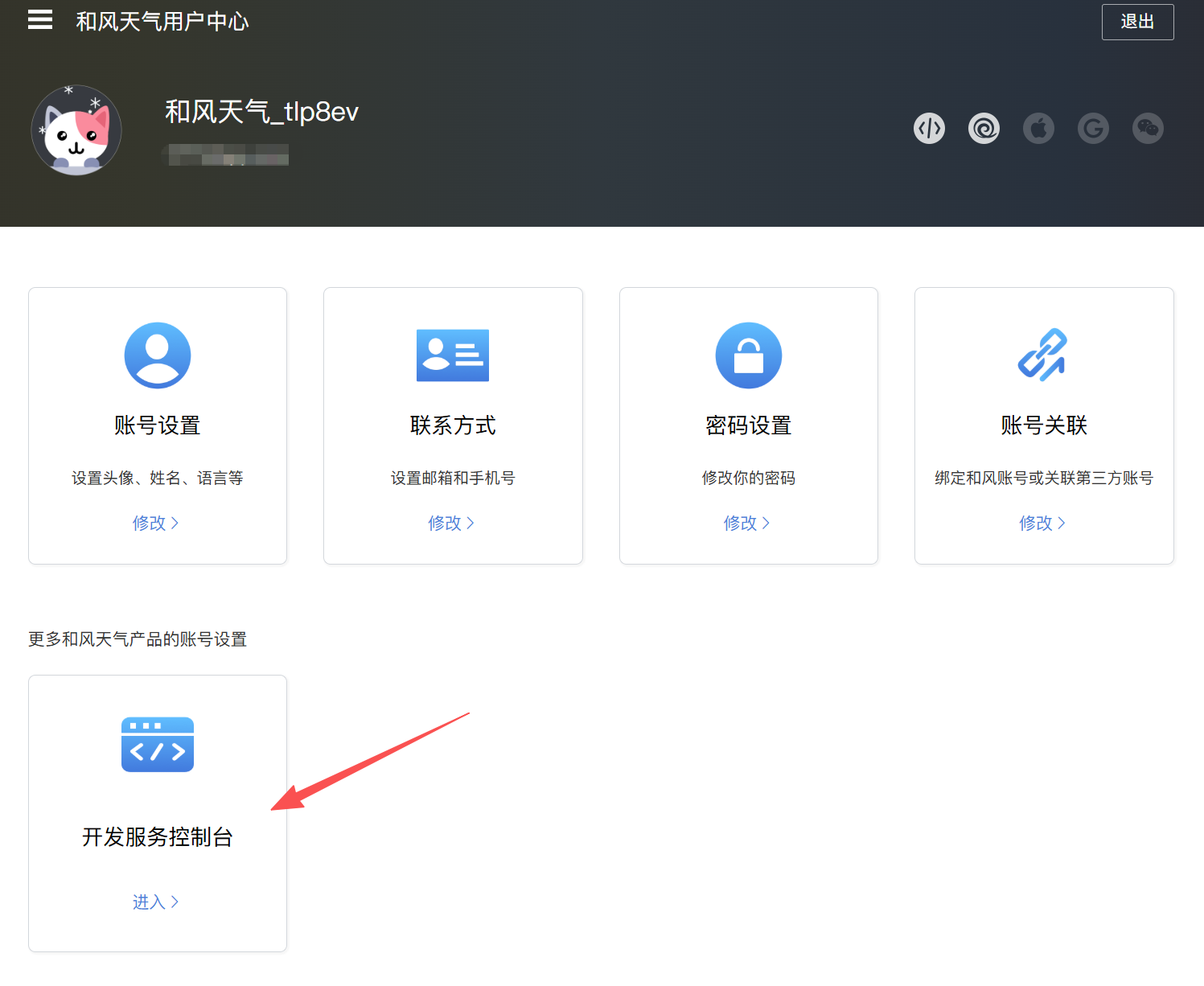
The second step is to create the project and obtain related parameters through the Hefeng Weather Development Console. Pay attention to each step.
Click "Project Management" in the left menu to create a project.
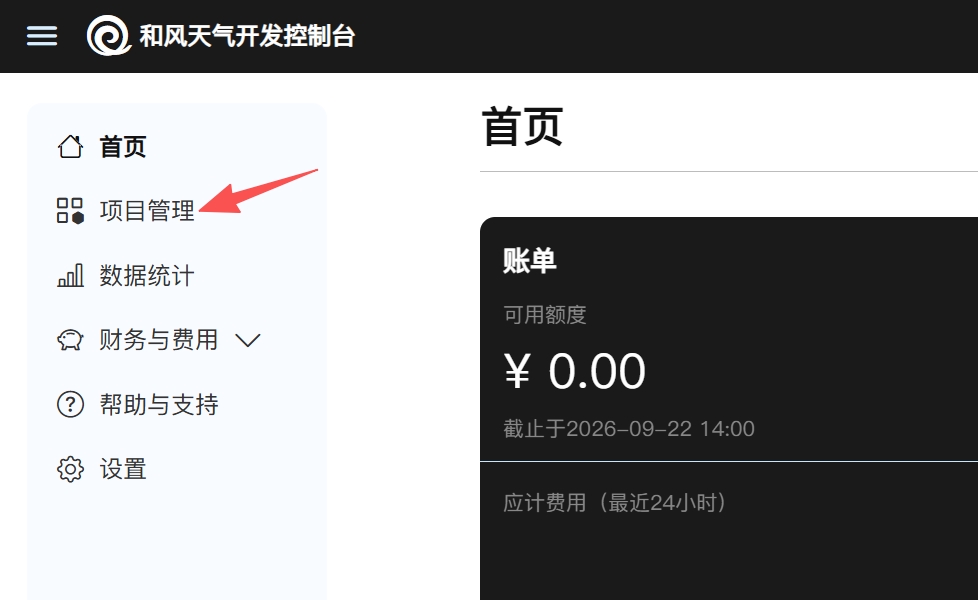
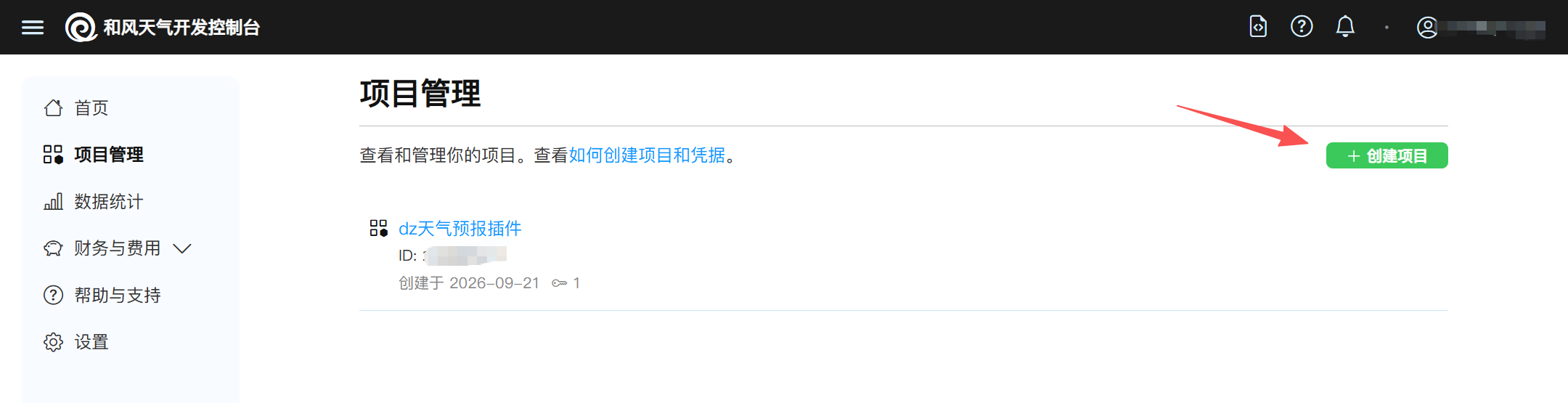
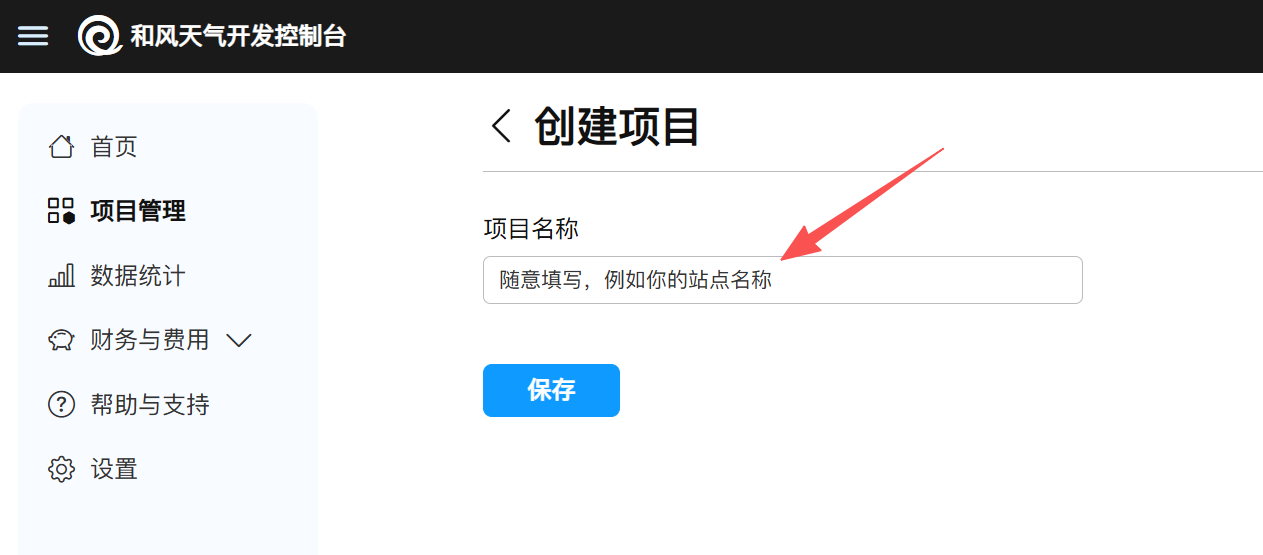
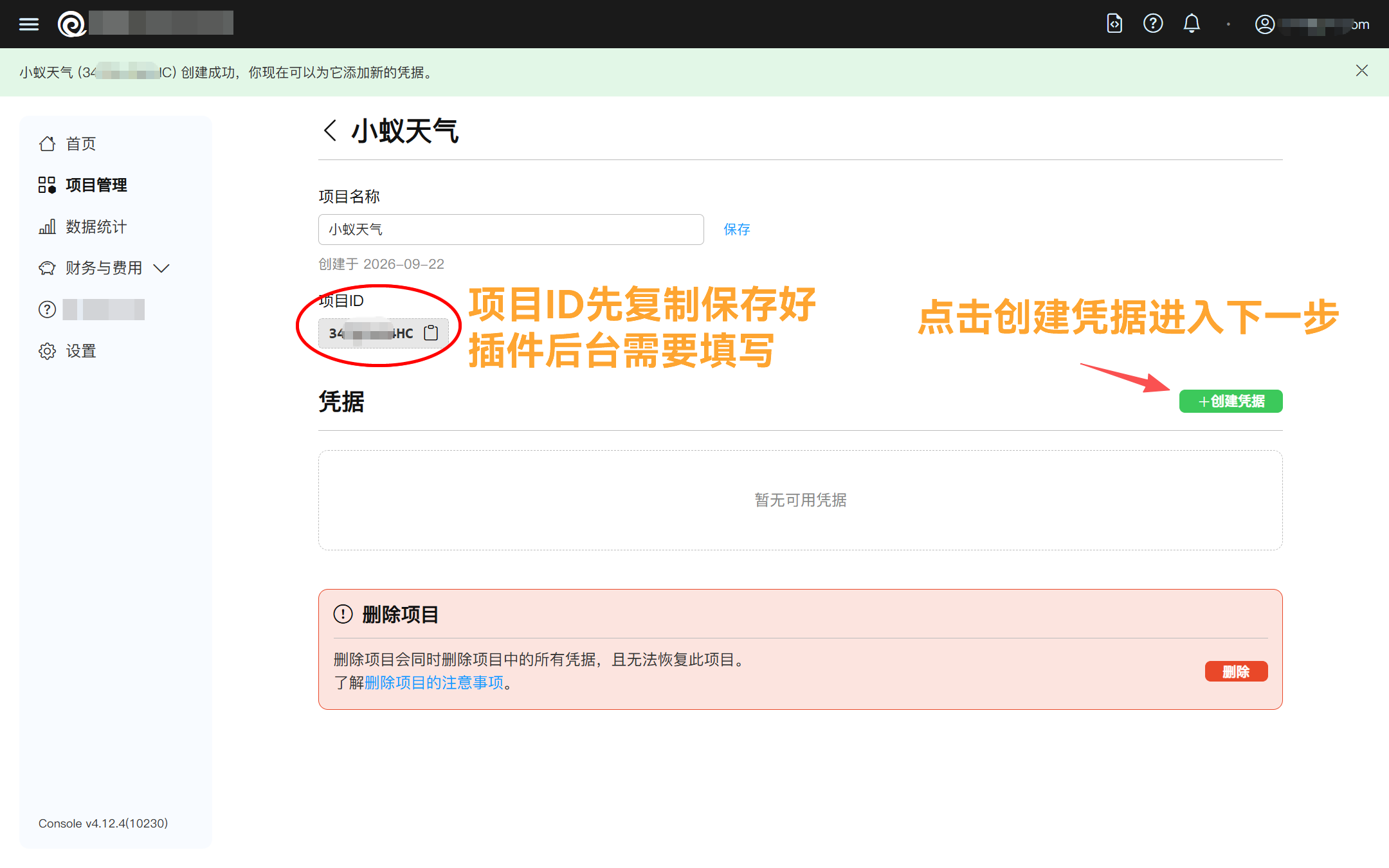
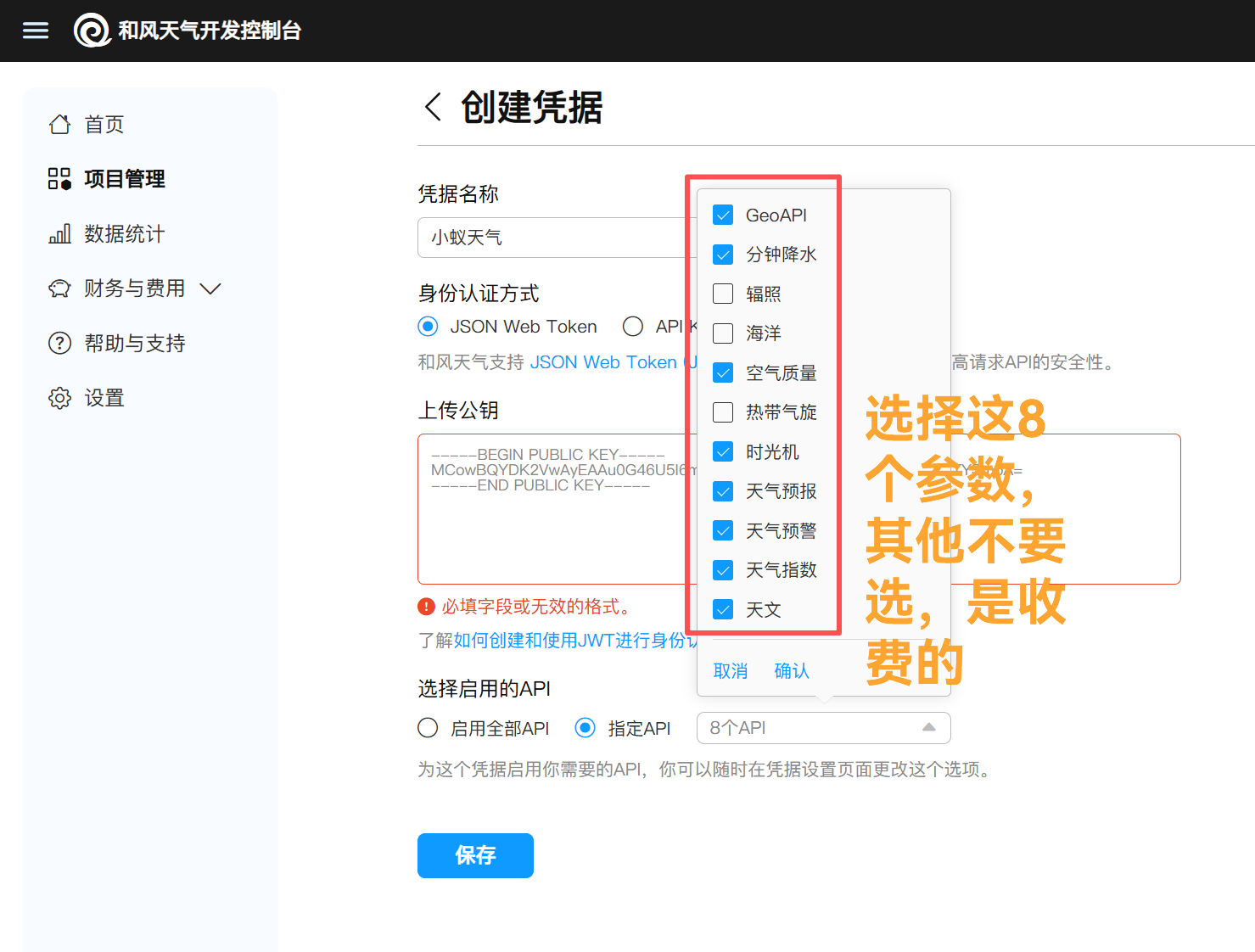
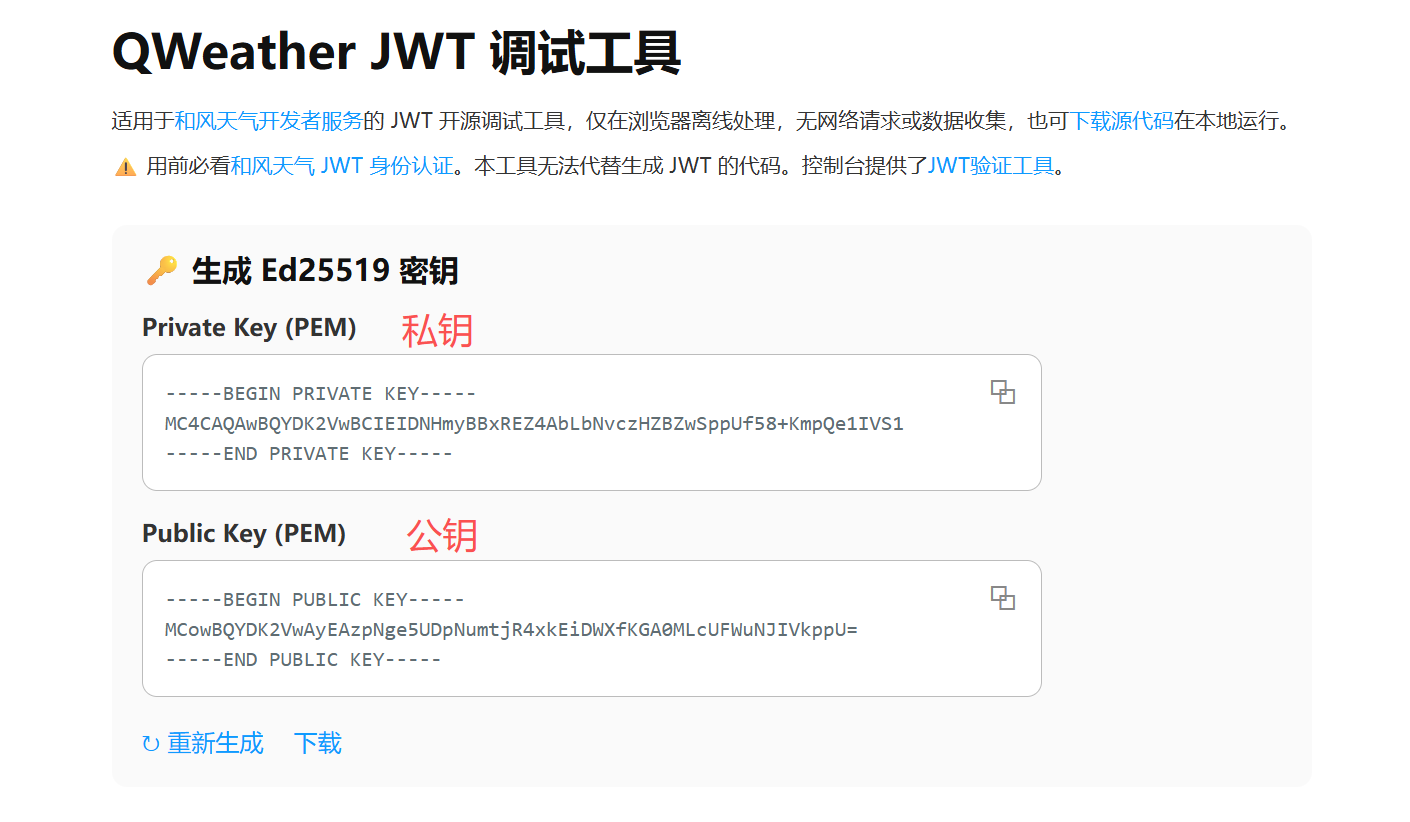
As shown in the image above, to upload the public key, please open the debugging tool website provided by Hefeng Weather.https://jwt.qweather.com/(As shown in the image below), click to copy the public key and paste it into the location where the public key was uploaded.
Note that the corresponding private key on the generation page should be copied and saved to avoid loss.
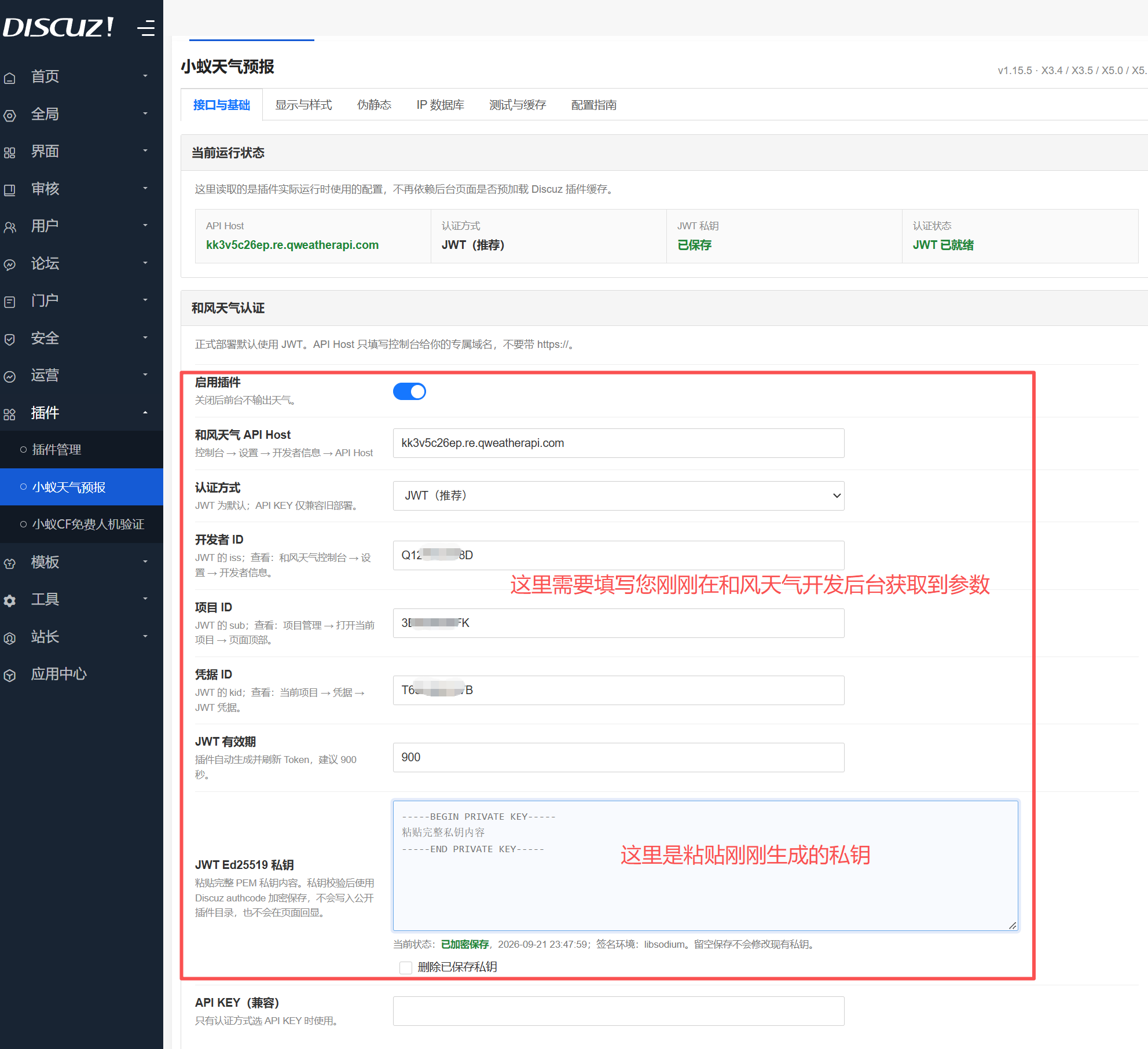
After saving, you can obtain the voucher ID, which needs to be copied to the plugin backend to fill in.
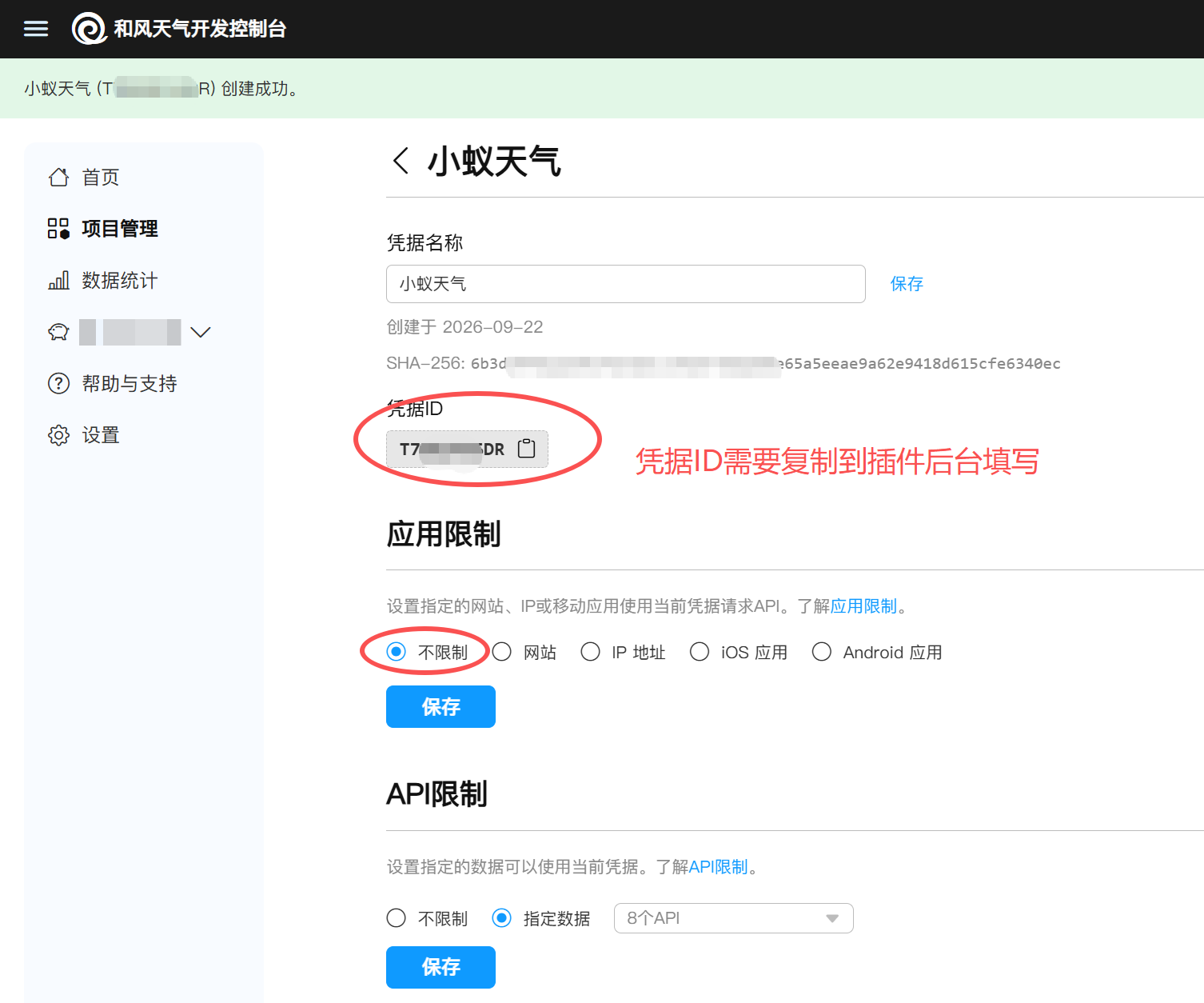
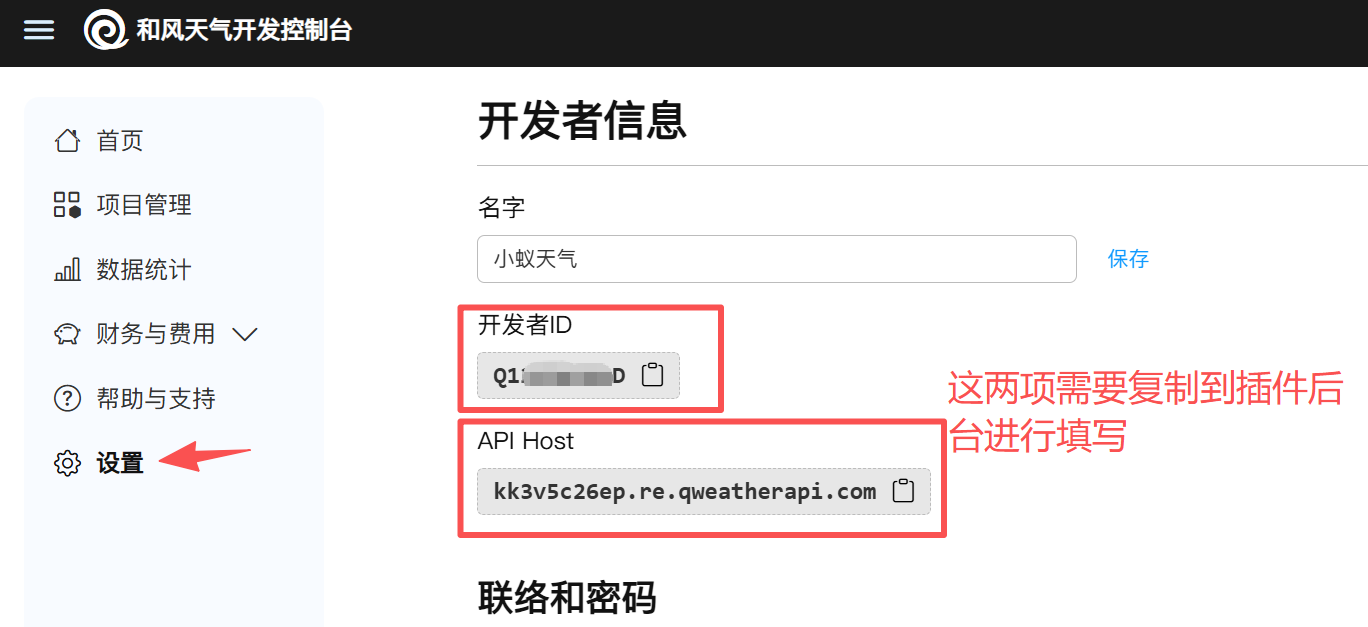
At this point, the relevant parameters for the Hefeng Weather backend have been obtained.
Step 3: Plugin Background Configuration
Regarding IP configuration, we recommend that you purchase a commercial IP for the most accurate results.
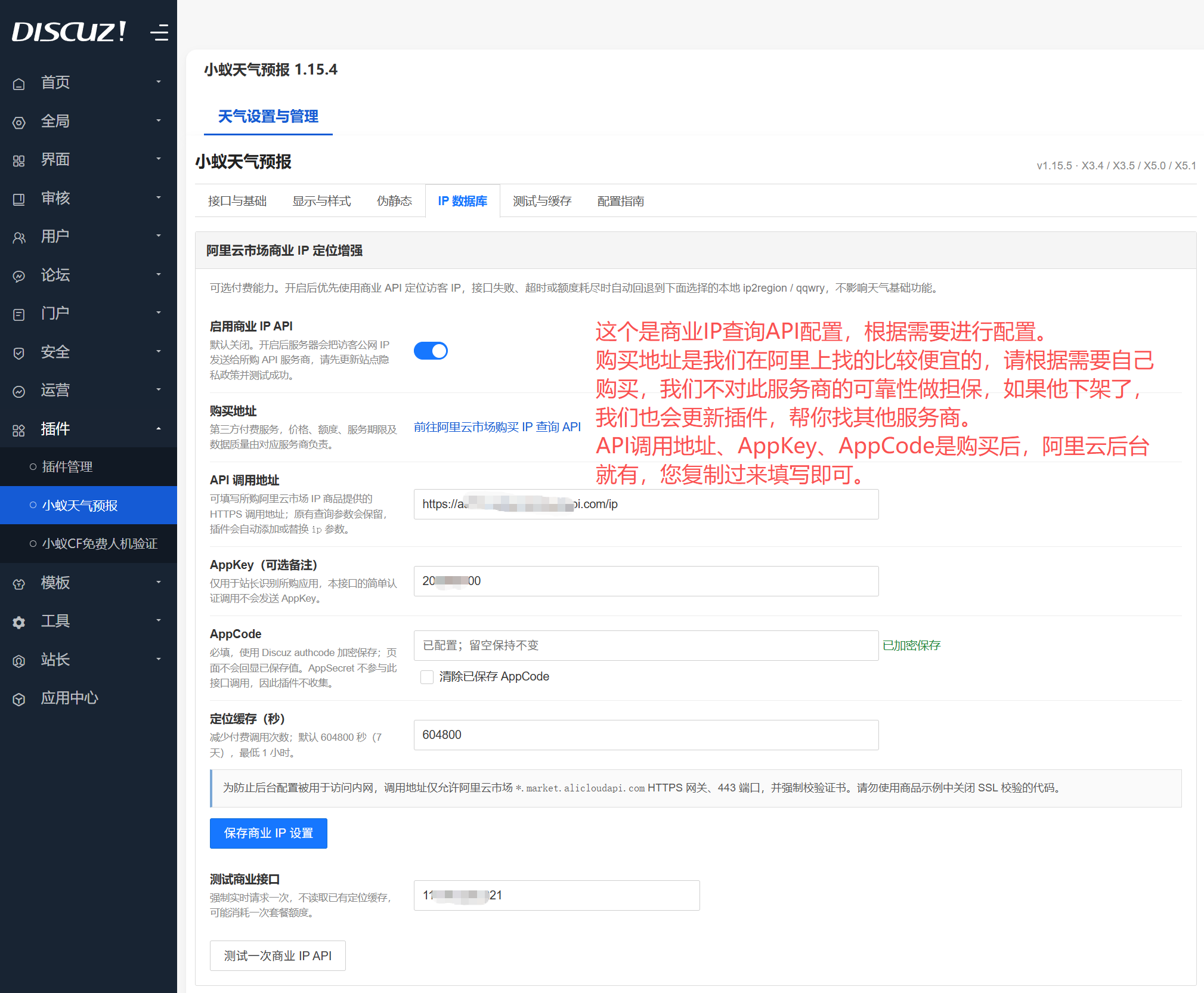
Alibaba Cloud Commercial IP Purchase Portal:https://market.aliyun.com/detail/cmapi00064443
Alibaba Cloud Market Management Portal:https://marketnext.console.aliyun.com/bizlist
If you think a free IP database is acceptable (not recommended, as some IPs cannot be found, making it impossible to locate a city), then you can continue reading.
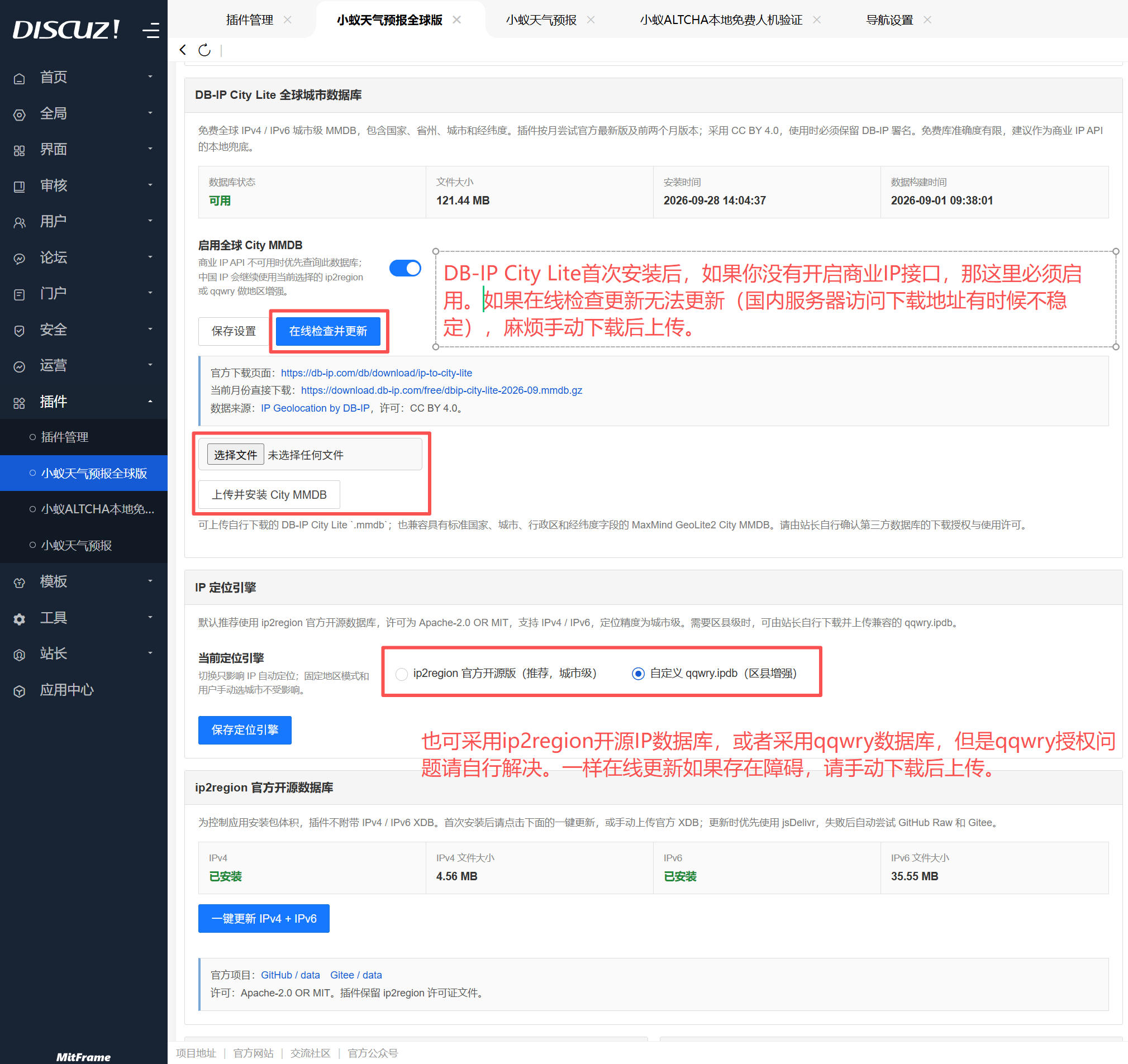
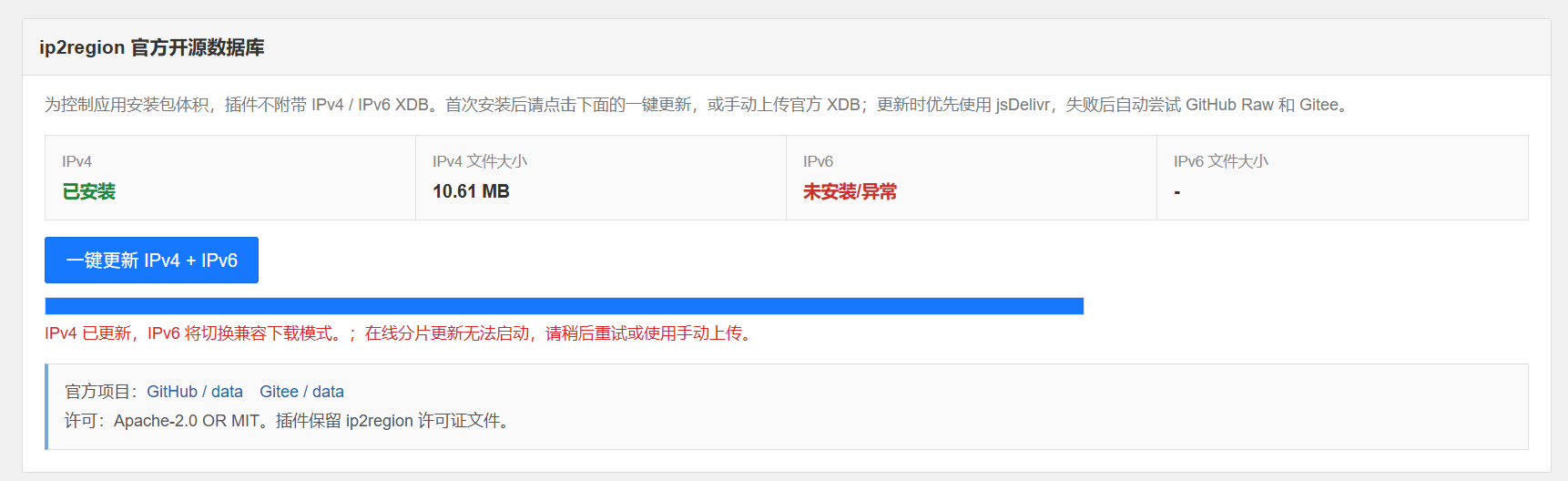
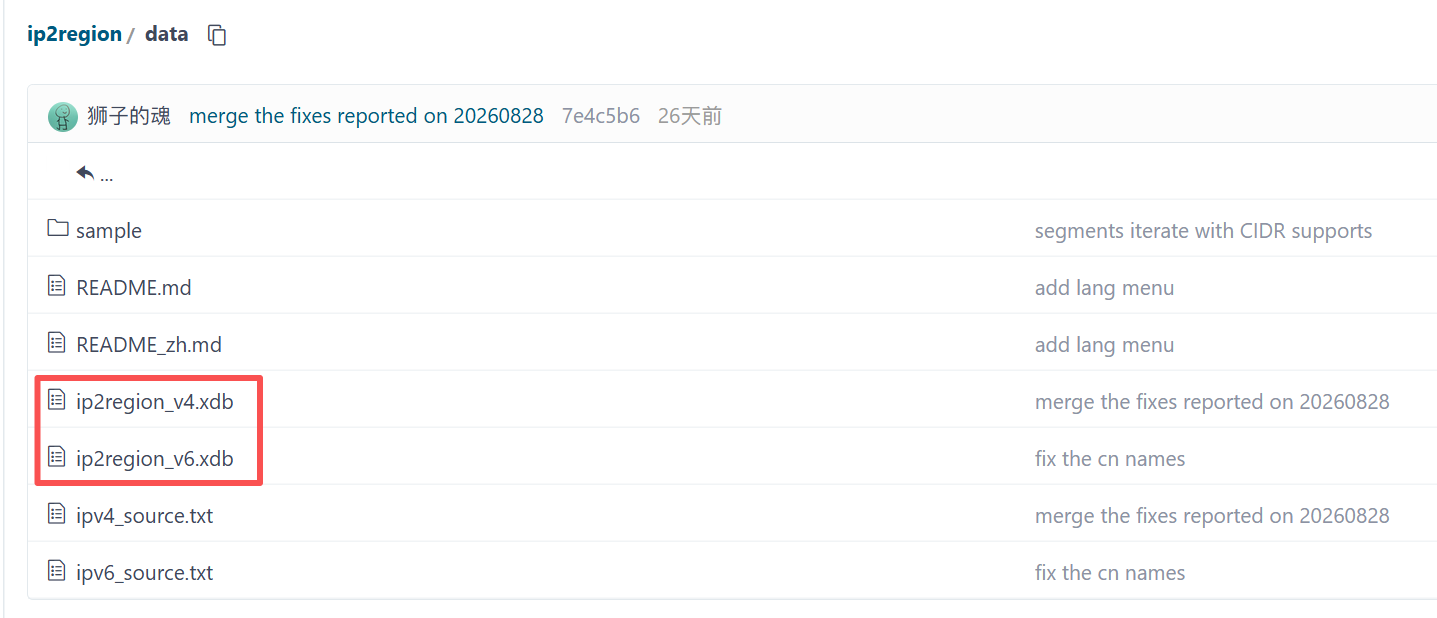
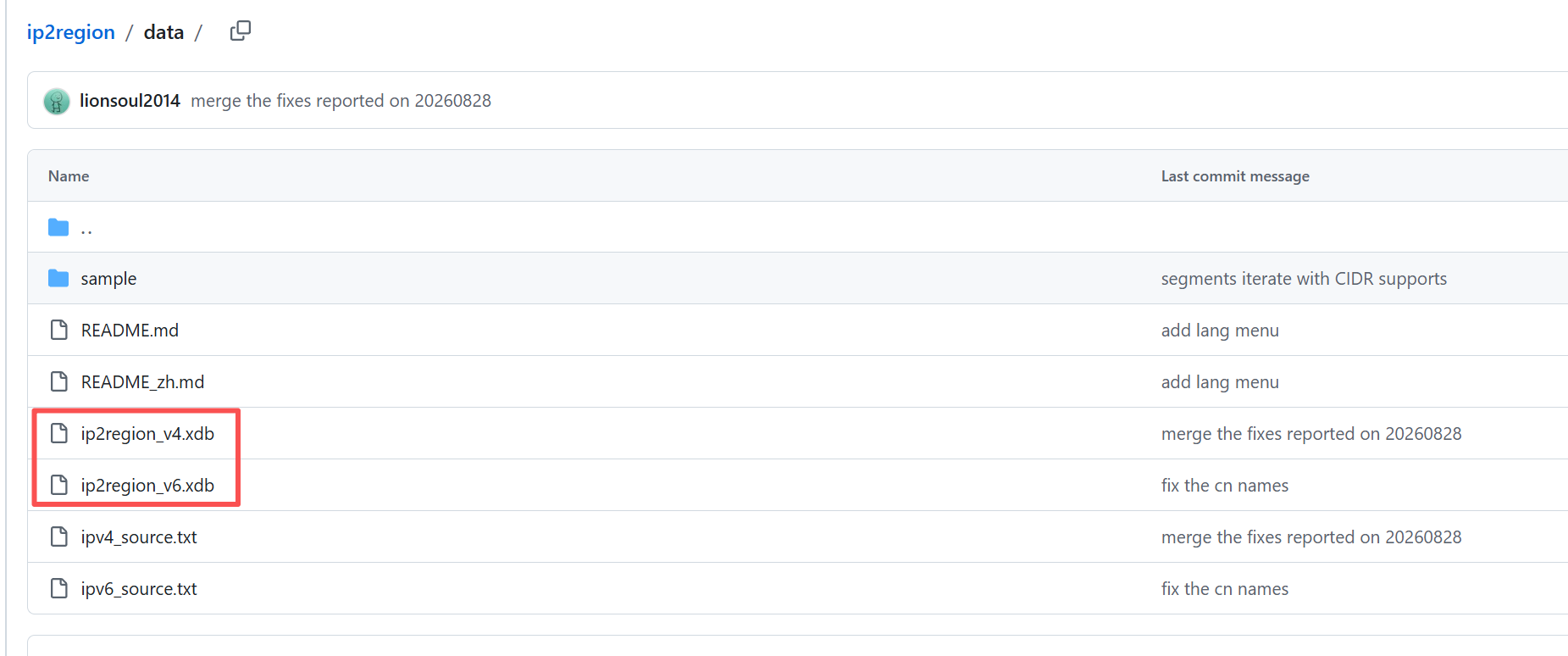
If the ip2region update fails, please download and upload manually. Manual download address:
https://gitee.com/lionsoul/ip2region/tree/master/data
https://github.com/lionsoul2014/ip2region/tree/master/data
The administrative region directory is mainly for China, so be sure to update it the first time you install it.
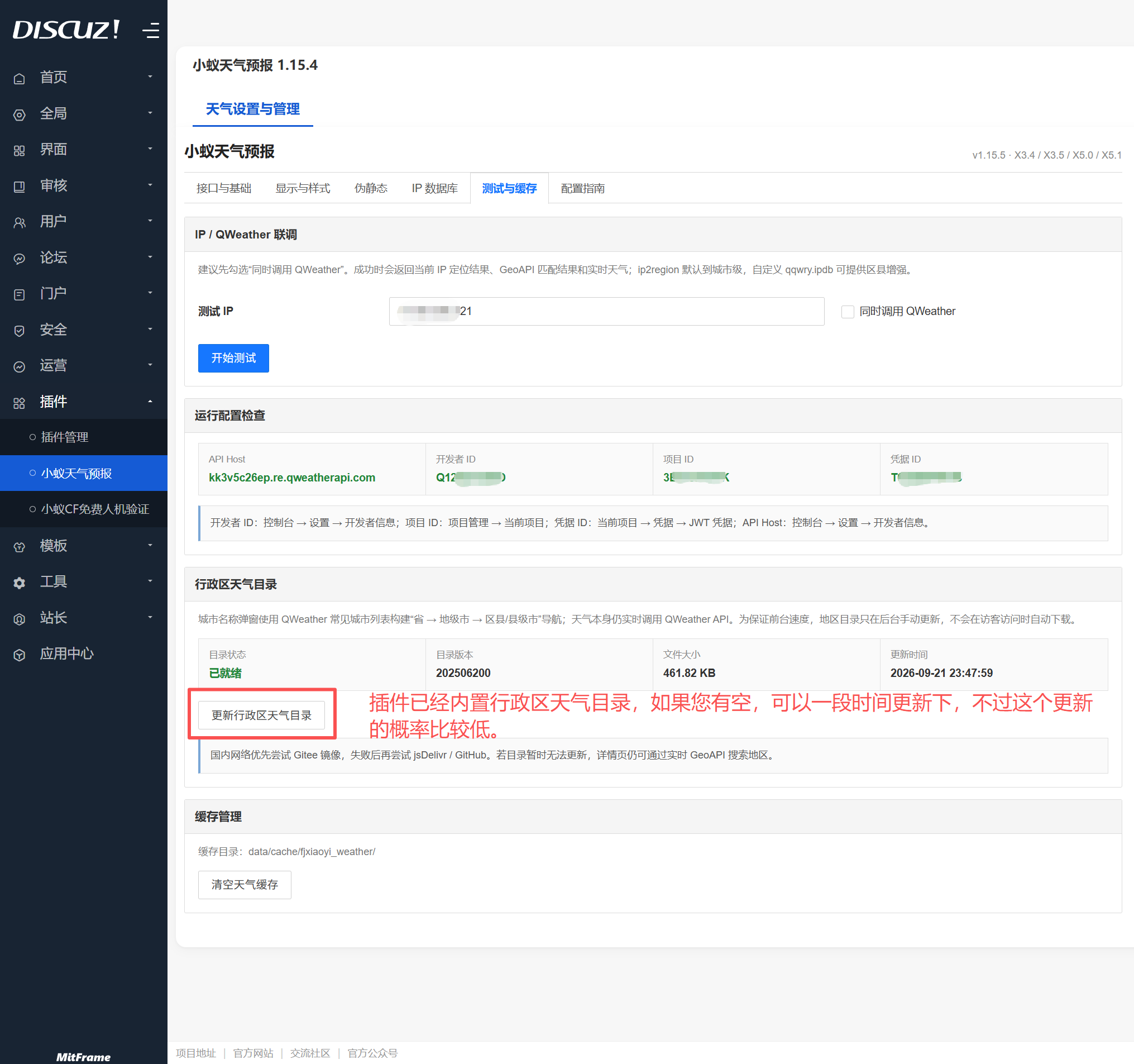
For pseudo-static, please select the rules and configure them according to your server situation.
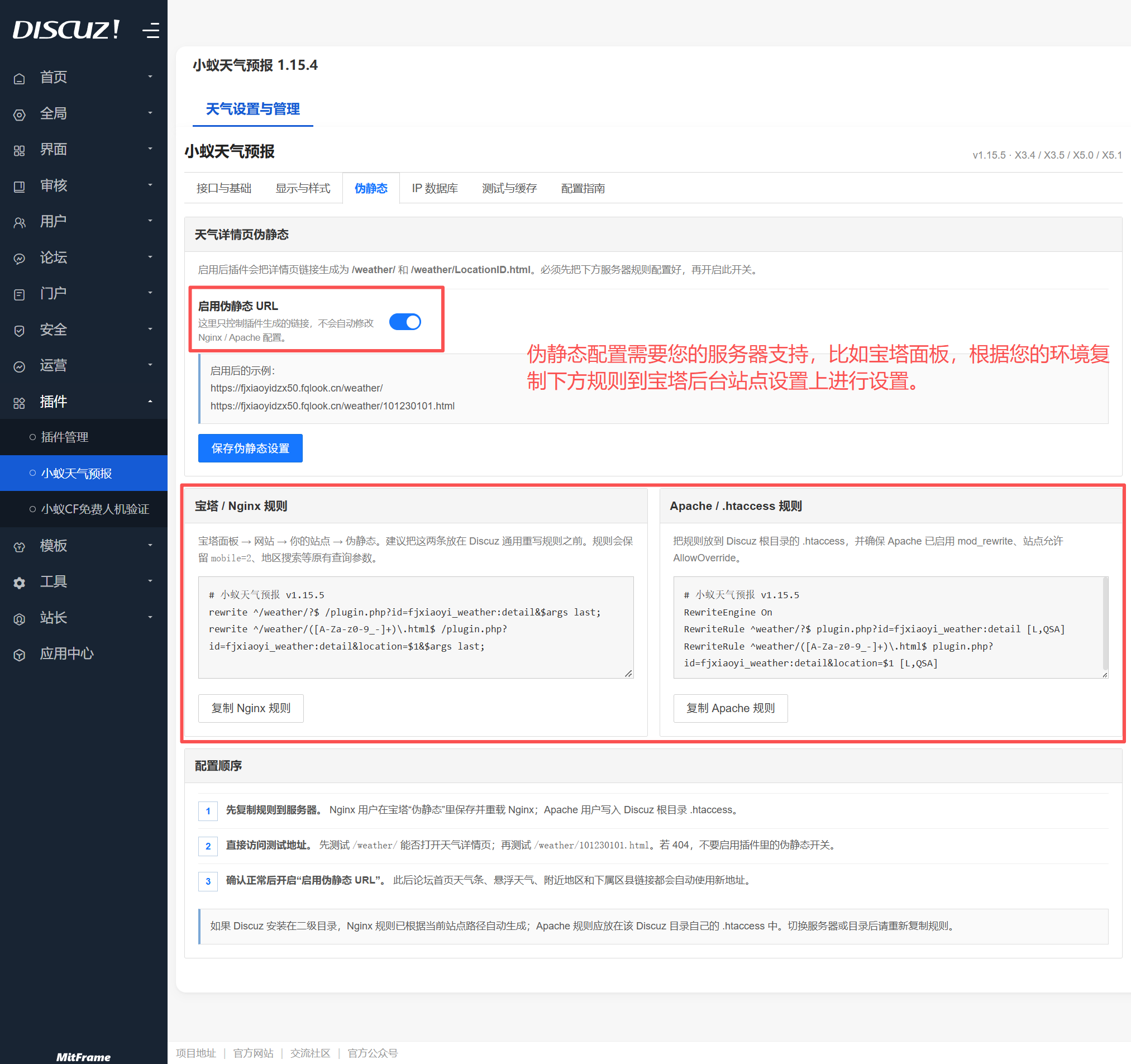
At this point, the plugin configuration is complete. You can now explore the plugin backend and configure it according to your needs.