Discuss! Plugin Alibaba Cloud ESA AI CAPTCHA
Connect the Alibaba Cloud ESA AI verification code to Discuz! It provides human-machine verification for scenarios such as user registration, login, password recovery, posting, replying, and post commenting, effectively reducing the risks of machine registration, credential stuffing, and spam submission.
Currently, AI verification codes for Alibaba Cloud ESA are provided free of charge.
Website owners can enjoy Alibaba Cloud's top-tier free risk control and protection capabilities.
The free period for ESA's AI CAPTCHA is subject to the official announcement by Alibaba Cloud.
Alibaba Cloud ESA AI CAPTCHA plugin via Discuz! The native plugin interface integrates Alibaba Cloud's ESA AI verification capabilities into common business scenarios of the forum, eliminating the need to modify system files and template files.
The plugin supports both embedded and pop-up verification methods, which can be flexibly selected according to the forum template and usage scenario. After verification is successful, the original submission operation will automatically continue, trying to keep Discuz! Native workflows and page styles.
Main functions:
- Supports user registration authentication
- Supports normal login, top login, and pop-up layer login authentication
- Supports password recovery authentication
- Supports posting topics and quick posting verification
- Supports published replies and quick reply verification
- Supports post comment pop-up layer verification
- Supports embedded and pop-up CAPTCHAs
- Supports custom embedded component widths
- Supports setting pop-up verification button color
- Supports turning unverified prompts on/off, as well as prompt styles and areas.
- Supports Mainland China and Singapore CAPTCHA regions
- Supports single-pass tickets and validity control
- Supports ESA return-to-source key verification, reducing the risk of bypassing ESA and directly accessing the source site.
- Supports debugging logs to facilitate troubleshooting, verification, and submission issues.
- Support Discuz! X3.4, X3.5, and X5.0 standalone compatible versions
Safety Instructions
The plugin adopts a server-side signature verification and one-time pass ticket mechanism. Verification tokens expire immediately after use and are subject to validity period, session, and business scenario restrictions, reducing the risk of reuse and cross-scenario reuse.
It must be used in conjunction with Alibaba Cloud ESA's empty Token interception rules and return request header rules, and the return key must be properly safeguarded.
Preparation before use
Before using this plugin, you need to create an AI CAPTCHA rule in the Alibaba Cloud ESA console and obtain:
- ESA Identity Label
- ESA Scene ID
- CAPTCHA Region
- Return key (address generated by the plugin backend)
Please close Discuz before enabling the plugin! The native CAPTCHA function in "Security → Authentication Settings" in the Management Center avoids conflicts when two sets of CAPTCHAs are enabled simultaneously.
Debug Log
When debug logging is enabled, the log is saved at:
`source/plugin/fjxiaoyi_esacaptcha/data/log/`
Logs must be logged into the website server and viewed via Pagoda File Manager, SSH, or other server management tools. The plugin backend does not provide online log viewing capabilities.
It is recommended to enable debugging logs only when troubleshooting problems; please close them promptly after the problem is resolved.
Compatible version- Discuss! X3.4 Special Edition
- Discuss! X3.5 Special Edition
- Discuss! X5.0 Special Edition
Please select the corresponding plugin branch to install based on the actual version of the forum; do not mix versions.
DisclaimerThis plugin is a third-party development plugin and is not an official Alibaba Cloud product. To use this plugin, you need to activate and correctly configure the Alibaba Cloud ESA AI CAPTCHA service yourself. The relevant service capabilities, usage restrictions, and fees are subject to the official instructions of Alibaba Cloud.
- Complete Discuz! X5.0 compatible, supports UTF8SC and UTF8TC encoding.
- Optimized for PHP 8 environment compatibility.
- Fixed an issue where verification code images were not displayed on the touchscreen registration, login, and password recovery pages.
- Fixed an issue where clicking verification on some login, registration, and posting pages on the desktop version would not respond.
- Fixed issues where the verification projectile close button failed, the projectile was obscured, and the mobile device displayed out of bounds.
- Optimize the width and adaptive layout of embedded CAPTCHAs.
- Once verification is passed, it will no longer be automatically submitted. The user must confirm and then click the business button to submit again.
- Added an unverified submission prompt, covering registration, login, password recovery, posting topics, posting replies, and post comments.
- Supports custom prompt switches, prompt text, display positions, colors, and styles in the background.
- Optimized the verification button status so that it no longer disappears when the verification layer pops up.
- The verification success status is simplified to "verification passed" to avoid incomplete display in the login float.
- Fixed other known issues and improved stability for the PC and touchscreen versions.
If your site has activated Alibaba Cloud EAS, please check the issued access and related instructions:
Currently, Alibaba Cloud ESA has a free version, and registered domains support global free CDN acceleration.
For questions related to site analysis, if you are a beginner, you can also consult online customer service through Alibaba Cloud's work orders.
After you have configured the site's ESA resolution, you can follow the steps below to configure the AI CAPTCHA.
Step 1: Create AI CAPTCHA rules in Alibaba Cloud ESA
Log in to the Alibaba Cloud console and enter "Edge Safety ESA" Backstage.
Found in the left menu:
AI CAPTCHA → Configuration → Add Rule
Follow the on-page prompts to create a new AI CAPTCHA rule.
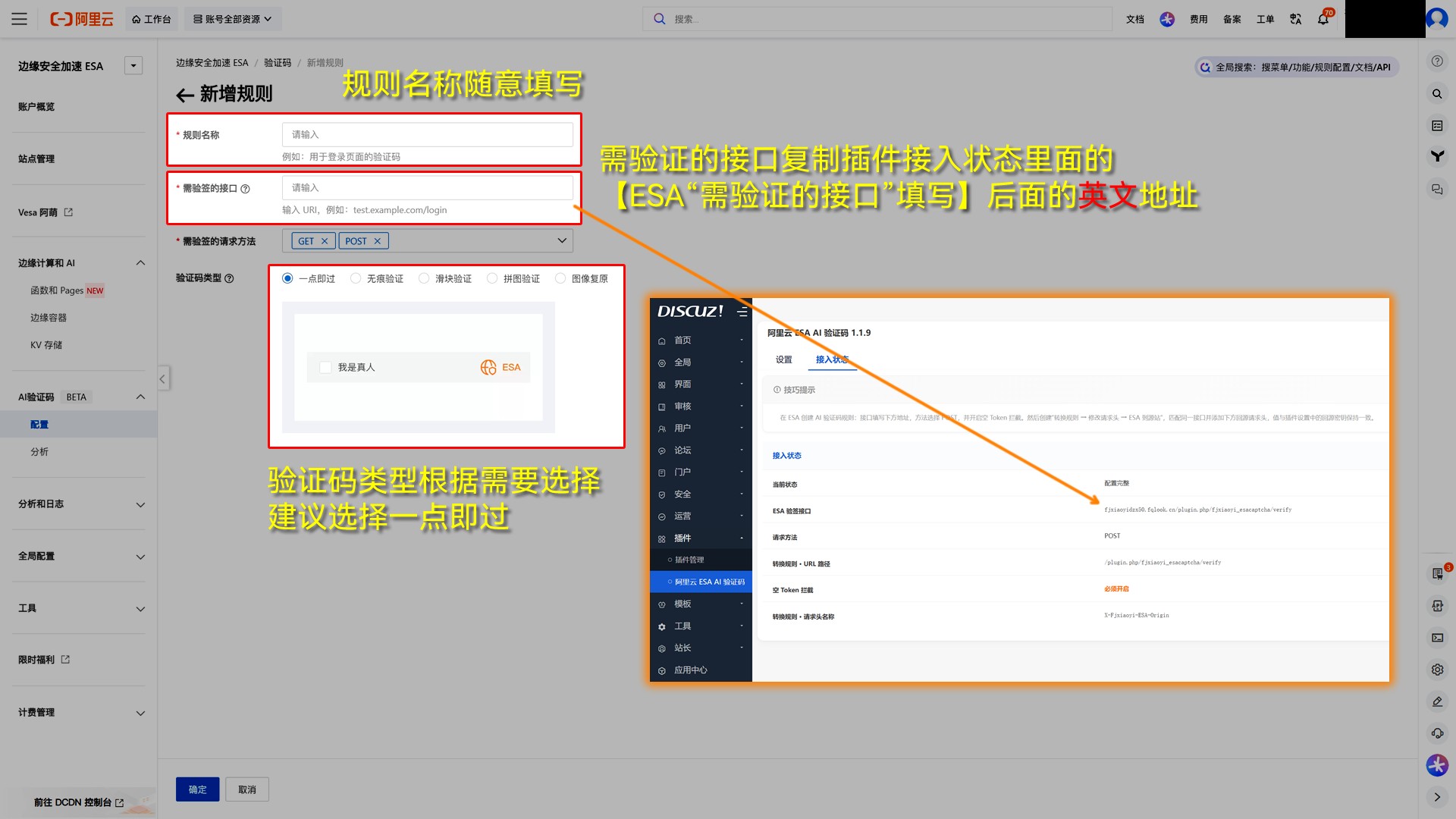
Special attention needs to be paid to this. "Interfaces requiring visa verification" Configuration.
Please enter Discuz first! In the plugin backend, copy the visa verification interface address provided by the plugin and then fill it in the corresponding location in the Alibaba Cloud ESA backend.
The plugin's signature verification interface is:
/plugin.php/fjxiaoyi_esacaptcha/verify
Please refer to the image below for details on how to fill out the form.
Important:
After the rule is saved, the system will prompt you whether to enable it. "Intercept Empty Token"。
You must select this option. openOtherwise, the CAPTCHA verification may fail or be bypassed.
Step 2: Fill in the scene ID and identifier
After the AI CAPTCHA rule is created, find the corresponding rule in the Alibaba Cloud ESA backend.
Copy the following two parameters:
- Scene ID
- identity identification
Then enter Discuz! In the plugin backend, fill in these two parameters in the corresponding locations and save them.
After completing the form, it is recommended to check the Alibaba Cloud ESA backend again:
Intercept Empty Tokens must remain on.
Please refer to the image below for the specific location

Step 3: Create the ESA Return-to-Source Request Header Rule
Enter the Alibaba Cloud ESA backend:
Site Management → Find the domain name that is already connected to ESA → Click to enter the site
Found on the right:
Rules → Rotation Rules → Modify Request Header
After entering, select the direction of action as:
ESA source station
Then click:
New Rules
Please refer to the image below for the specific location

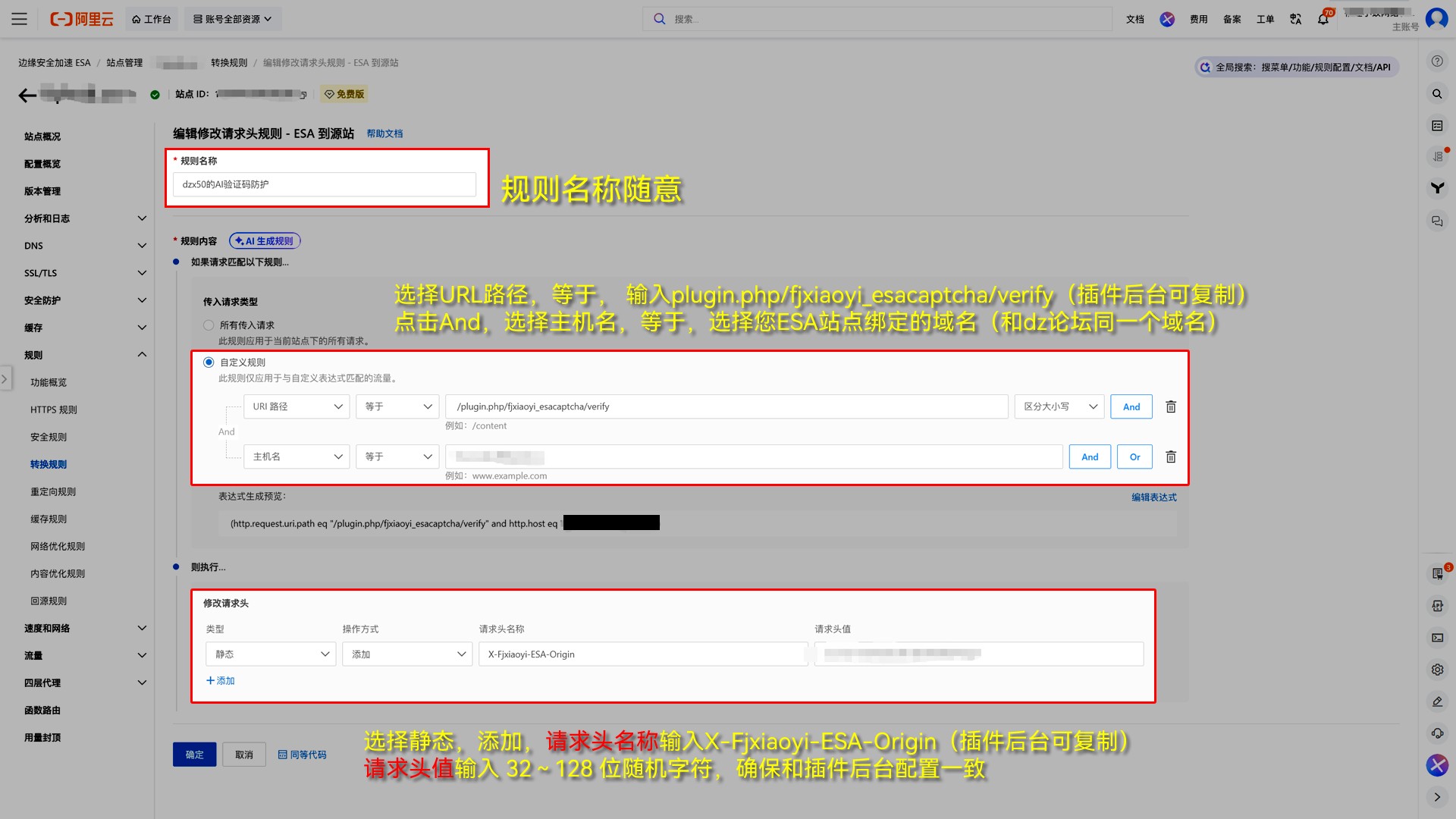
Step 4: Set matching conditions
You can fill in the rule name yourself, for example:
Xiaoyi ESA AI CAPTCHA Return-to-Source Verification
Rule content selection:
custom rules
First add the first condition:
URL path → equals → /plugin.php/fjxiaoyi_esacaptcha/verify
Then click 「And」Continue to add a second condition:
Hostname → Equals → Select the domain name of the site you have already connected to Alibaba Cloud ESA.
The final rule needs to meet two conditions simultaneously
Condition 1:
URL path = /plugin.php/fjxiaoyi_esacaptcha/verify
And
Condition 2:
Hostname = The domain name of your currently configured ESA site
Please refer to the image below for specific configuration methods.
Step 5: Add a return source security request header
Below the rules "then execute" In the area, fill in the following parameters:
Type: static
How to operate: Add
Request Header Name:
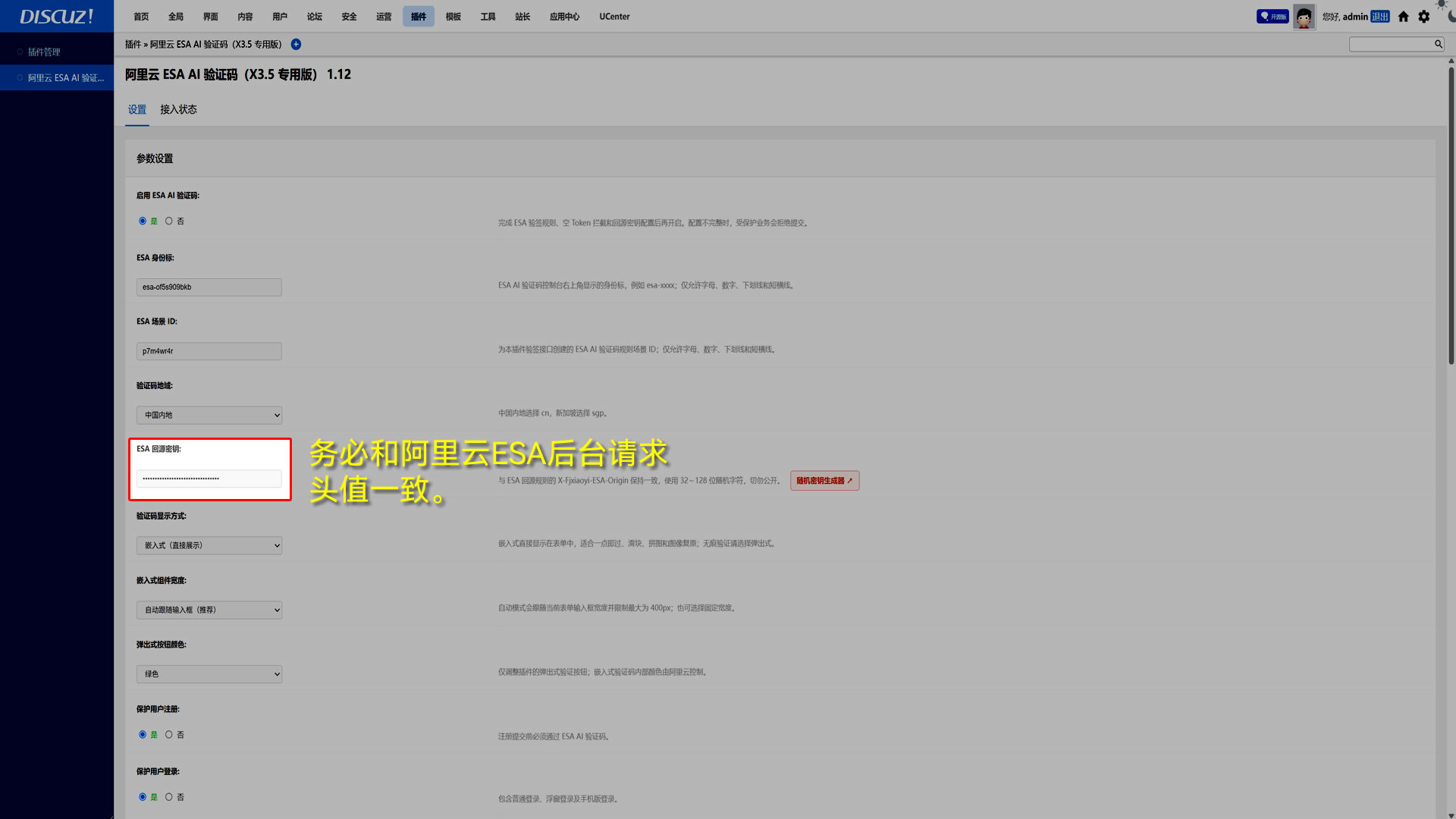
X-Fjxiaoyi-ESA-Origin
Request header value:
Fill in oneRandomly generated 32-bit string。
For example:a8F3kL9mP2xT7qW4nR6yH1cV5sD0zB8e(This is an example, please do not use it.)
Tools:Click here to enter the 32-bit random character generator
Then back to Discuz! Plugin backend, in:
ESA Return Source Key
Fill in the fieldExact same 32-bit string。
Special attention
Fill in the Alibaba Cloud ESA:
X-Fjxiaoyi-ESA-Origin
The request header value must be related to the plugin backend:
"ESA Source Key"
Exactly the same.
Including:
- Upper and lower case letters
- figure
- character order
As long as one character is different, the plugin may not be able to complete the return validation correctly.
Please check after configuration is complete.
After all settings are complete, it is recommended to confirm the following 5 items again:
- Signature verification interface requiredIt has been filled in correctly;
- Intercept empty TokenIt has been turned on;
- Scene IDIt has been correctly filled in in the plugin backend;
- identity identificationIt has been correctly filled in in the plugin backend;
- Alibaba Cloud ESA
X-Fjxiaoyi-ESA-OriginRequest header value, related to the plugin backend ESA return key is completely consistent。
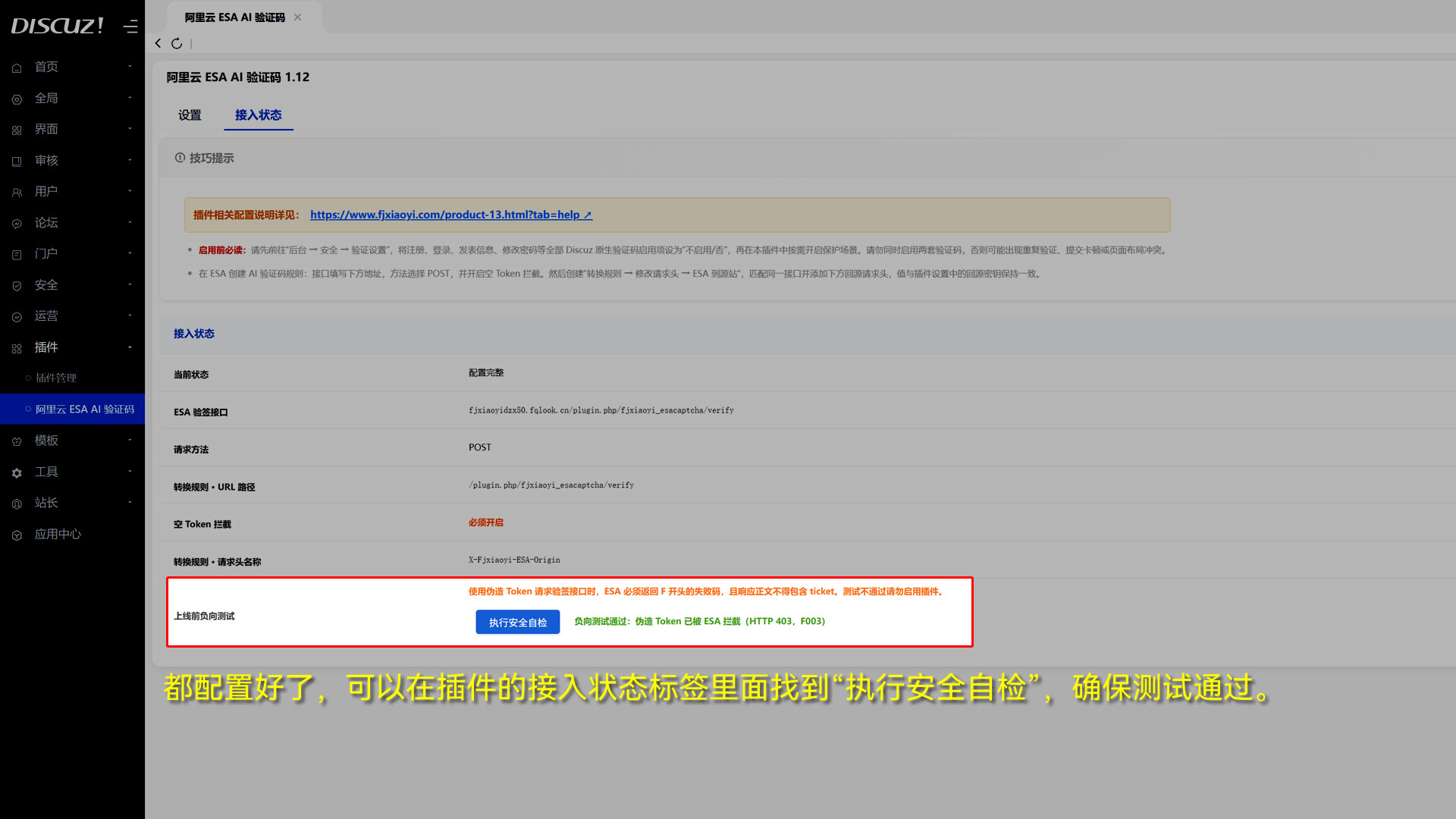
After confirming that all of the above is correct, find "Perform Security Self-Test" in the plugin's access status tab to ensure that the test passes. You can then begin testing the AI CAPTCHA feature. (Figure below)
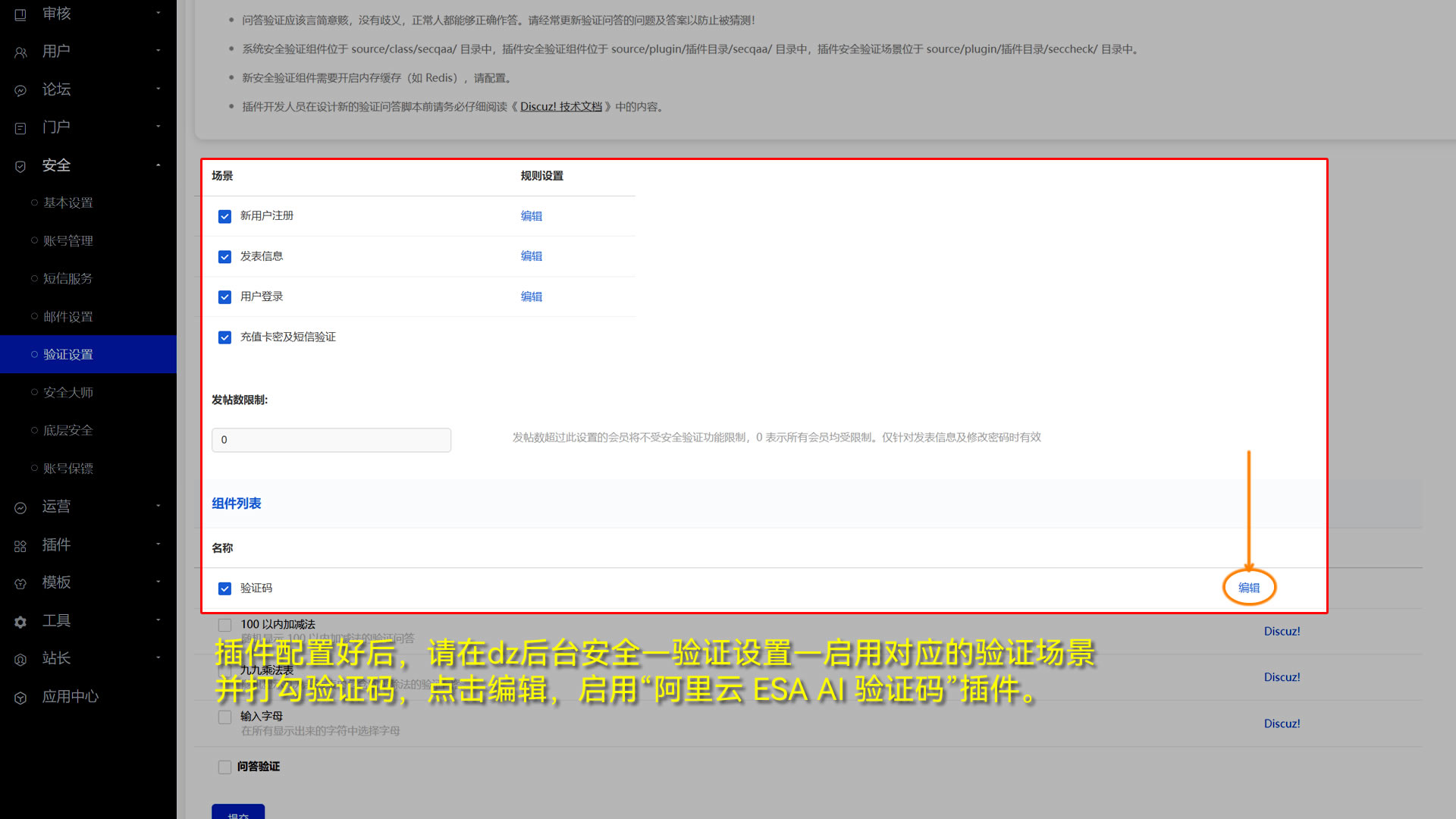
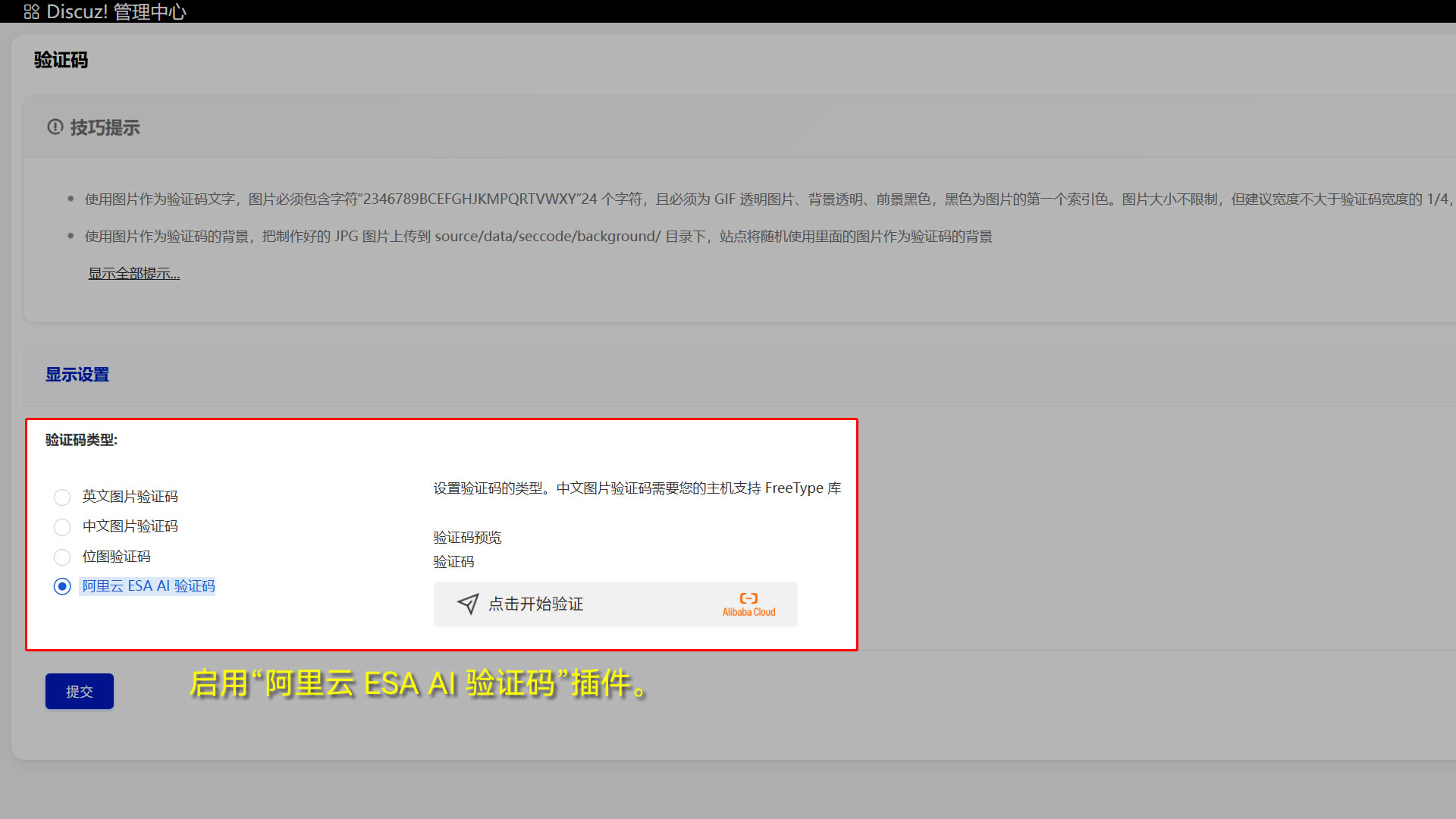
Step 6: Enable Alibaba Cloud ESA AI verification code
dz Backend Security - Authentication Settings - Component List - Captcha - Edit - Enable Alibaba Cloud ESA AI Captcha