Discuss! Ant Weather Forecast Plugin (Domestic Version)
Making weather truly integrated into your Discuz website isn't about adding a weather number to Discuz, but about adding a complete set of local weather services to your website.
#Ant Weather Discuz Plugin
Making weather truly integrated into your Discuz website isn't about adding a weather number to Discuz, but about adding a complete set of local weather services to your website.
Hefeng Weather provides 50,000 weather forecast requests free of charge every month, which is enough for ordinary webmasters.
Demo Station:https://fjxiaoyidzx50.fqlook.cn/
Little Ant Weather is a tool specifically designed for Discuz! This professional weather display plugin supports PC and mobile devices. It can automatically identify the city and display the local weather based on the visitor's IP address. It also supports a wealth of information such as fixed cities, manual city switching, weather detail pages, future weather, air quality, weather warnings, living index, and precipitation trends, and has independent weather detail pages with various themes and styles.
Instead of simply placing a temperature number at the top of the forum, the plugin aims to make "weather" a useful content entry point on the Discuz website.
Whether it's a local portal, city forum, community website, lifestyle service website, or comprehensive information forum, you can quickly add a lifestyle service function that a user might use every day through Xiaoyi Weather.
#Why choose Little Ant Weather?
Currently, many Discuz weather plugins simply call the weather interface and then display: Fuzhou 28℃ cloudy, with very limited functionality.
Xiao Yi Weather was designed from the very beginning as a complete Discuz weather service module. It should not only "display the weather", but also focus on: accurate positioning, aesthetically pleasing display, mobile-friendly, fast loading, easy to manage in the background, compatible with Discuz, standardized data sources, and convenient for long-term operation. For website owners, there is basically no need to modify the template or write the code themselves after installation.
#Core Advantages
1. Automatic IP location: After visitors open the website, it can automatically identify their city and display local weather, eliminating the need for manual selection.
2. ip2region default location engine: It uses the open-source ip2region database by default, supports IPv4/IPv6, and can be updated with one click in the background.
3. Supports enhanced location at the district and county levels: Website owners can purchase commercial IP location services (very cheap) or upload a compatible qqwry.ipdb database (commercial authorization required) to further identify districts and counties with data support.
4. QWeather Professional Weather Data (more weather forecast interfaces will be supported in the future): Supports real-time weather, hourly weather, future forecasts, air quality, weather warnings, index of life, sunrise and sunset, precipitation trends and other information.
5. PC + WAP dual-device compatibility: Instead of simply shrinking the PC page, the display logic and floating entry point are optimized separately for mobile devices.
6. Free control of multiple display positions: Supports forum homepage, forum list, post details, page top, global hover, and other positions.
7. Multiple weather themes: Built-in modern cards, minimalist lines, transparent glass, dark colors, gradients and other styles, which can be adapted to different Discuz templates.
8. Independent Weather Details Page: The weather can be made into an independent lifestyle service channel on the website, rather than just a weather banner.
9. Administrative Region Switching: Users can select weather regions from the provincial, municipal, and district/county levels.
10. Weather in nearby cities: The details page supports displaying weather in surrounding cities, enhancing the local lifestyle attribute.
11. Top precipitation trend chart: Can display future precipitation trends, making weather information more intuitive.
12. High-performance caching mechanism: Forum pages prioritize reading local cache to avoid synchronizing requests for weather interfaces with each visit.
13. Asynchronous weather refresh: Update the weather via AJAX after the cache expires to avoid external APIs slowing down the forum loading speed.
14. Supports pseudo-static weather pages: The weather details page can be set to a more user-friendly address such as /weather/ or /weather/101230101.html.
15. Compatible with DiscuzX3.4/X3.5/X5.0/X5.1.
# What will visitors see when they open the forum?
For example, a user from Fuzhou enters the website.
After the system automatically identifies the visitor's city, it can be displayed at the top of the forum:
☀ Fuzhou 28℃ Cloudy
Feels like 30℃, humidity 68%, northeast wind level 2
Today 25℃/32℃
If users just want to quickly check the weather, this is enough.
If you click on the weather area, you can enter the full weather details page.
You can further see on the details page:
1. Current weather: large-font temperature, weather conditions, perceived temperature, and the highest and lowest temperatures of the day.
2. Today's weather: Information such as wind direction, wind speed, humidity, precipitation, visibility, ultraviolet radiation, sunrise, and sunset is displayed in a centralized manner.
3. Future precipitation trends: These trends show rainfall changes over a period of time.
4. Hourly weather: View changes in temperature, weather, precipitation, etc. over the next few hours.
5. Future Weather: View the weather trend for the next few days.
6. Air quality: Check air quality information such as AQI.
7. Weather warnings: When there are warnings of high temperatures, heavy rain, strong winds, typhoons, etc. in the local area, they can be displayed on the weather page.
8. Life Index: Provides relevant life references based on the weather.
9. Weather in nearby cities: View the weather in nearby areas at the bottom of the weather details page.
In this way, a small function that originally only had a simple "weather and temperature" has become a complete life service module on the website.
#Six Weather Bar Styles
The plugin has multiple built-in weather bar visual styles.
1. Follow the template: white background, light border, low shadow. Suitable for most Discuz default templates and portal templates.
2. Modern cards: A more modern website visual effect. Suitable for portals, technology, integrated information websites.
3. Minimalist lines: Reduce background and decoration. Suitable for minimalist style templates.
4. Transparent glass: Uses a light transparent effect. Suitable for image backgrounds and high-tech templates.
5. Dark color: Suitable for dark Discuz templates.
6. Color gradient: More visually active. Suitable for younger, community-oriented websites.
Website owners can switch directly in the background without needing to modify the CSS.
#Optimized for PC and mobile devices separately
Many old Discuz plugins claim to "support mobile devices," but in reality, they simply shrink the PC page. Little Ant doesn't handle the weather this way.
The plugin is available for PC and WAP respectively:
The PC display settings and WAP display settings can be controlled by the website owner separately.
For example, PC support: the top of the forum homepage, the top of the forum list, the top of the post details, and the weather button in the lower right corner (the number of pixels from the bottom can be adjusted).
The mobile version can be set separately: the mobile homepage, the mobile forum page, the mobile post page, and the weather button in the lower right corner (the distance to the bottom can be adjusted by how many pixels).
There will be no problem where the mobile layout is damaged after the PC settings are changed.
The PC weather bar supports freely selectable fields, with different forum template widths.
Some website owners prefer simplicity: Fuzhou 28℃ Cloudy
Some website owners prefer a wealth of information: Fuzhou 28℃ cloudy, feeling 30℃, humidity 68%, northeast wind level 2, visibility 10km, so the weather bar at the top of the PC supports free selection of fields.
Selectable options: weather icon, city, current temperature, weather conditions, perceived temperature, relative humidity, wind direction, wind force, precipitation, visibility, ultraviolet radiation, today's lowest temperature, today's highest temperature, sunrise, sunset
Website owners can combine templates according to their own width.
#Weather icon supports multiple colors
The plugin has a complete Qweather weather icon resource built in. It also supports: intelligent multicolor, blue, orange, green, purple, gray, dark, and custom colors.
For example, a sunny day may display a yellow sun. A blue weather icon is displayed on rainy days. Cloudy days display grayish-blue. Different weather conditions can be distinguished at a glance.
#Independent Weather Details Page
Little Ant Weather isn't just about the weather bar at the top of the forum. The plugin comes with a full weather detail page.
Default access:
/plugin.php?id=fjxiaoyi_weather:detail
You can also configure pseudo-static, for example:
/weather/
Designated Area:
/weather/101230101.html
Therefore, for local portals, a weather channel can be added directly. You can even add the following to the website's main navigation: Homepage, News, Real Estate, Jobs, and Weather, making the weather truly part of the website's content system.
# Supports Discuz site navigation and headers
The weather details page allows users to choose between using a standalone page or displaying the Discuz website's top navigation. Once enabled, users can still see the original website: LOGO, navigation bar, user login status, and overall website structure when entering the weather page, without visually resembling jumping to a third-party website.
#WeatherInterface
The weather interface uses QWeather, and the plugin weather data is based on QWeather. Usage: JWT certification (the official generic API will be phased out in 2027).
#High-Performance Cache Architecture
The most common problem with weather plugins is that if the weather interface is slow, the entire forum will slow down. Little Ant Weather has been specifically optimized for this issue. Forum homepage, post page, and other global pages: They will not directly synchronize and wait for external weather interfaces because the weather cache has expired. The plug-in reads the local weather cache first.
It uses multi-level weather caching, and the data changes at different speeds depending on the weather. For example, the current weather updates rapidly, while sunrise and sunset remain largely unchanged throughout the day. Therefore, instead of simply setting a uniform caching time, the plugin caches for different weather types. This can reduce the number of QWeatherAPI calls and improve the loading speed of the weather page.
#Continuous optimization for Discuz Application Center specifications
Little Ant Weather is not simply about "submitting if it works". The plugin has been specifically modified to address the Discuz Application Center review guidelines. The following optimizations have been focused on:
plug-in directory specification
Permanent Data Directory
cache directory
upload processing
lifecycle script
System table operation
External API Request
SSRF Protection
private key management
Directory permissions
AJAX Refresh
global Hook performance
IPv4/IPv6 database
Third-Party Open Source License Description
This is very important for long-term website operation.
#Transparent sourcing of third-party components
The plugin does not secretly build an IP database of unknown origin. The default IP location is ip2region (supports one-click updates), and the corresponding open-source license is retained.
The weather icon uses: QWeatherIcons, and retains the corresponding CCBY4.0 license notes.
For website owners who need to additionally use a third-party IP database, the plugin only provides compatibility capabilities, and the website owner obtains the relevant data files themselves.
# What other fees do I need to pay after purchasing the plugin?
This plugin does not include the weather API fee. It belongs to the Discuz weather system plugin. Weather data is subject to the website owner's own application for the QWeather service (there are 50,000 free requests per month, which is enough for small websites). The plugin itself does not sell or resell QWeather data. Specific API free quotas, packages, and call limits are subject to the actual display on the QWeather official account.
Please refer to the price standard for Japanese wind weather:https://dev.qweather.com/docs/finance/pricing/
Configuration Guide:https://www.fjxiaoyi.com/product-15.html?tab=help
v1.6
- Fixed an issue where &mobile=2 occasionally appeared in the redirect link of the PC weather component: The mobile=0/1 parameter carried by the asynchronous refresh request was previously mistaken for the mobile version, causing the compact weather or hovering weather to enter the mobile version details address after clicking the top weather bar or Logo on the computer;
- The detail page cache update time is displayed within the current weather card.
- The lifestyle index icon is split into its own independent linear icon based on the Japanese lifestyle index.
- The commercial IP interface is compatible with GET priority, POST fallback, and supports province and latitude-longitude baseline positioning.
v1.5
Removes descriptions of region switching and IP auto-targeting bias at the bottom of the detail page.
The data source description at the bottom of the PC and WAP detail pages remains single-line and can be viewed horizontally on narrow screens.
v1.4 Search, Collections, and Life Index Visual Upgrade
• Added a city weather search bar to the detail page, following the QWeather GeoAPI search results.
• Logged-in users can bookmark cities and quickly switch between them on the details page, saving up to 30 cities.
• Life Index cards supplement exercise, car wash, dressing, fishing and UV icons.
V1.16.0 Version Update
New features
-
Built-in ip2region official IPv4 and IPv6 XDB databases allow for direct use of IP city location functionality upon first installation, eliminating the need for manual online updates.
-
Built-in Japanese weather general city administrative area data, after installation, directly supports three-level selection functions at the provincial, municipal, and district/county levels nationwide.
-
New built-in automatic data deployment capabilities, combined with SHA-256 file integrity verification, ensure data file security and compliance.
mechanism optimization
-
The plugin upgrade logic has been optimized. The upgrade process only incrementally replenishes missing data files, retaining custom data manually modified and uploaded by the website owner to avoid overwriting and loss.
-
Retains the online update function for the ip2region database and administrative region directory, and supports website owners to manually refresh the latest data in the background.
-
Streamline the initial installation process, resolve configuration abnormalities when the server cannot connect to the update source, and improve the installation success rate.
compatibility and adaptation
-
Continuously fully compatible with all Discuz versions X3.4, X3.5, X5.0, and X5.1, supporting UTF8SC, UTF8TC, and GBK mainstream site encodings.
V1.15 Commercial IP Location Extension
New features
-
Connect to a third-party commercial IP positioning interface as a supplementary positioning solution to the local IP database, improving IP positioning accuracy.
-
Fully supports Alibaba Cloud Market's APPCODE type IP positioning interface, adapting to mainstream commercial positioning services.
-
A new independent caching mechanism for business interfaces has been added, with a default cache of 7 days, effectively reducing the frequency of interface calls and lowering usage costs.
-
The backend adds business interface connectivity testing and positioning result testing functions to facilitate website owners to quickly troubleshoot configuration issues.
-
The backend includes a built-in Alibaba Cloud Marketplace interface purchase portal, allowing website owners to independently select and activate corresponding location services.
mechanism optimization
-
The business interface call address has been changed to be customized and manually filled in in the backend, which can be adapted to various Alibaba Cloud Market compliant IP positioning services.
-
Enforce commercial interfaces to support only HTTPS protocols, strictly restrict access to domain names and standard ports, and eliminate insecure requests.
-
Intelligently retains the original query parameters of the interface, automatically adapts and replaces guest IP parameters, and is compatible with various interface rules.
-
A new interface address security verification mechanism has been added to intercept request configurations containing account passwords, fragment addresses, and illegal formats.
-
Accurately filters request addresses, initiating commercial interface queries only for public IPs, while intranet and invalid IPs are directly located locally.
-
Supports dual-mode positioning of "business interface priority, local database backup", and automatically downgrades the local database when the interface is abnormal
-
The cache data is bound to the corresponding interface address, and the old cache is automatically cleared after switching service providers to avoid data confusion.
-
Optimize the JWT private key configuration method, changing from file upload to direct paste and entry in the background to reduce configuration difficulty.
-
Adjust the JWT private key configuration location, migrate it below the JWT expiration date settings, and optimize the background operation logic.
-
Added private key format verification, encrypted storage, null retention, and individual deletion functions to improve configuration security.
Problem Fix
-
Fixed an issue displaying the "Current Style" error flag in the Weather Detail Page theme drop-down box.
Detail adjustment
-
Remove prompts related to third-party commercial IP positioning services on the front end to optimize the user browsing experience.
-
Sensitive configurations such as APPCODE are stored encryptedly, and incomplete background echoes ensure site configuration security.
-
Clearly define the licensing responsibilities for third-party commercial IP data and services, ensuring that users purchase and use them independently and in compliance with regulations.
V1.14 IP Location Upgrade
New features
-
Added ip2region local IP positioning engine, set as the default recommended local positioning solution, and supports IPv4 and IPv6 dual-protocol databases.
-
A new IP database status monitoring panel has been added in the backend, allowing users to view database update time, file size, and real-time update progress.
-
It supports two deployment methods: online update of ip2region database and local manual upload, adapting to different server environments.
-
Added traditional Chinese UTF8TC encoding compatibility, improving full-scenario compatibility of UTF8SC, UTF8TC, and GBK encodings.
mechanism optimization
-
Configure multiple update source download strategies, support channels such as Gitee, jsDelivr, and GitHub Raw, and automatically switch to alternate sources if updates fail.
-
The database update mechanism has been optimized to support segmented downloads, breakpoint resumption, file verification, and atomic replacement, significantly reducing the probability of update failures and file corruption.
-
Retains pure IP database compatibility, supports manual uploading and reading of existing databases, and ensures a smooth transition for existing users.
-
Optimize the installation package structure of the application center, unify the authorization document specifications, and adapt to the Discuz application center listing standards.
-
Supplement the ip2region database, open-source license and copyright statement for weather icon resources, and improve the compliance system.
Rule Description
-
The plugin only provides third-party IP database adaptation and reading capabilities; users must obtain the database files and corresponding commercial licenses themselves in accordance with regulations.
V1.13 Security and Audit Optimization
safety reinforcement
-
The plugin's directory structure, file operations, and data storage logic have been refactored to fully comply with the official Discuz specifications.
-
Core configurations such as interface keys, JWT private keys, database status, and cached data will be uniformly migrated to the Discuz standard data directory storage.
-
The JWT Ed25519 private key is stored with high-strength encryption, and complete sensitive information is not displayed in the background, preventing information leakage.
-
Strengthen remote request security verification, enable HTTPS certificate verification and hostname verification, and block illegal requests.
-
Restrict the range of domain names that remote interfaces and download sources can access to eliminate the risks of abnormal address redirection and illegal resource requests.
-
Improve the verification of read and write permissions for cache, temporary files, and database files, and add write protection mechanisms.
process optimization
-
Optimize the entire process of installation, upgrade, and uninstallation, strictly limit the scope of file cleanup, and never accidentally delete data from sites outside the plugin.
-
Optimize pseudo-static rules for weather detail pages to improve address compatibility across different site environments.
Problem Fix
-
Fully compatible with Discuz versions X3.4, X3.5, X5.0, and X5.1, fixing compatibility issues in each version.
-
Rectify security, compatibility, and standardization issues identified during the application center code review (including fixes in the V1.13.1 iteration).
V1.12 Performance Optimization
performance optimization
-
The weather details page usesFirst screen priority loadingStrategy: The first screen only displays core data such as location, real-time weather, and daily weather.
-
Secondary data such as hourly forecasts, air quality, weather warnings, minute-by-minute precipitation, index of life, astronomical data, and nearby cities are loaded asynchronously after page rendering, significantly improving first-screen speed.
-
Supports cURL Multi concurrent requests, allowing real-time and daily weather data to be acquired concurrently in a server-adapted environment, reducing request time.
-
Each extension module on the detail page makes independent concurrent requests, and various types of weather data are configured with independent caching periods, balancing real-time performance and loading efficiency.
-
Reconstruct the data acquisition logic for nearby cities, relying on the local administrative region directory for calculation, and eliminate duplicate online backlog requests.
-
Optimize the weather request method for nearby cities, adopting concurrent batch acquisition to significantly reduce the number of interface requests.
Experience Optimization
-
Disable the logic of automatically downloading the administrative region directory on the front end to avoid page lag and timeout caused by abnormal download sources on the first visit.
-
Unified migration of administrative region directory updates to background manual operation to improve site stability
-
Strengthen the fault-tolerant mechanism for IP database updates, and add directory pre-check, write test, source detection, failure retry, and task repush capabilities.
-
Automatically retry if front-end initialization fails, and automatically reinitialize when update tasks are not ready, reducing the probability of abnormal errors.
-
The background IP database update page has been streamlined, removing irrelevant log displays for a simpler and clearer interface.
V1.1 Enhanced Display and Experience
Display Optimization
-
Optimize the compatibility of weather components for PC and mobile touchscreen versions to resolve issues of misalignment and display abnormalities under different templates.
-
Refine the display permission control of the weather component on the forum homepage, forum pages, and post pages, and support precise switch configuration.
-
Added a custom combination function for the top weather field, allowing users to freely combine and display content according to site needs.
-
Optimize the interaction of the hover weather portal, supporting custom display range, hover direction, and bottom margin.
-
Reconstruct the layout of the weather details page and optimize the mobile user interaction experience.
mechanism optimization
-
Improve the three-level fallback logic of fixed city, automatic location, and default city to solve the problem of no safety net after abnormal location.
-
Optimize weather data caching strategies, precisely control caching cycles, and reduce invalid duplicate interface requests.
-
Enhance fault-tolerant handling of interface anomalies and network fluctuation scenarios to improve availability in extreme network environments.
-
Improve the backend configuration documentation and optimize the operation logic of interface testing and cache cleaning functions.
V1.0 First Official Release
Core competencies
-
Connected to the official Hefeng Weather service, supporting JWT Ed25519 and traditional API KEY dual authentication methods.
-
It supports three location modes: automatic visitor IP location, default city guarantee, and fixed city, adapting to various site scenarios.
-
Covering all dimensions of weather data: real-time weather, hourly forecasts, daily forecasts, air quality, weather warnings, minute precipitation, index of living conditions, sunrise and sunset astronomical data, etc.
Demonstration ability
-
All terminals are compatible with PC and mobile touchscreen versions, supporting independent on/off control of the forum homepage, forum pages, and post pages.
-
It offers a dual display format with a top weather bar and a hovering weather portal, supporting customizable hovering positions and page spacing.
-
The top bar supports custom display of fields such as temperature, weather conditions, humidity, wind speed, precipitation probability, and air quality.
-
Independent weather details page, supporting city switching, real-time location query, and weather browsing in nearby cities.
-
It includes multiple built-in detail page themes, component styles, and icon color schemes, and supports custom beautification.
-
The detail page supports two modes: full-screen independent display and display following the site template, adapting to different site styles.
basic configuration
-
Built-in intelligent caching mechanism effectively reduces interface call frequency and improves page loading speed.
-
The backend integrates a complete configuration system, including functions such as interface configuration, positioning settings, display settings, cache management, and interface testing.
-
Comprehensive fault-tolerant handling provides a safety net for scenarios such as interface abnormalities, location failures, and data missing, ensuring normal site access.
-
Compatible with Discuz versions X3.4, X3.5, X5.0, and X5.1, supporting UTF8SC and GBK site encoding.
Thanks to Xiaoyi Weather Discuz, developed using Xiaoyi Network Technology! Plugins.
Step 1: Register a Hefeng Weather developer account:https://id.qweather.com/#/register
During the registration process, you can choose either an individual or a business account and follow the official steps. Neither will affect the 50,000 free weather forecast calls per month. The specific free credit limit is subject to the official announcement from Hefeng Weather.
Log in after registration:https://id.qweather.com/#/login?lang=zh
Select Enter the Development Services console, as shown in the image below:
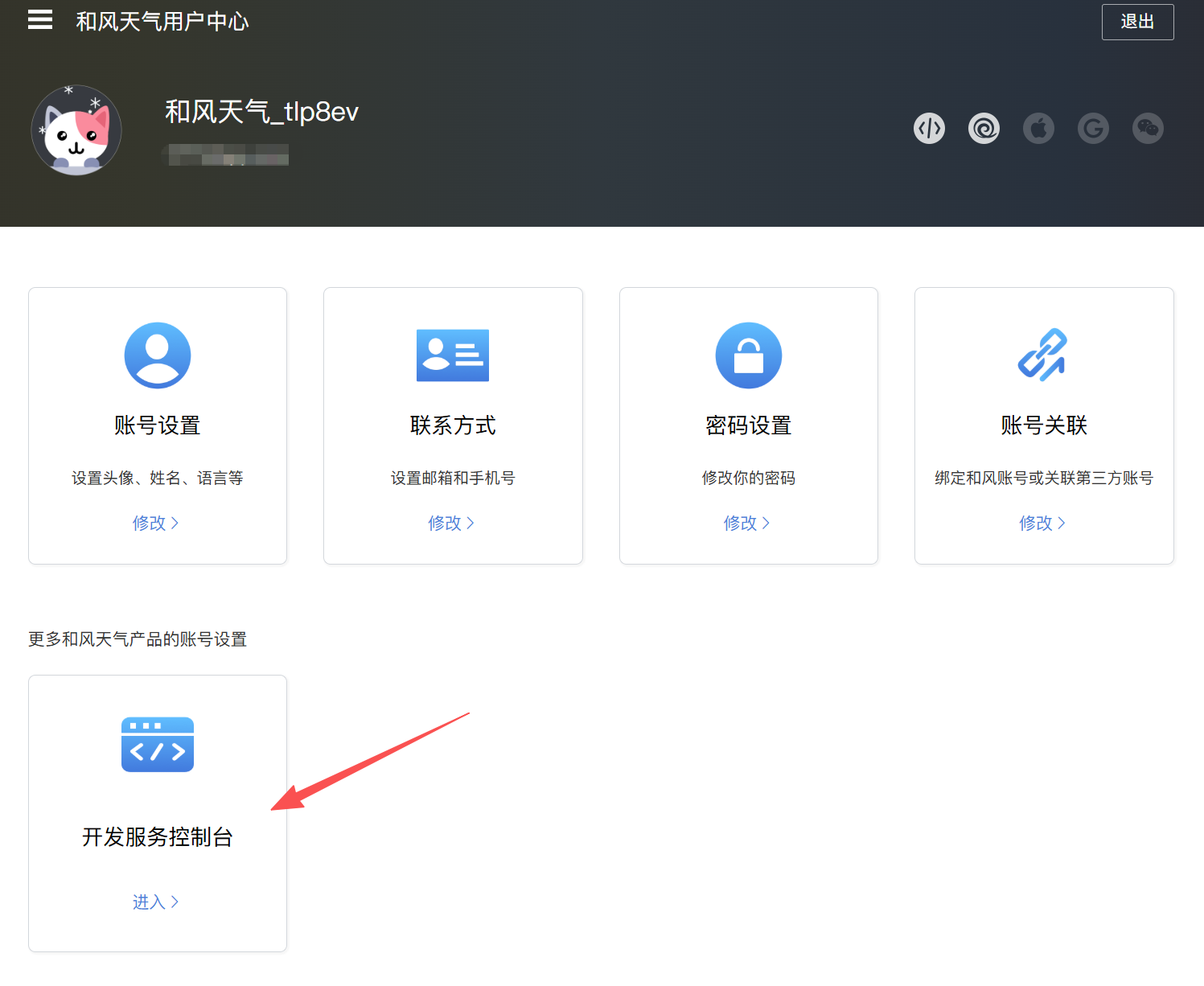
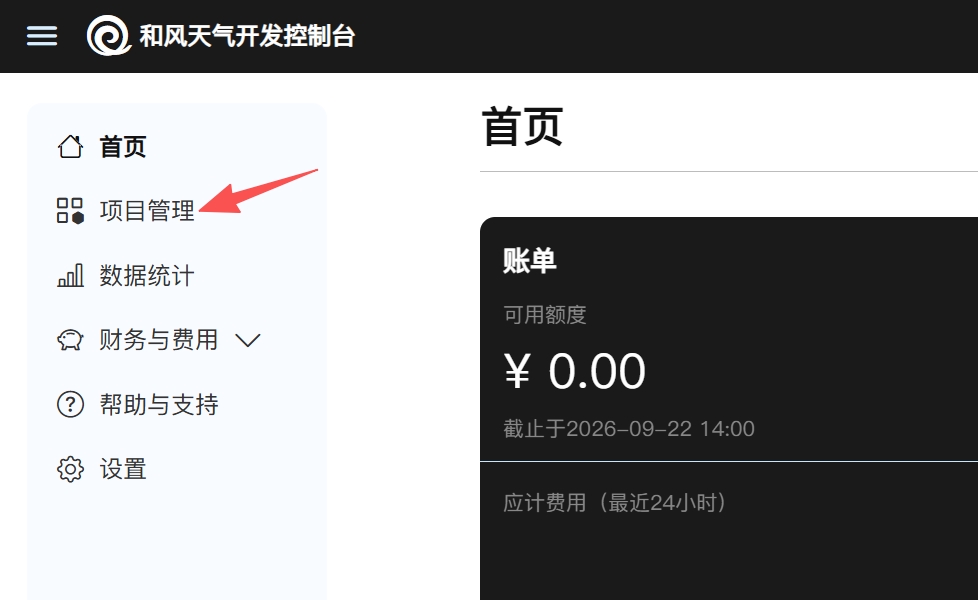
The second step is to create the project and obtain related parameters through the Hefeng Weather Development Console. Pay attention to each step.
Click "Project Management" in the left menu to create a project.
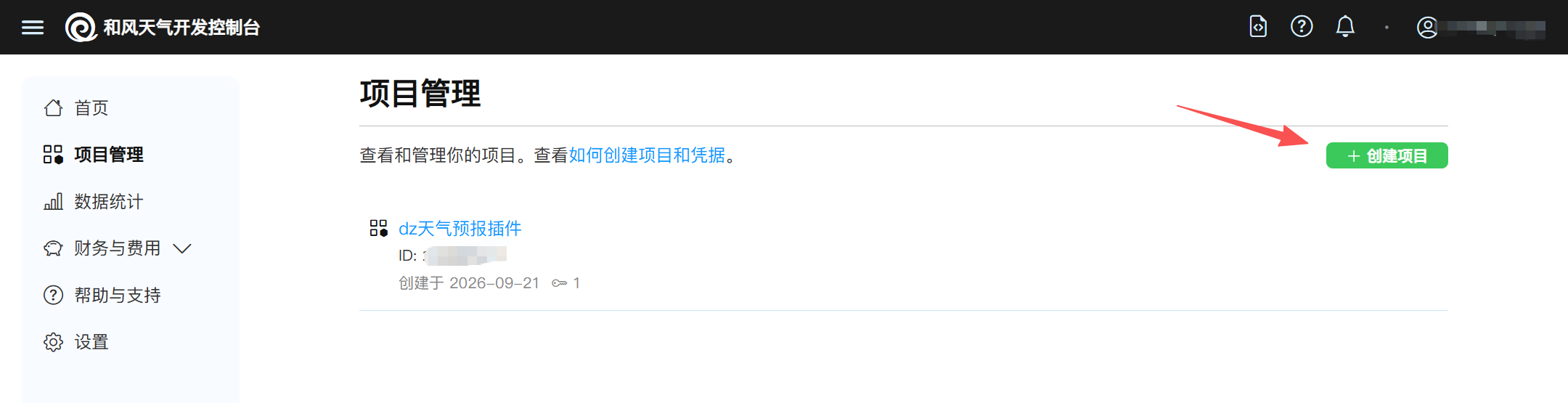
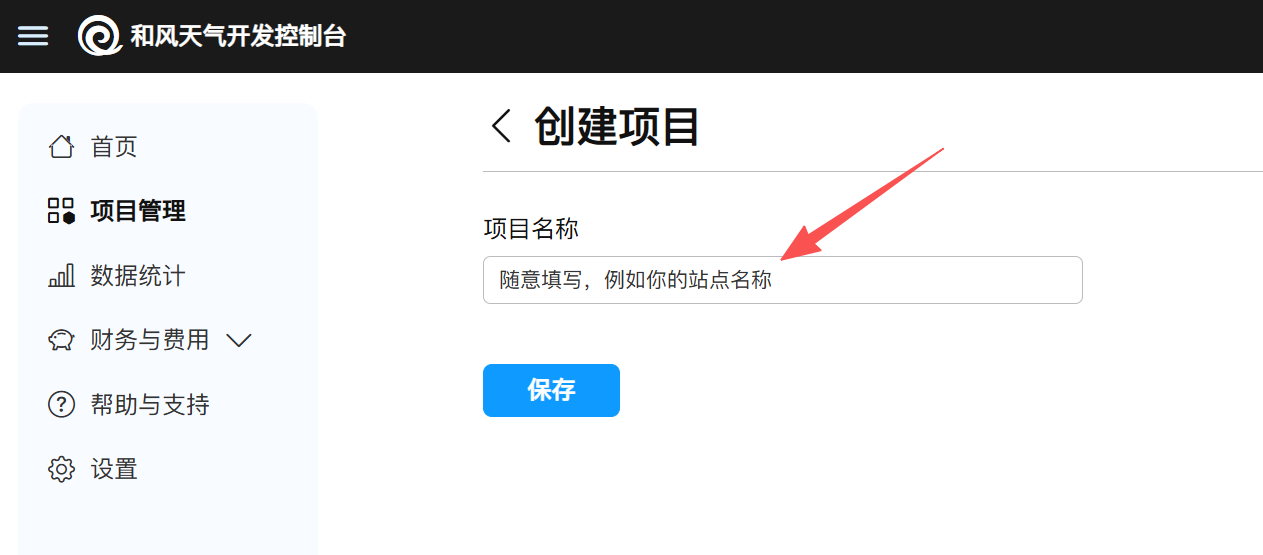
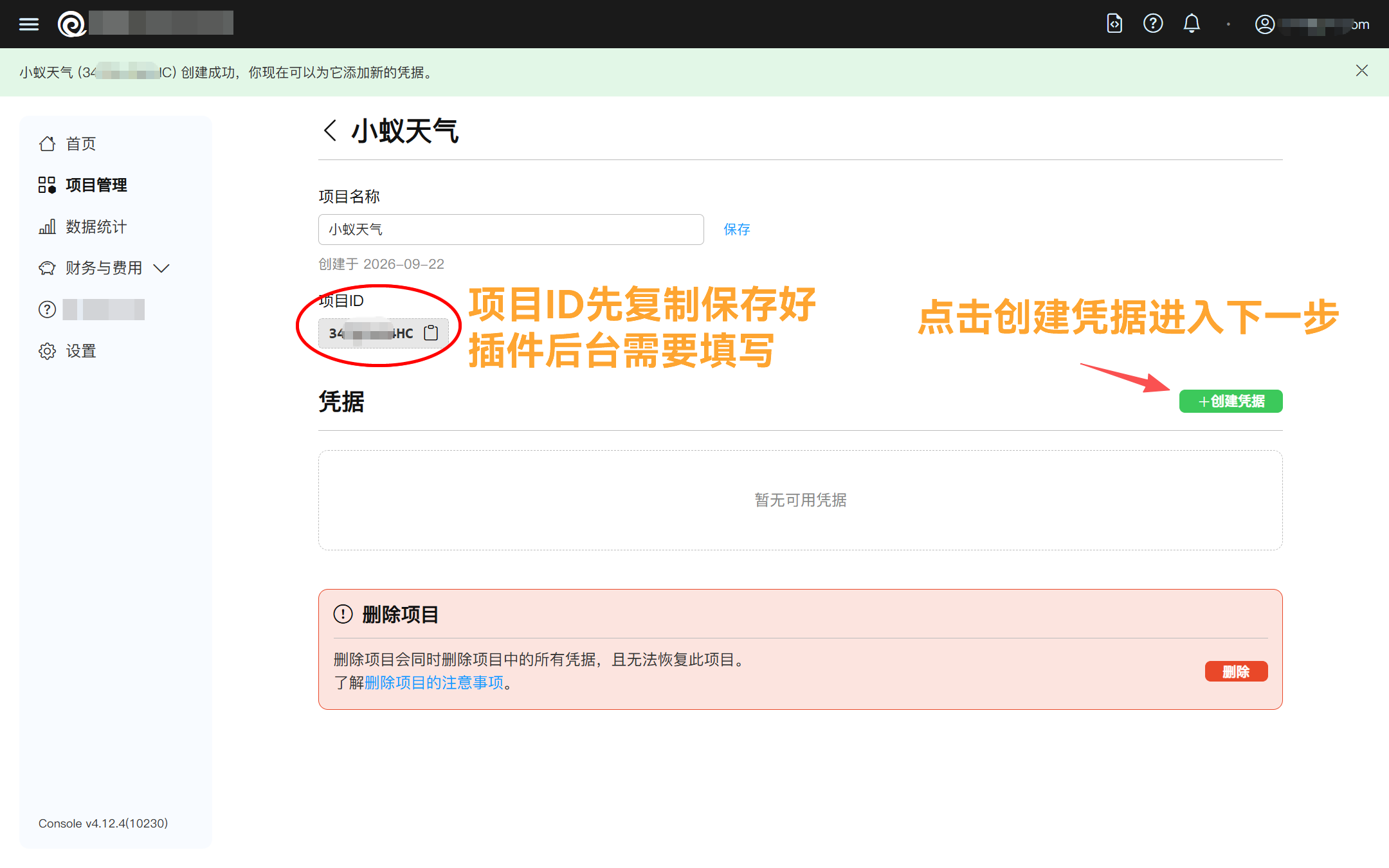
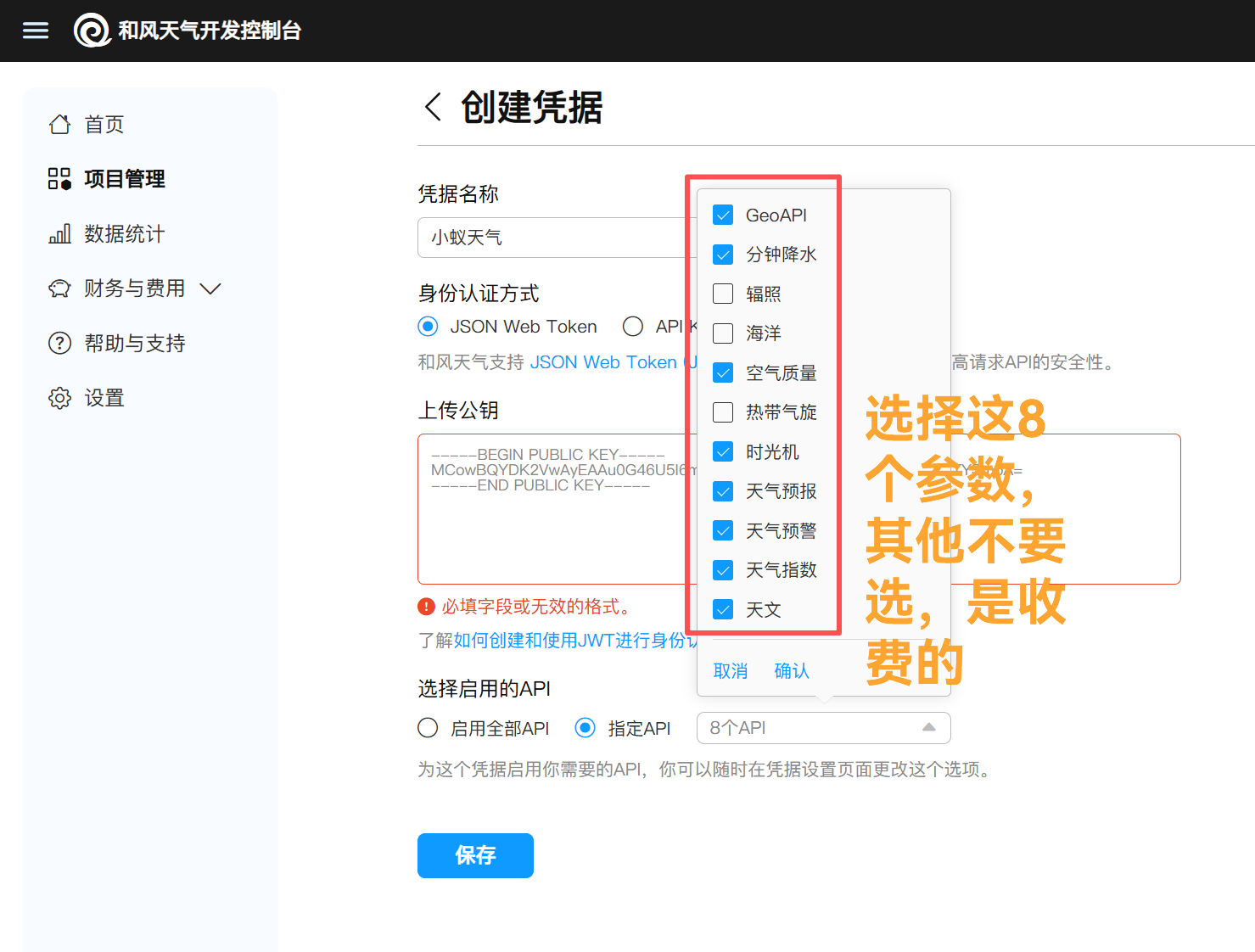
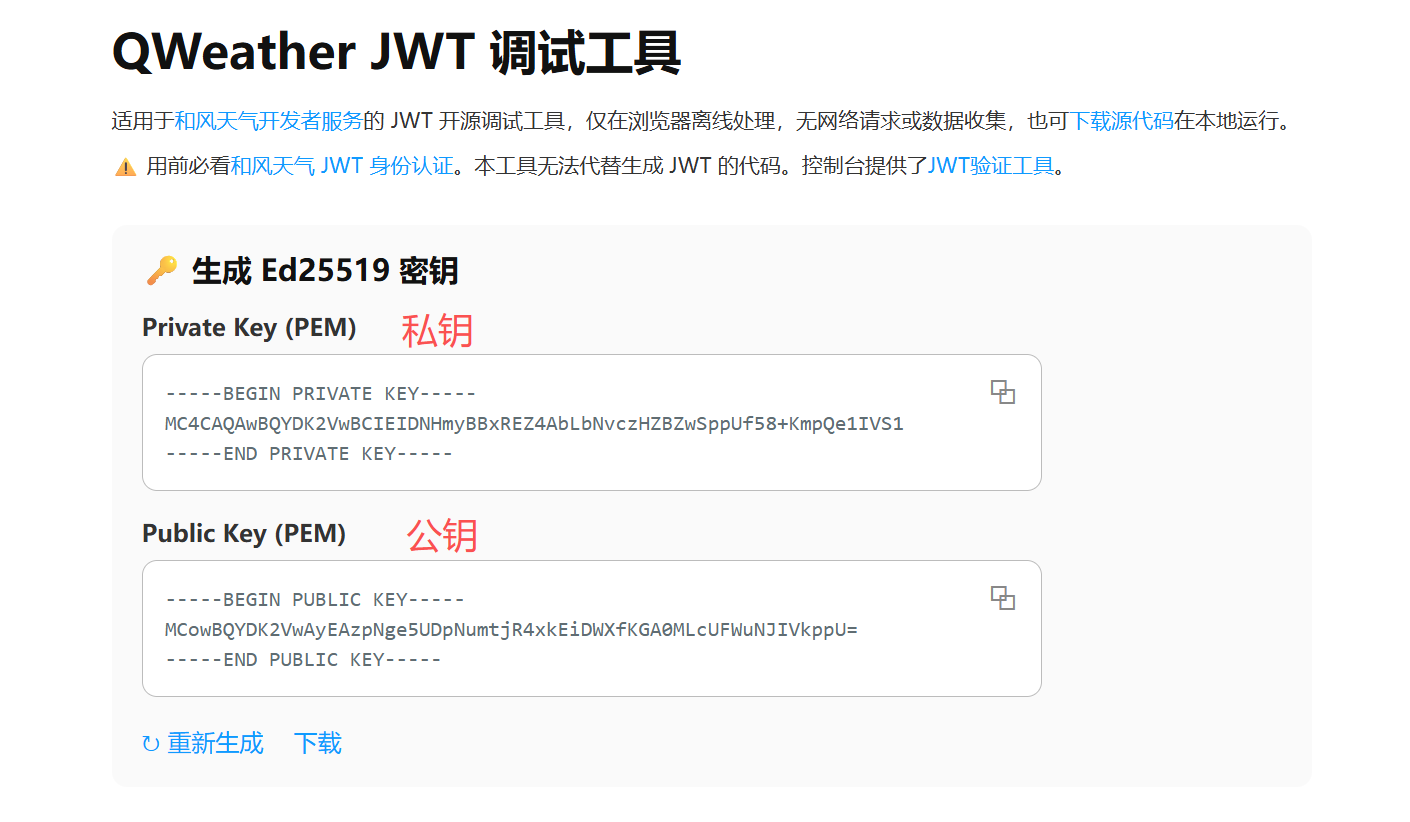
As shown in the image above, to upload the public key, please open the debugging tool website provided by Hefeng Weather.https://jwt.qweather.com/(As shown in the image below), click to copy the public key and paste it into the location where the public key was uploaded.
Note that the corresponding private key on the generation page should be copied and saved to avoid loss.
After saving, you can obtain the voucher ID, which needs to be copied to the plugin backend to fill in.
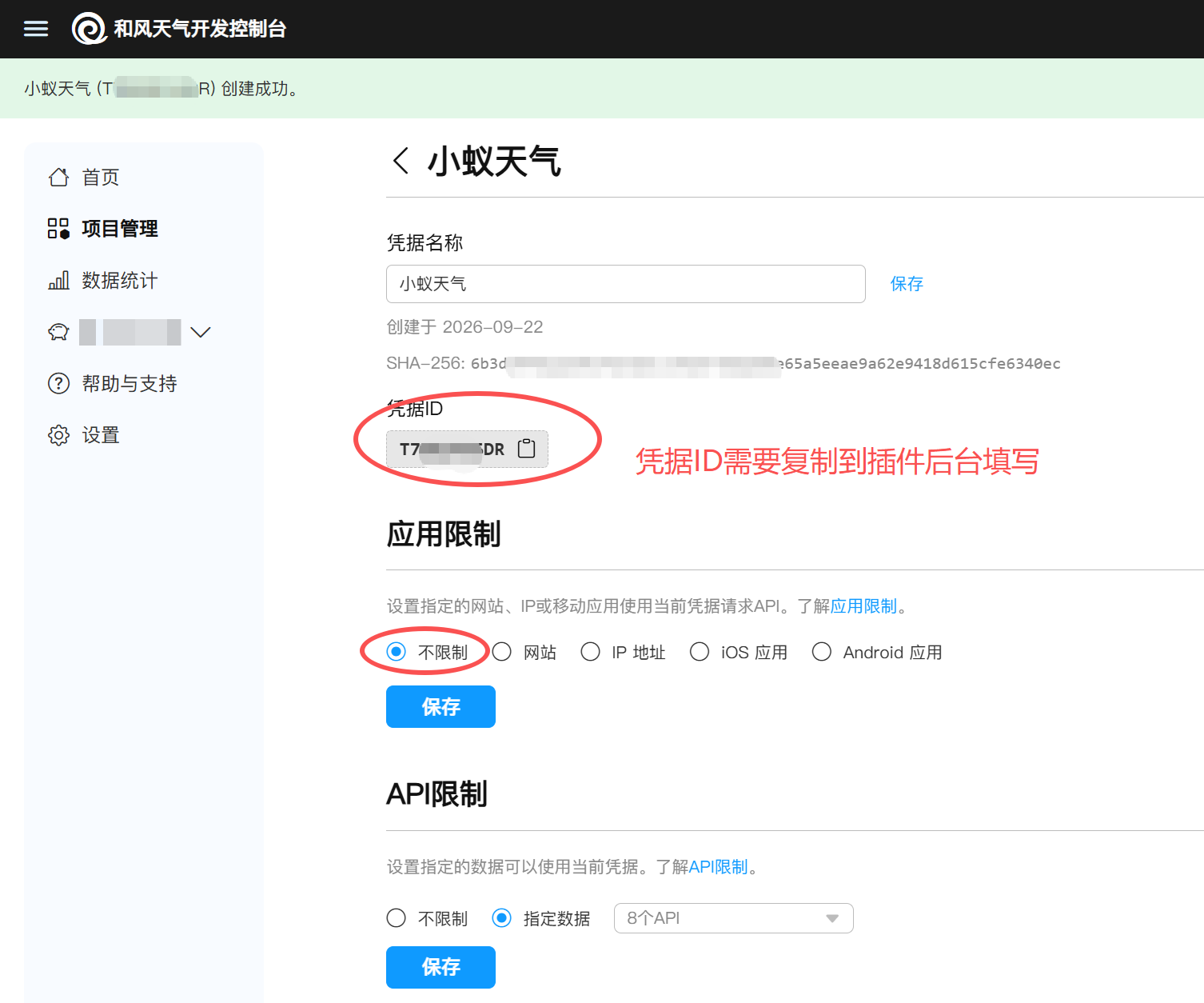
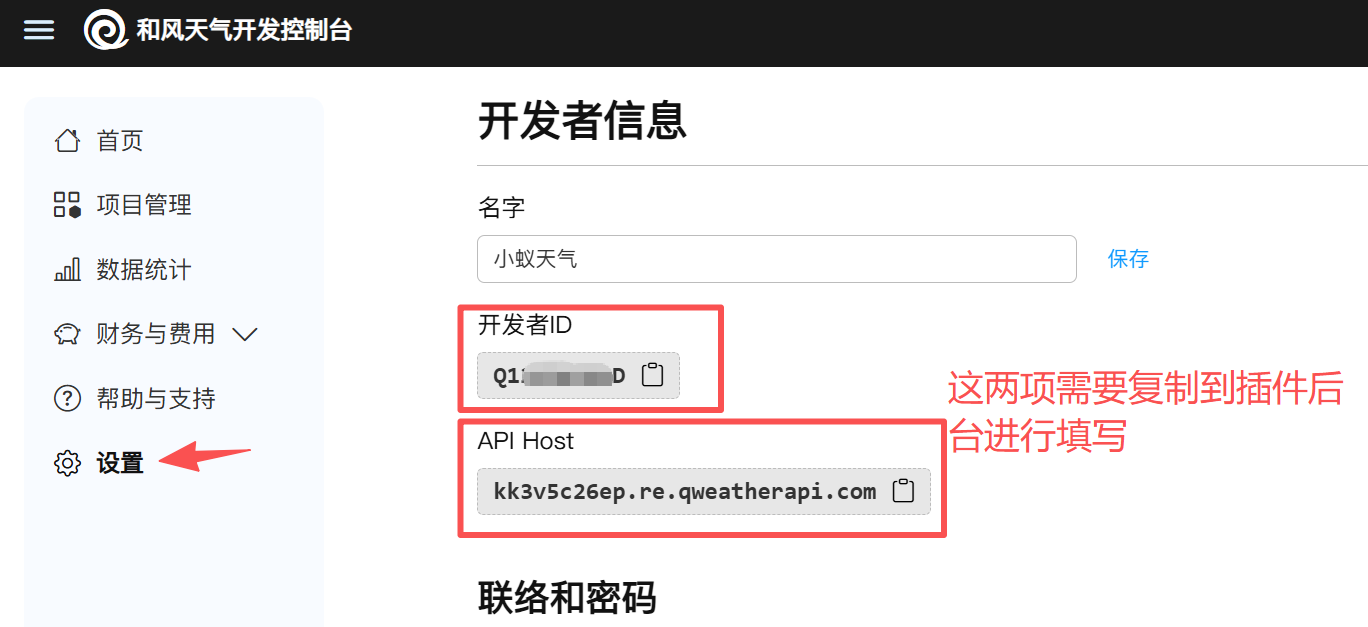
At this point, the relevant parameters for the Hefeng Weather backend have been obtained.
Step 3: Plugin Background Configuration
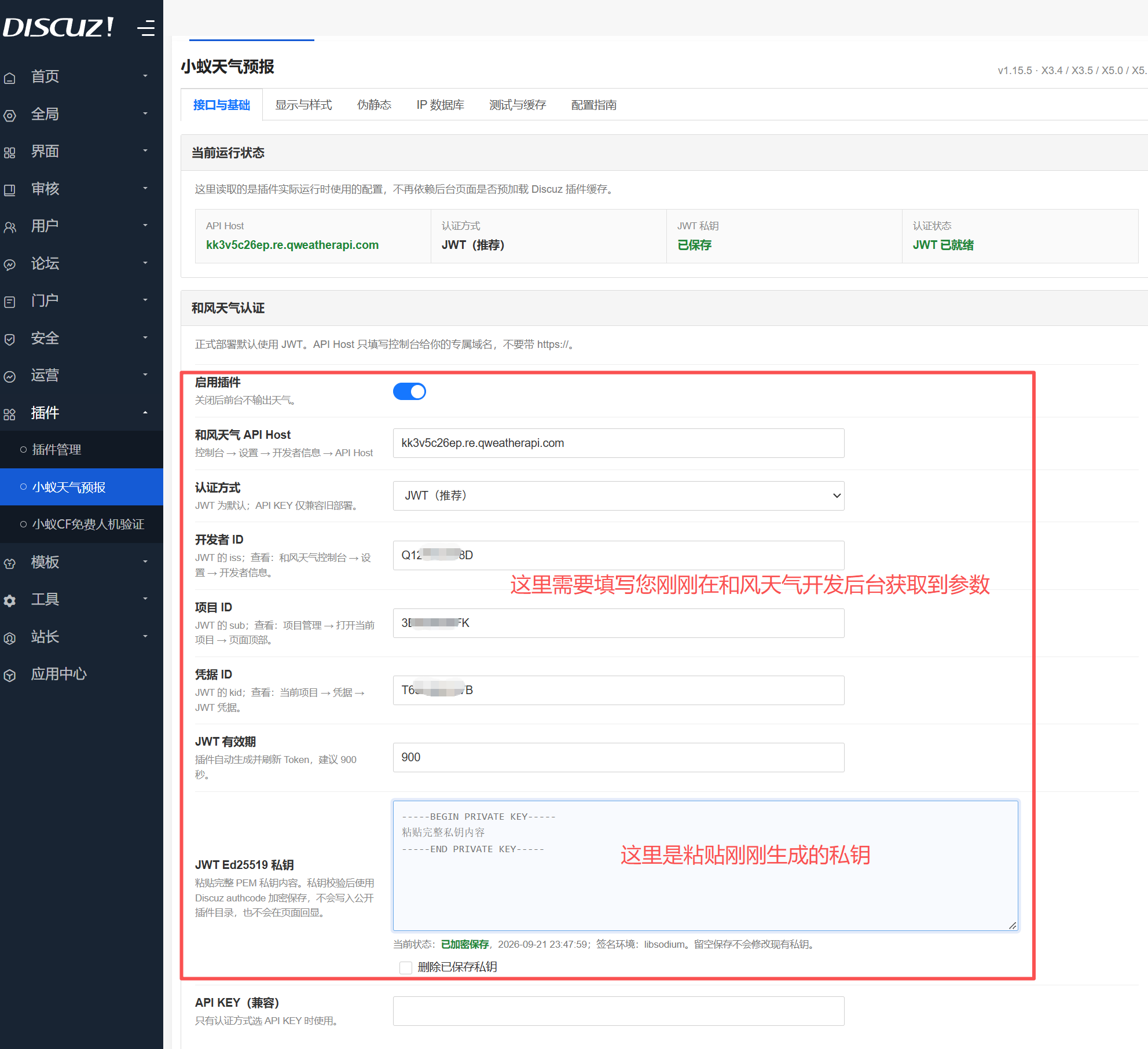
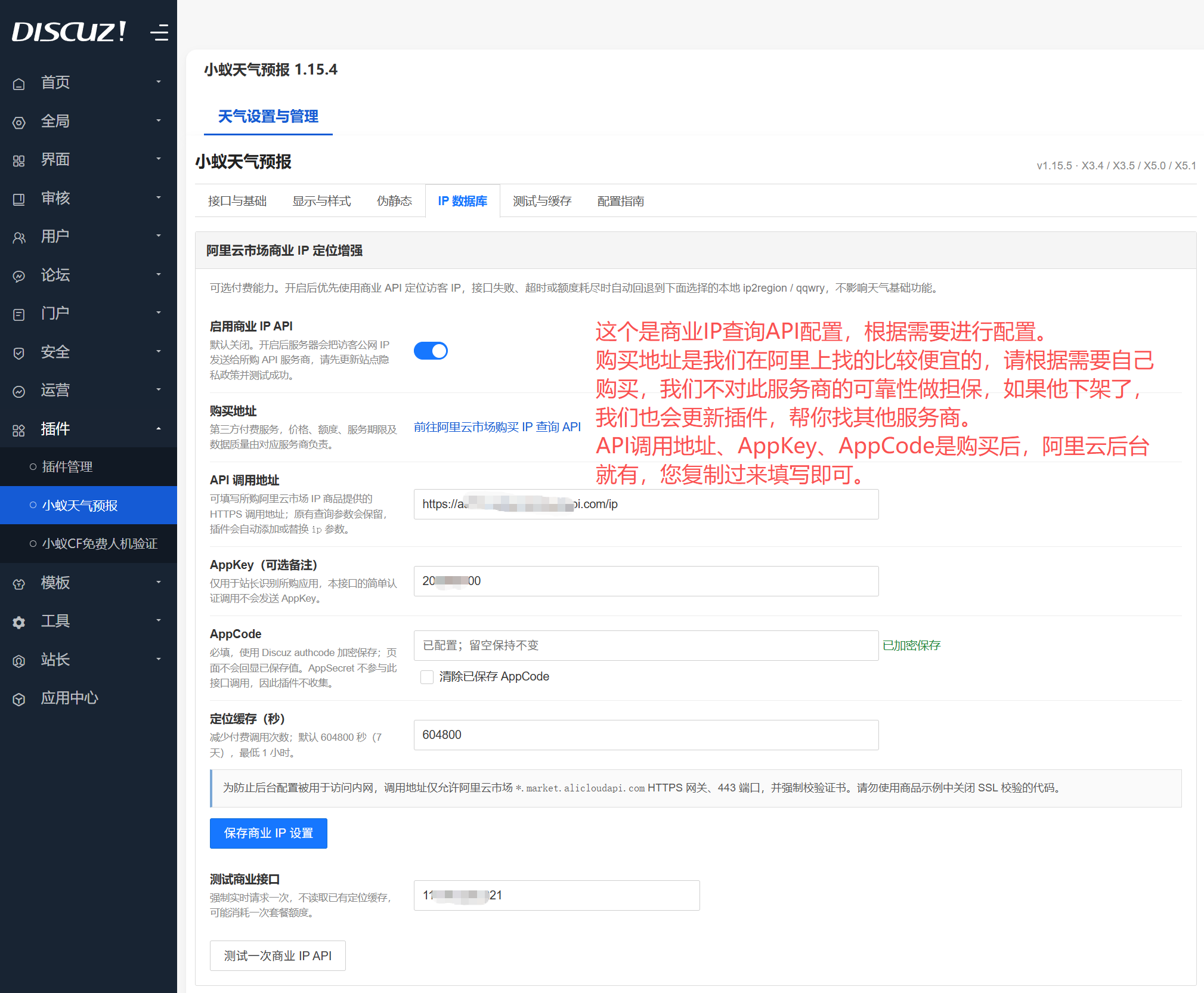
Alibaba Cloud Commercial IP Purchase Portal:https://market.aliyun.com/detail/cmapi00064443
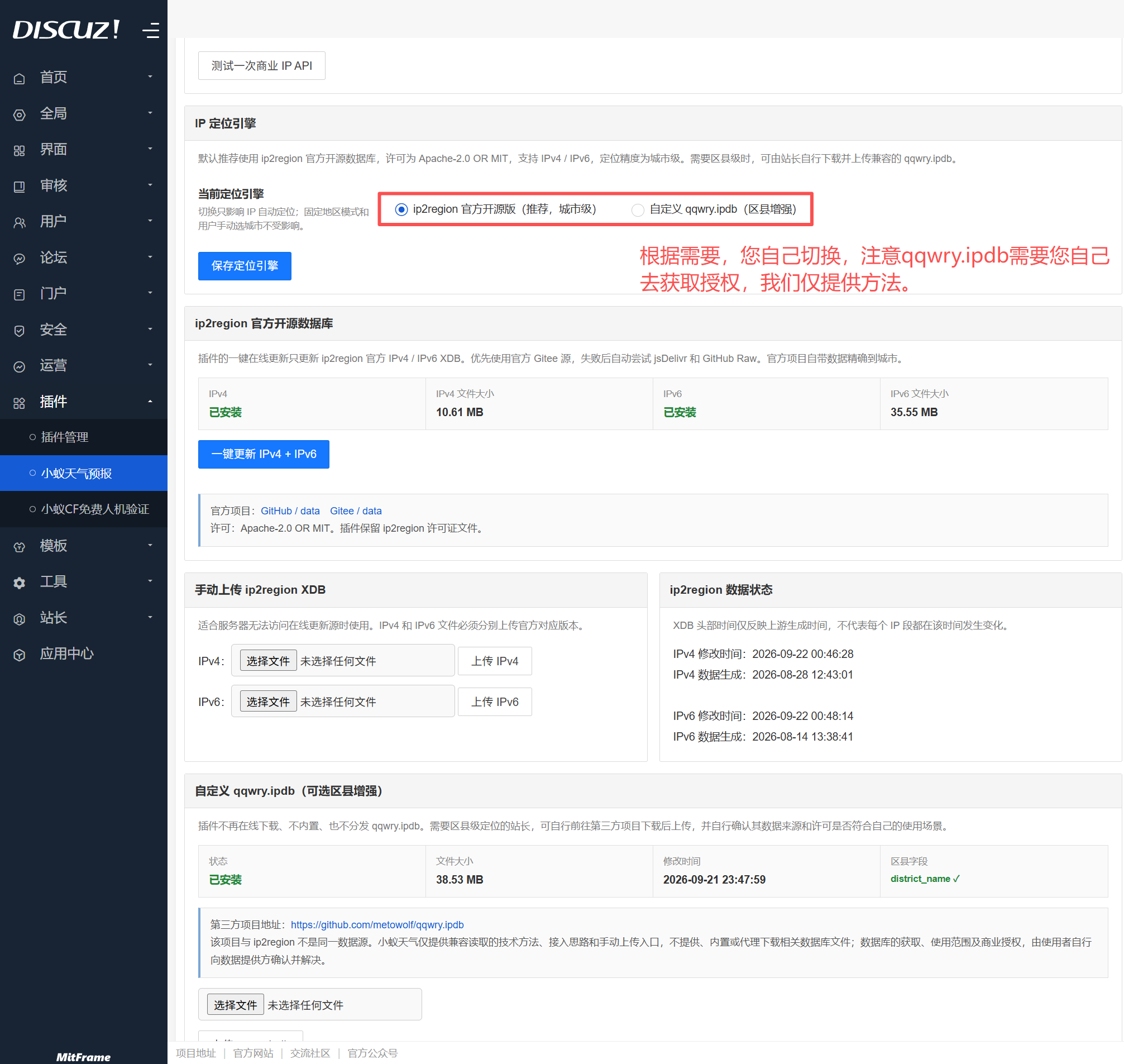
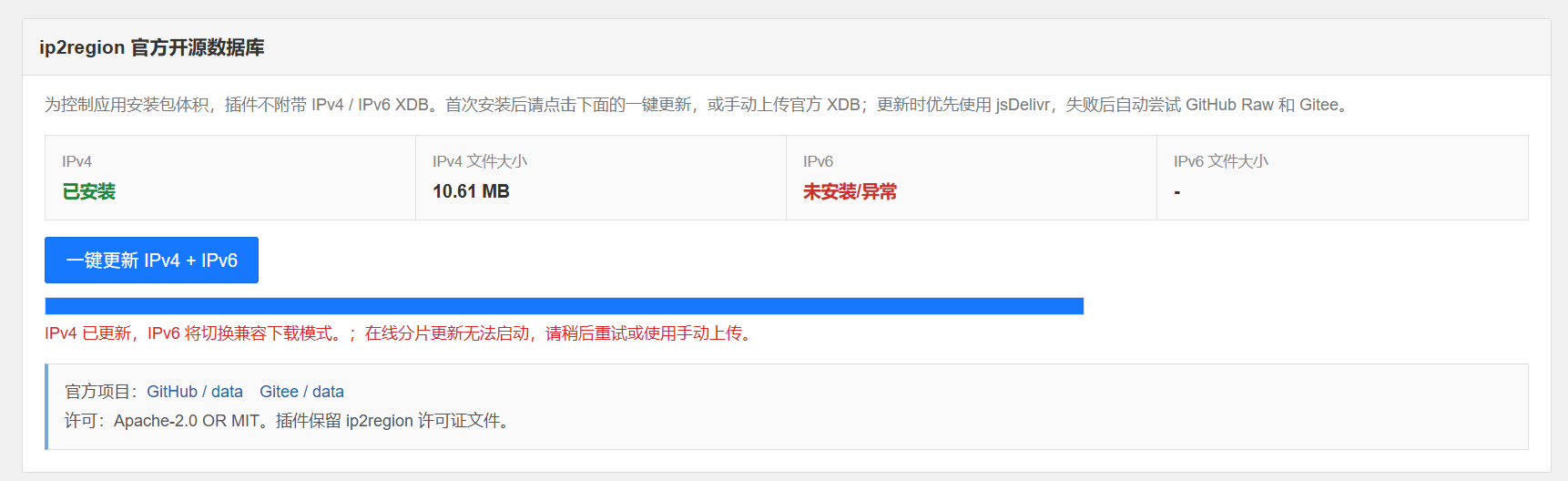
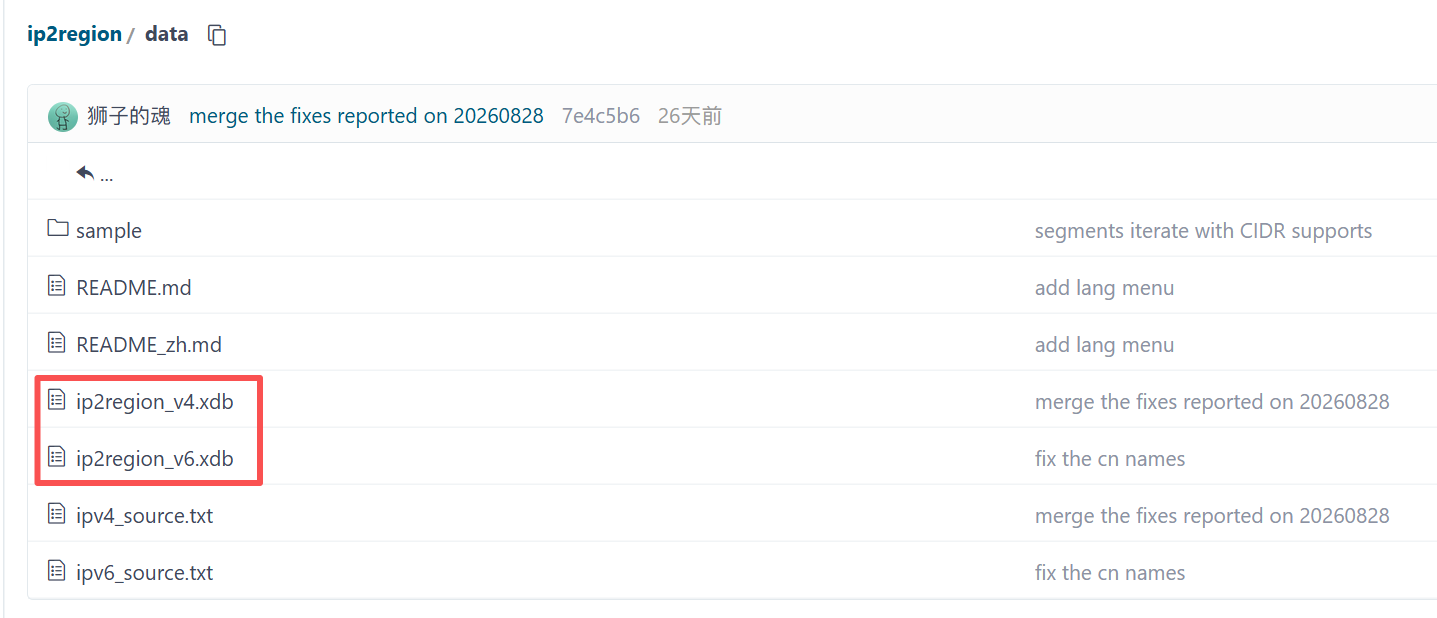
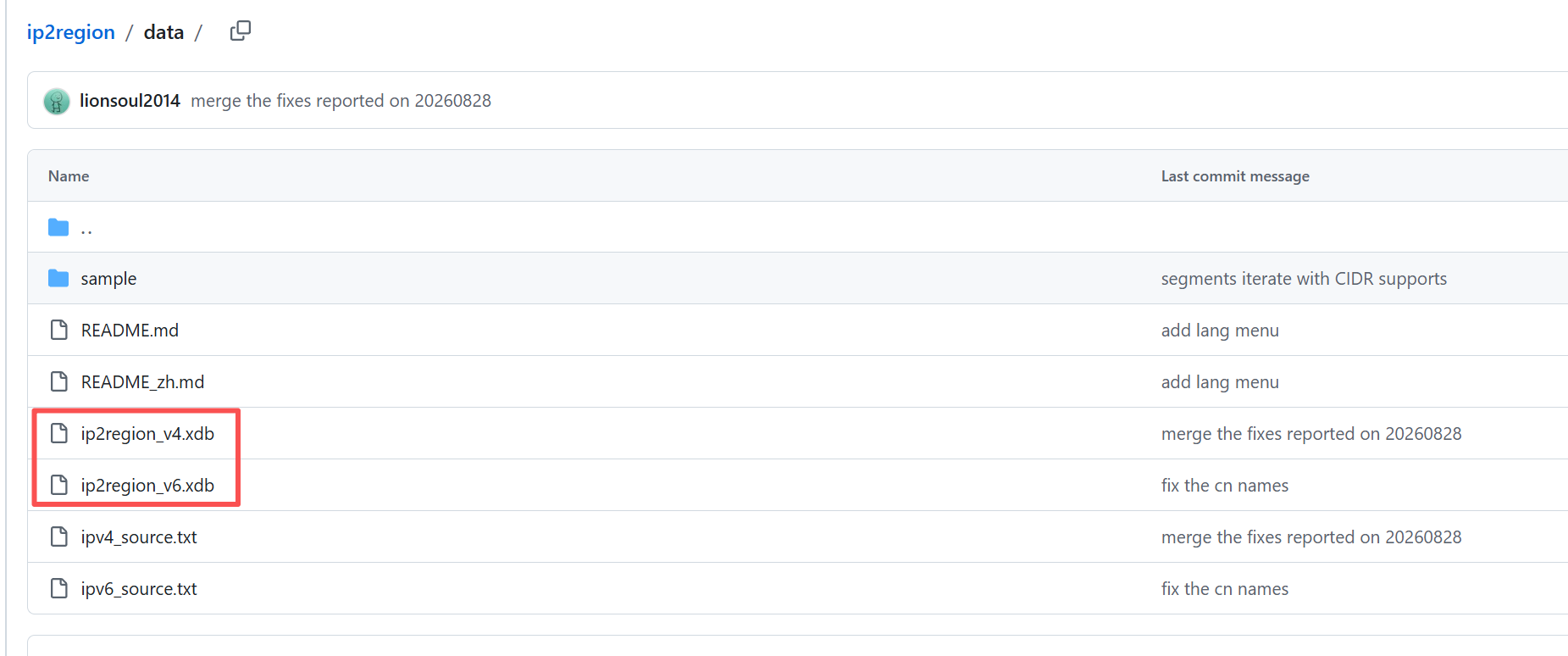
If the ip2region update fails, please download and upload manually. Manual download address:
https://gitee.com/lionsoul/ip2region/tree/master/data
https://github.com/lionsoul2014/ip2region/tree/master/data
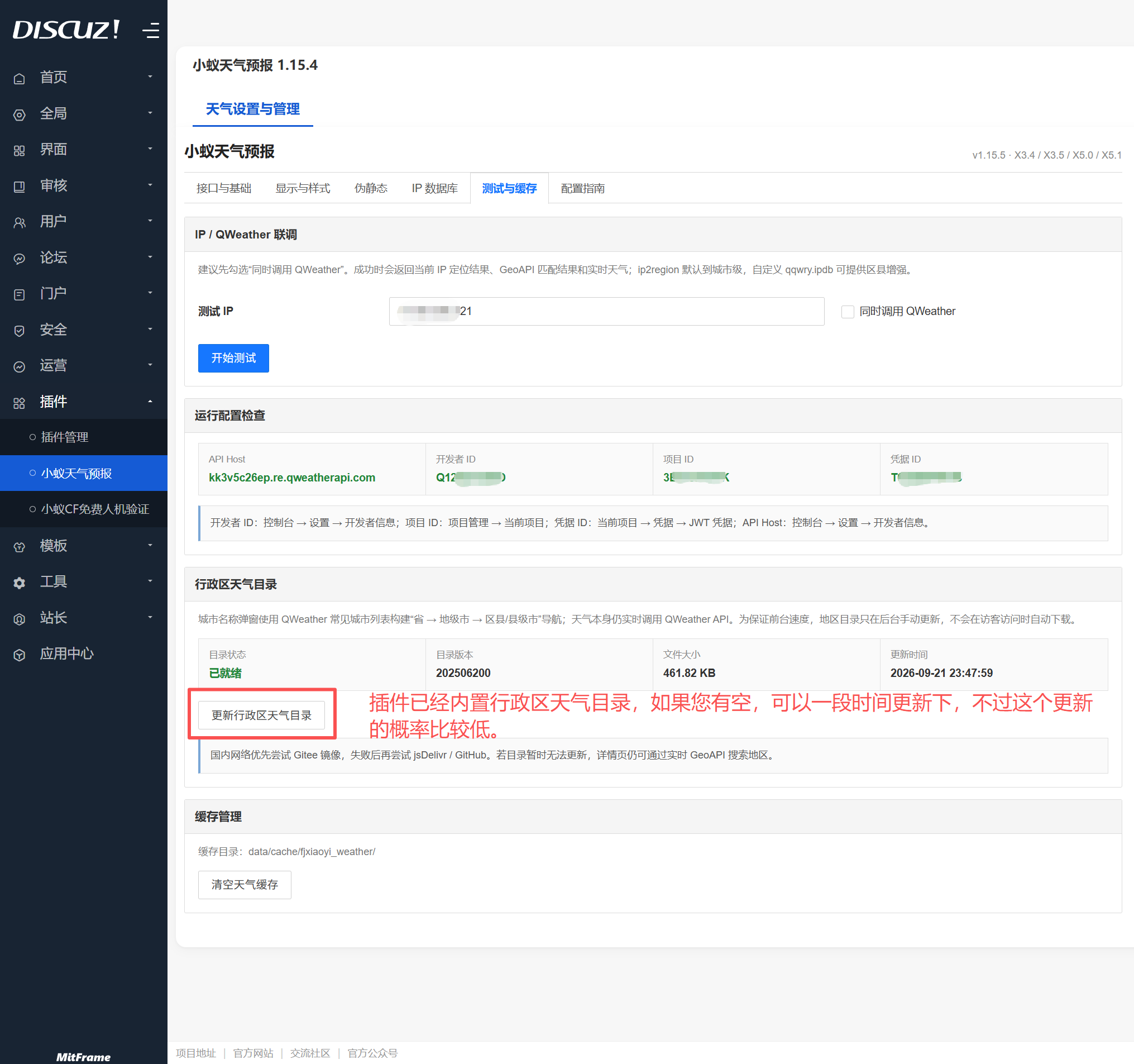
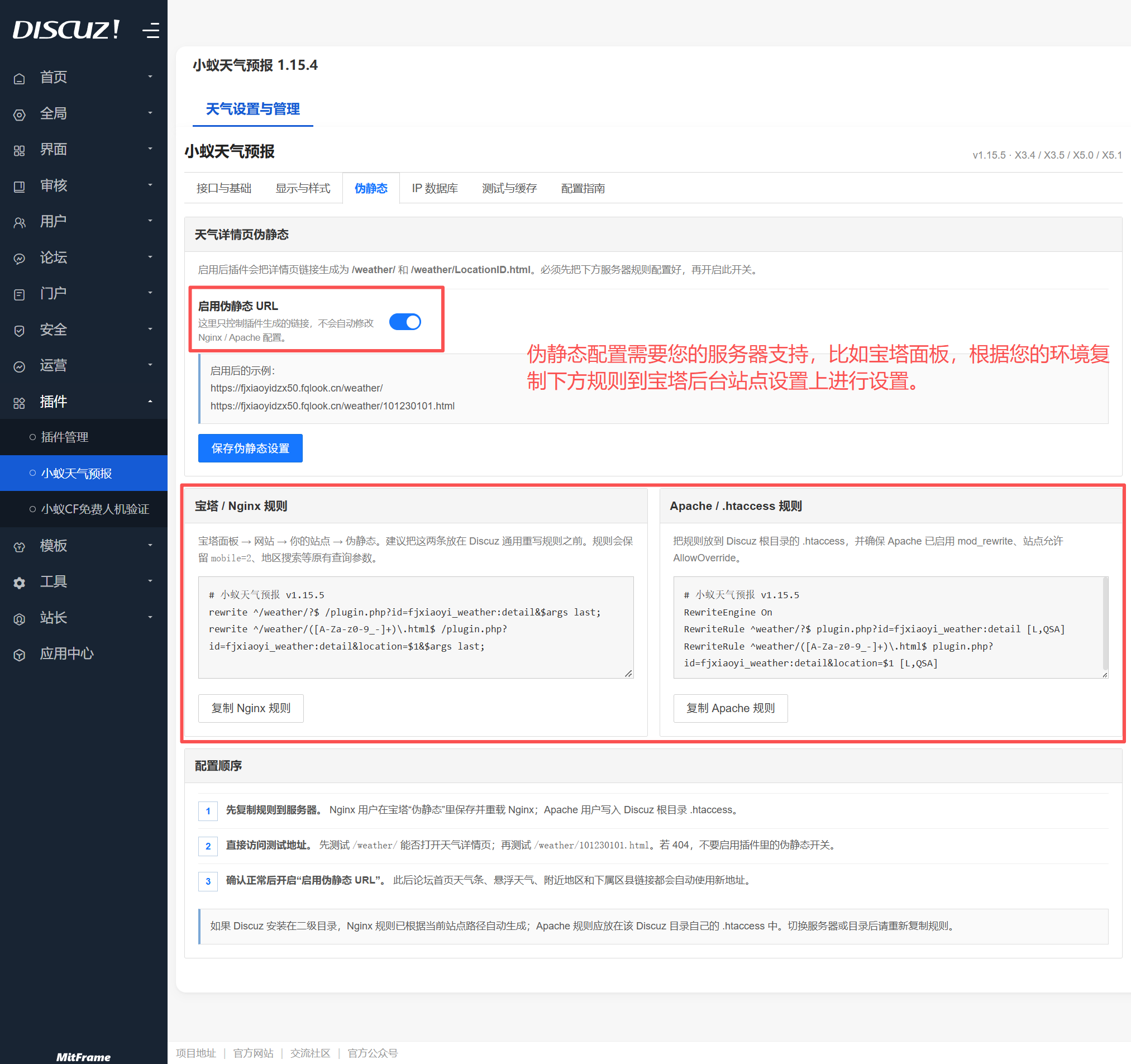
At this point, the plugin configuration is complete. You can now explore the plugin backend and configure it according to your needs.