Discuss! Plugin Cloudflare Turnstile Free Human-Machine Verification
Little Ant Cloudflare Turnstile Human-Machine Verification Passes Discuz! The native security verification component interface connects Cloudflare Turnstile touchless verification to the forum, which can be used to protect scenarios such as user registration, login, posting, replying, commenting, recharge card passwords, and sending mobile SMS (DZ5.0).
Plugin Name: Cloudflare Turnstile Human-Machine Verification
Current version: 1.2.1
Compatible version: Discuz! X3.4, X3.5, X5.0
Little Ant Cloudflare Turnstile Human-Machine Verification Passes Discuz! The native security verification component interface connects Cloudflare Turnstile touchless verification to the forum, which can be used to protect user registration, login, posting, replying, commenting, recharge card passwords, as well as sending SMS and email verification codes.
One plugin package compatible with Discuz at the same time! X3.4, X3.5, and X5.0, no modifications to Discuz! System files or template files.
Main functions:
- Supports user registration and login authentication.
- Supports topic posting, quick posting, replying, and comment verification.
- Supports recharge card PIN, mobile SMS, and email verification code scenarios.
- X3.4 and X3.5 use native CAPTCHA-type interfaces for access.
- X5.0 appears in the component list as a standalone security verification component.
- The server calls the Cloudflare Siteverify verification results.
- Rigorously validate Actions, cdata, and validate domain names.
- Use one-time short tickets tied to sessions, users, and business scenarios.
• Verify that the ticket expires immediately after use, preventing duplicate submissions.
• Supports automatic, light and dark themes.
- Supports standard, adaptive, and compact component sizes.
- Supports automatic, simplified Chinese, traditional Chinese, and English interfaces.
- Supports additional legitimate access to domain names.
• Support for optional Siteverify outbound proxy.
- Provides optional debug logs that do not record tokens, tickets, or Secret keys.
- Automatically cleans up self-built data tables and run logs during uninstallation.
Before use, you need to create the Turnstile widget in the Cloudflare console, add the website domain to the allow list, and then fill in the Site Key and Secret Key in the plugin settings.
"Additional Allowed Domains" is usually left blank. The plugin automatically validates Discuz! The domain name corresponding to the site URL is only required if the website is accessed through other legitimate domains.
1.2.1
- New Discuz! X3.4, X3.5, X5.0 single package compatibility support.
- Added CloudflareTurnstile server-side Siteverify validation.
- Added authentication scenarios, sessions, users, domains, and cdata context bindings.
- A new one-time short-ticket mechanism has been added to prevent the verification results from being reused.
- Added support for registration, login, posting, replying, and commenting scenarios.
- Added support for recharge card PIN, mobile SMS, and email verification code scenarios.
- Added X5.0 independent security verification component.
- Fixed the issue of "Error filling in verification Q&A" when submitting posts and replies in X5.0.
- Fixed an issue where the verification component was not displayed in X5.0's Quick Post, Quick Reply, and Comment locations.
- Fixed an issue where the X3.4 and X3.5 CAPTCHA type names were displayed abnormally.
- Optimize the layout and spacing of the verification components on the registration and login pages.
- Added component theme, size, and language settings.
- Added additional allowed domain name settings.
- Added optional Siteverify outbound proxy.
- Added security debugging logs.
- Refine the installation, upgrade, and uninstallation cleanup logic.
- The plugin name has been changed to "Xiaoyi CloudflareTurnstile Human-Machine Verification".
- The backend "Access Status" has been changed to "Configuration Guide", and an online configuration help portal has been added.
The Cloudflare registration URL is as follows:
https://dash.cloudflare.com/sign-up
Please inquire about how to register yourself via Baidu or AI.
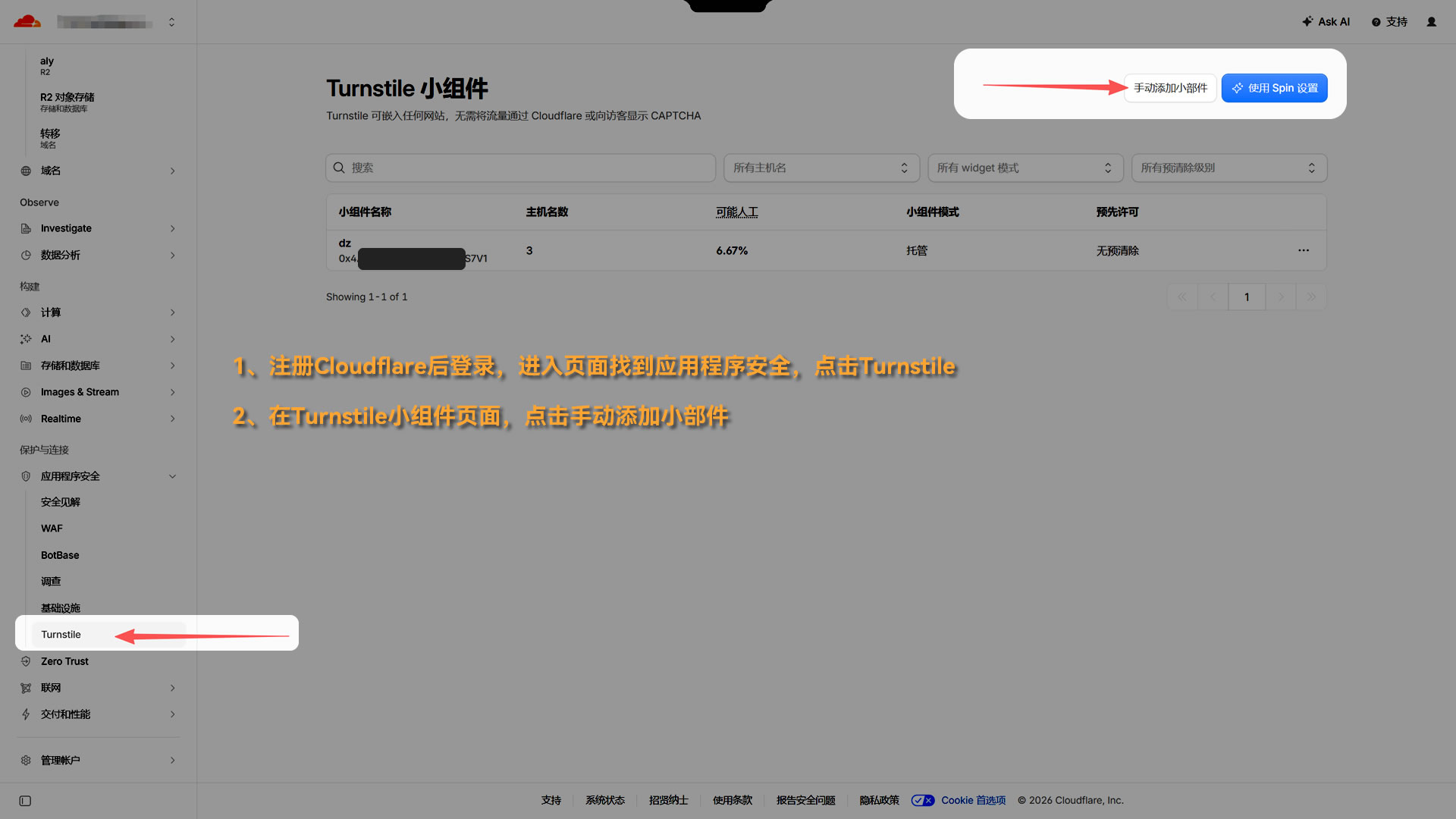
1. After registering for Cloudflare, log in, go to the page, find Application Security, and click Turnstile.
2. On the Turnstile widget page, click Manually Add Widget.
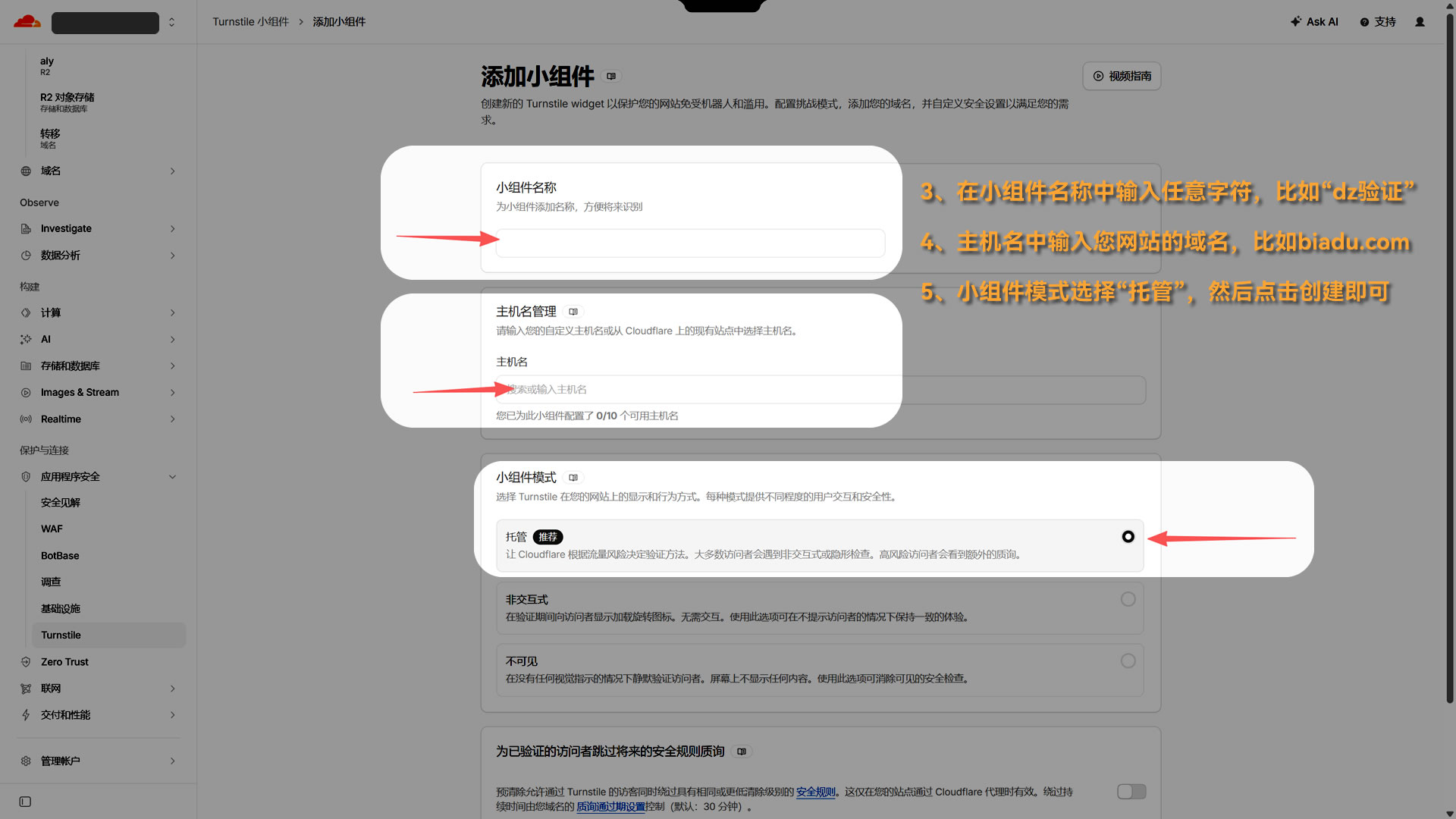
3. Enter any character in the widget name, such as "dz Verification".
4. Enter your website's domain name in the hostname field, such as biadu.com.
5. In widget mode, select "Managed" and then click Create.
6. After creation, you will see "Site Key" and "Key". Please copy these two sets of values to the plugin backend.
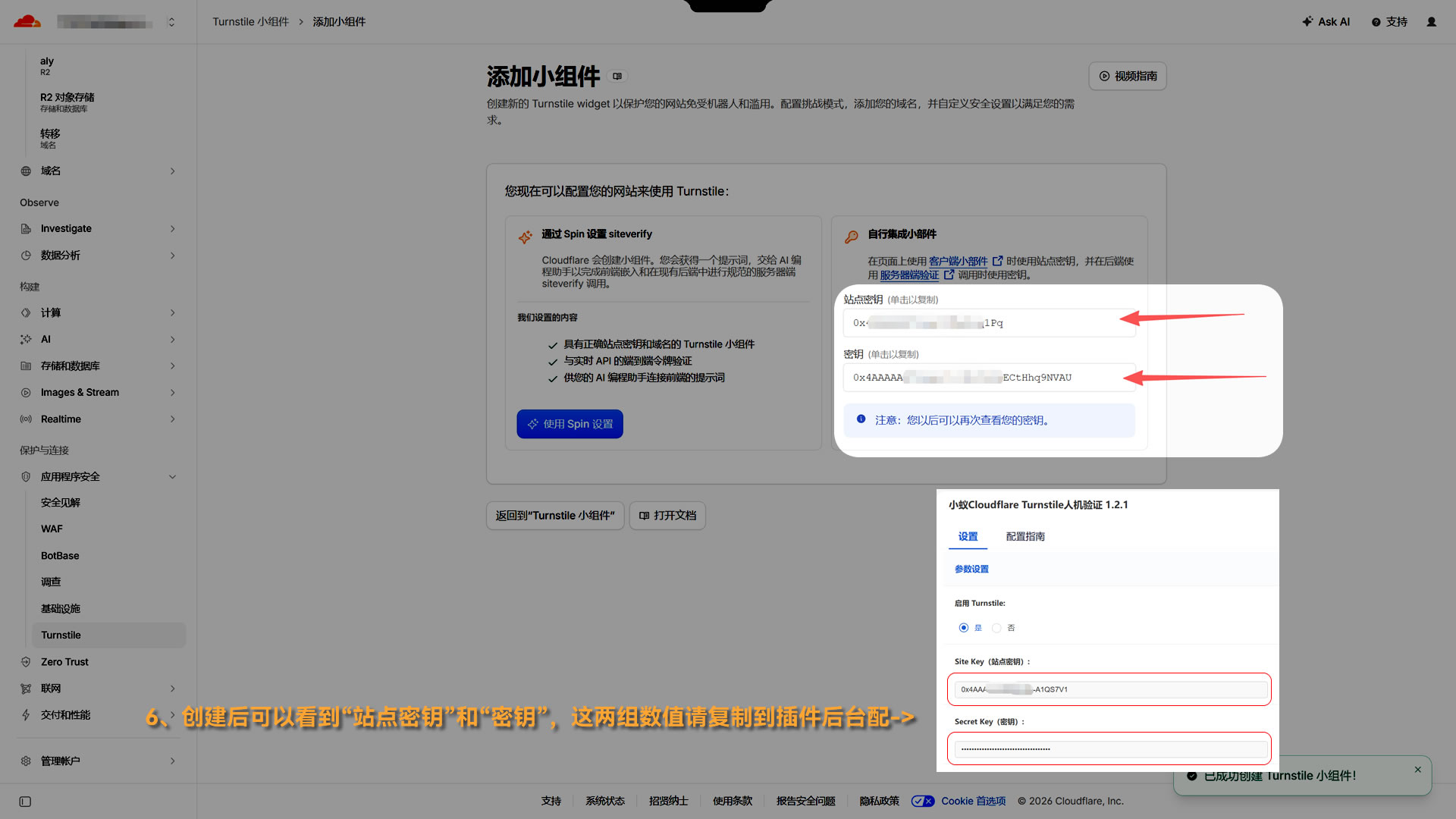
If you didn't copy the "Site Key" and "Key" just now, you can click "..." at the end of the newly created Widget on the Turnstile page, select "Edit Widget," and you can also find the key at the bottom of the page (as shown in the image below).

After the plugin is configured, please enable "Xiaoyi CF Free Man-Machine Verification" in the forum backend security - verification settings.