Discuss! Plugin: Little Ant Typhoon Path
Little Ant Typhoon Path is a game designed for Discuz! Typhoon path display and data source management plugins developed for forums, local portals, and information communities. The plugin can be for Discuz! A separate "Typhoon Real-Time Path" function page has been added, supporting PC and mobile access, and providing functions such as typhoon data source management, data source switching, in-site embedding, original site access, SEO settings, page icons, and mobile adaptation.
Plugin name:Typhoon Xiaoyi path
Plugin ID:fjxiaoyi_typhoon
Developer:Fujian Xiaoyi Network Technology Co., Ltd.
Official website:https://www.fjxiaoyi.com
Compatible version:Discuz!X3.4/X3.5/X5.0/X5.1
Encoding Support:UTF-8 Simplified/UTF-8 Traditional
Terminal support:PC+WAP/Touch
Plugin Introduction
Little Ant Typhoon Path is a game designed for Discuz! Typhoon path display and data source management plugins developed for forums, local portals, and information communities. The plugin can be for Discuz! A separate "Typhoon Real-Time Path" function page has been added, supporting PC and mobile access, and providing functions such as typhoon data source management, data source switching, in-site embedding, original site access, SEO settings, page icons, and mobile adaptation.
The plugin comes with a WindyEmbed data source by default. Website owners can also add and maintain other domestic and international typhoon path websites based on their website's location, service targets, and actual needs.
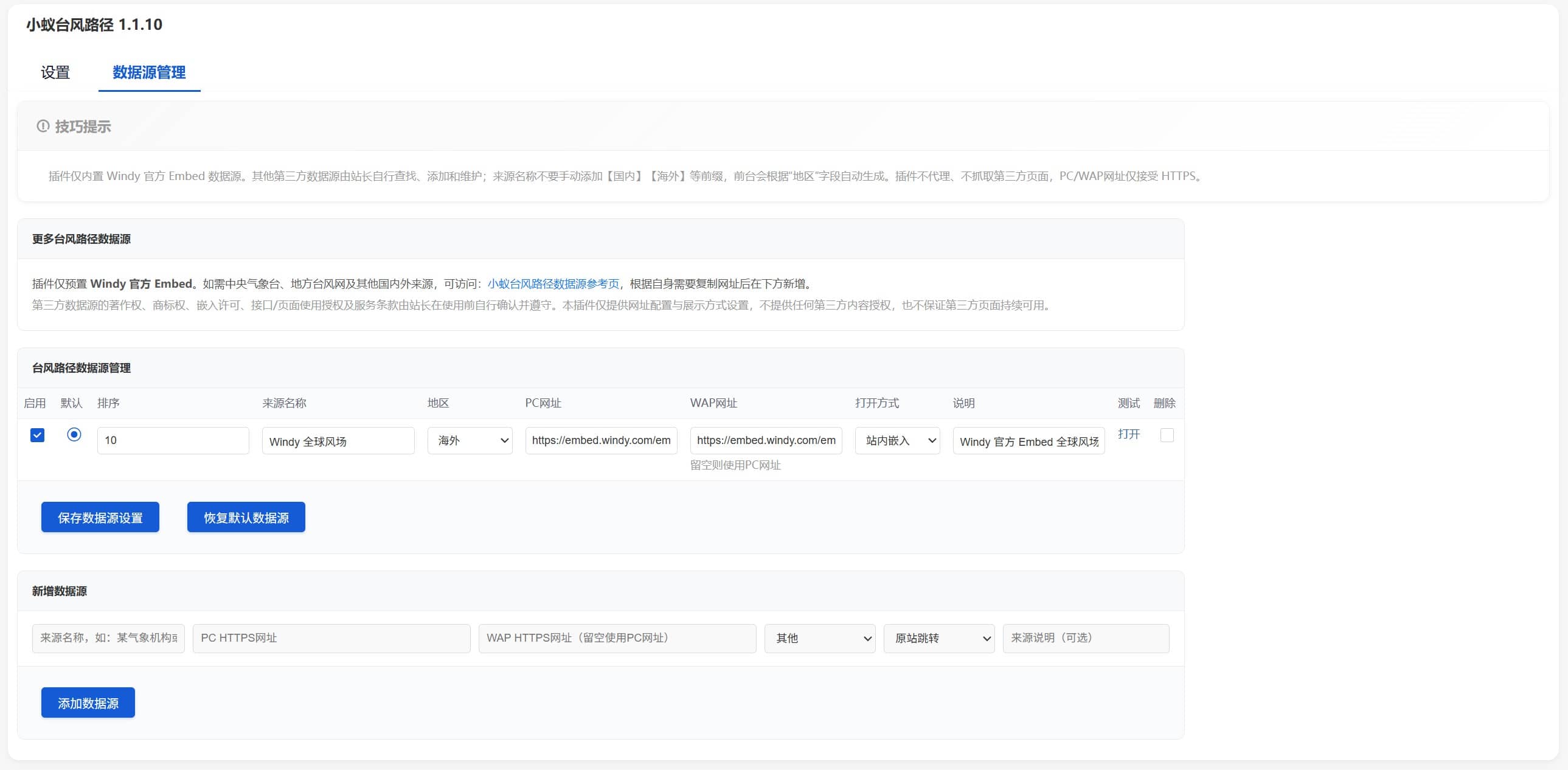
Unlike the traditional method of writing URLs directly into templates, Xiao Yi Typhoon Path provides independent data source management functions. Website owners can modify the source name, PC address, WAP address, region type, display order, and opening method themselves without modifying PHP or template code.
Particularly suitable for local portals, city forums, coastal communities, weather information forums, outdoor communities, and Discuz that needs to provide an entry point for typhoon information! Website usage.
I. High system compatibility and adaptation, standardized deployment
This plugin strictly follows Discuz! The official plugin development standards adopt a standard plugin directory structure and background management model, ensuring that the entire process is tamper-proof and does not overwrite core system files, thus guaranteeing the safe and stable operation of the forum system.
In terms of version compatibility, the plugin is fully compatible with Discuz! Mainstream versions such as X3.4, X3.5, X5.0, and X5.1; In terms of language encoding, it supports Simplified Chinese UTF-8 and Traditional Chinese UTF-8 formats, and no longer provides the GBK version. It is compatible with mainstream website encoding specifications and is highly versatile.
II. Full terminal compatibility, customizable display effect
The plugin is independently compatible with both PC and mobile (WAP/Touch) devices, specifically for Discuz! Both mobile and touch operating modes on mobile devices have been optimized for targeted compatibility. When users access the site via mobile phone, the mobile-dedicated typhoon page can be loaded directly without needing to be forcibly redirected to the desktop interface, greatly improving the mobile browsing experience.
Meanwhile, the backend supports independent setting of page display height on PC and WAP platforms, and can flexibly adjust the display ratio according to the screen size of different devices such as computers and mobile phones to adapt to various terminal display scenarios.
III. Built-in global wind farm, ready to use with zero configuration.
The plugin comes with Windy's global wind farm data display capabilities by default, enabling visual display through the official embedded page. After deploying the plugin, the site does not need to apply for an additional weather API key, set up data acquisition services, or configure scheduled tasks. There are no additional configurations throughout the entire process. Once installed, the global wind farm and typhoon path query functions can be directly enabled, avoiding the problems of traditional plugins relying on third-party interfaces and interface quotas expiring, which can cause functional paralysis.
IV. Visual data source management, flexible and extensible
The plugin abandons the fixed data source code writing mode, and all typhoon data sources support background visual autonomous configuration and maintenance, with a high degree of freedom. Website owners can independently complete operations such as adding, editing, enabling, disabling, sorting, and deleting data sources in the backend. They can also customize and configure the data source name, PC access address, WAP access address, region category, display order, page opening method, and note information.
When the website address and service status of the third-party typhoon data source change, there is no need to modify the program code or wait for the plugin version update. The adaptation can be completed by simply modifying the parameters in the background, which greatly reduces the subsequent operation and maintenance costs. The plugin also provides a reference list of official data sources, covering authoritative channels such as the National Meteorological Center Typhoon Network, typhoon platforms of local meteorological bureaus, and global typhoon tracking platforms, allowing website owners to choose the best ones.
V. Independent configuration of dual-end addresses to support multiple scenario sources
In response to the fact that most typhoon data sources distinguish between dedicated pages for PC and mobile devices, the plugin supports independent configuration of access URLs for PC and WAP devices. When accessed by mobile devices, the system will automatically call the data source address adapted to the mobile device to ensure page compatibility and loading effect; If a WAP address is not configured separately, the system will call the PC address by default, balancing flexibility and versatility.
VI. Dual display mode, compatible with third-party site rules.
For each data source, the plugin provides two ways to open the page: embedded iframe display within the site and redirected to the original site. Website owners can independently choose the display mode based on the embedding permissions and service rules of the third-party typhoon website. If the third-party platform restricts iframe embedding, they can switch to the original site redirect mode with one click without deleting the original data source configuration and adapt to various third-party service rules.
VII. Simplified front-end interaction for easy user operation
The plugin's PC and mobile front-ends both adopt a lightweight design and feature a drop-down data source selection menu, eliminating cumbersome operation layouts and redundant controls. Users can quickly filter various domestic and overseas typhoon data sources through the drop-down menu. The system will automatically categorize and display them according to the regional categories set in the background, eliminating the need to manually swipe the page to search, making the operation intuitive and convenient.
The front-end page consists of four modules: icon title, data source selection bar, typhoon path display area, and source prompt information, maximizing the typhoon map display area and creating a simple and elegant visual effect.
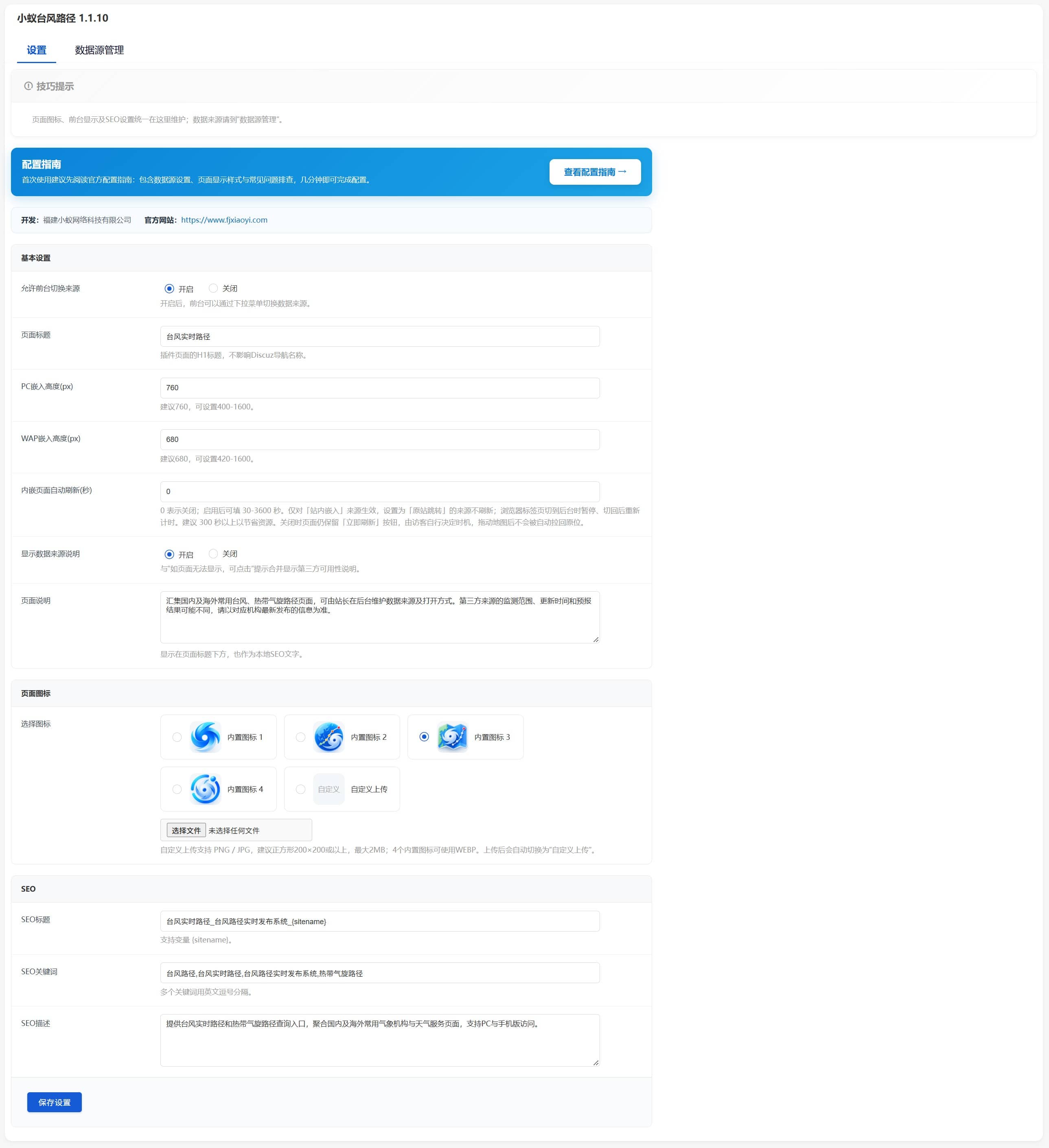
8. Customize page icons to beautify site display
The plugin supports custom page title icons and has four sets of exclusive WebP format icons built into the backend. It is loaded based on the plugin's local resources and does not rely on external image services, resulting in stable and efficient loading. It also supports website owners to independently upload custom icons in formats such as PNG and JPG, which can customize the visual effects of the page to match the overall style of the site and improve the recognizability and aesthetics of the page.
IX. Independent SEO configuration to help optimize website indexing
Unlike ordinary tools that simply embed third-party pages, plugins are equipped with complete localized SEO optimization configuration functions. The backend supports custom page SEO titles, keywords, descriptions, H1 titles, and page descriptions. It also supports calling site name variable combinations to generate standardized SEO content. Even if the page is embedded with third-party typhoon data, the site can still have independent page search information, effectively improving the site's search engine indexing effect and exposure.
10. Modular backend layout, clear and efficient operation and maintenance.
The plugin backend adopts a modular partition design, which is divided into two core sections: "Global Settings" and "Data Source Management", with clear function partitions and no confusion between them. The global settings section is responsible for configuring site-wide content such as page titles, display icons, page heights on both ends, and SEO parameters; The data source management module focuses on refined operations such as adding, editing, sorting, and status management of various typhoon data sources, reducing the operation and maintenance learning costs for station owners and making management operations efficient and convenient.
XI. Low-dependency deployment, stable and reliable operation
This plugin runs without additional environment dependencies, does not require configuring weather API keys, setting up data collection servers, enabling scheduled tasks, or relying on extension services such as Redis, Node.js, Python, and external databases. Once installed, the plugin can run independently and stably, completely avoiding functional failures caused by free API quota exhaustion and third-party service failures. Its operational stability is far higher than that of traditional similar plugins.
COMPLIANCE RIGHTS AND RESPONSIBILITIES
This plugin only provides technical services such as data source configuration, page embedding display, and function management. The copyright, trademark rights, page embedding authorization, content usage rights, and related terms of service of all third-party typhoon data sources are verified and used in compliance by the website owner. The plugin does not provide any third-party content licensing, nor does it guarantee the permanent and stable availability of third-party data sources. Website owners must operate in compliance with their own usage scenarios.
Product Core Advantages
Traditional typhoon display functions only embed fixed pages through simple HTML code, which has drawbacks such as the inability to modify data sources, poor dual-end adaptation, cumbersome operation and maintenance, and a lack of SEO capabilities. The Xiaoyi Typhoon Path plugin, based on actual operation and maintenance needs, has achieved a comprehensive upgrade with modularized functions, configurable parameters, expandable data, full-end adaptability, and SEO optimization. Once installed and deployed, all subsequent function adjustments, data source updates, and page optimizations can be completed through visual operations in the background, without the need to modify code or wait for plugin upgrades, significantly reducing site operation and maintenance costs. That's Discuz! The website is a preferred plugin for building typhoon data query functions.
v1.1.10 Update Log
newly increased
- Embedded frame timed automatic refresh: The refresh interval can be configured in the background (0 indicates off, fill in 30–3600 seconds after enabling), which only applies to "in-site embedded" sources; The browser automatically pauses when the tab is switched to the background, and restarts the timer after switching back to avoid unnecessary consumption.
- Theme-embedded page manual refresh button: The page has a permanent "Refresh Now" button, and visitors can decide when to refresh; The refresh is achieved by rebuilding the iframe node without modifying the frame address and without breaking the third-party link with signed parameters.
- Background "Configuration Guide" entrance: A prominent blue gradient card has been added at the top of the settings page, allowing you to jump to the official configuration guide (data source settings, display styles, and FAQ troubleshooting) with one click.
- Traditional Chinese (TC) language support: The front-end display page, back-end settings page, and back-end data source management page all have bilingual text.
- Official plugin language packs: Added `i18n/SC_UTF8/lang_plugin.php` and `i18n/TC_UTF8/lang_plugin.php` (Discuz official standard format, which can be directly recognized and cached by the X5.0/X5.1 kernel).
optimize
- Multilingual site adaptation: Language determination prioritizes reading the X5 guest-level language `$_G['i18n']`, and then falls back to the site's default language; Fixed an issue where language judgment was inaccurate in X5 multilingual stations.
- Cross-language built-in real-time copy rollback: The built-in data source name/description and each copy type setting item are displayed in real-time rollback according to the current visitor language, and there is no need to reinstall the plugin after switching languages.
- Compatibility guarantee: The language value adopts a three-stage system of "official language pack → built-in text pool → default value". X3.4/X3.5 can still be displayed normally even without the i18n mechanism, without garbled characters or missing text.
repair
- Fixed the bottom menu on the WAP version being obscured: Fixed the hierarchical relationship between the plugin container and the bottom toolbar of the Discuz mobile version `#mfoot`, and the bottom navigation on the mobile version is now visible and clickable.
- Fixed the issue of automatically refreshing and pulling back the drag position of embedded frames: Cross-domain frames cannot retain the drag position due to homology policy restrictions. Instead, automatic refresh is turned off by default and the manual refresh button is retained. After dragging the map, it will no longer be forced to reset.
- Fixed exceptional display when missing text: Fixed an issue where the Discuz language function returned a dirty value of `plugin identifier:keyname` when it missed a hit, causing the page to display `fjxiaoyi_typhoon:xxx`.
- Fixed residual traditional Chinese text: Entries such as "Original Site Redirect" in the traditional Chinese text pool misused simplified Chinese characters and have been changed to "Original Site Redirect".
V1.1.9
Comprehensively restructure data source management functions.
Added a separate "Data Source Management" backend.
V1.1.8
It supports website owners to add, modify, close, and sort data sources independently.
Supports data source PC/WAP independent URLs.
Supports source categories such as domestic, Hong Kong, Macao, and overseas.
V1.1.7
It supports both on-site embedding and original site redirection.
The front-end data source selection has been changed to a drop-down menu to optimize the user experience for both PC and mobile versions.
Optimize the mobile Touch page and fix the "The page you are visiting has no mobile page" message.
Optimize the front-end typhoon display area and remove redundant source status information and duplicate buttons.
V1.1.6
Added 4 sets of built-in page icons.
Added the ability to upload custom page icons for website owners.
Icon management is uniformly moved to the plugin "Settings" page.
Optimize the background settings structure and eliminate duplicate settings entry points.
Add development information and official website backend display.
V1.1.5
Optimize data source saving and set the background return path after saving to fix Discuz! Duplicate nesting issue in the background.
The default data source is changed to Windy Global Wind Farm Embed.
Other sources of domestic and international typhoon paths will be added by the station administrator as needed.
Added an entry to the official data source reference page.
V1.1.4
Optimize third-party data source usage tips and disclaimers.
For Discuz! Plugin review specifications for code review and security optimization.
V1.1.3
Optimize installation, upgrade, and uninstallation logic.
Optimize SQL operations and data source batch processing.
V1.1.2
Optimize dynamic content output and security filtering.
Optimize the plugin directory structure and installation package content.
V1.1.1
Added support for UTF-8 Simplified and UTF-8 Traditional.
Add Discuz! Phone Touch template compatibility.
V1.0
The path of Typhoon Xiao Yi has been officially released.
Support Discuz! X3.4 / X3.5 / X5.0 / X5.1.
Supports PC and WAP typhoon path pages.
Added a separate entry point for typhoon paths.
Increase the display of third-party typhoon data sources.
Increase data source switching.
Increase PC/WAP standalone display height.
Add page titles, SEO titles, SEO keywords, and SEO description settings.
The website owner shall confirm and comply with the copyright, trademark rights, embedding licenses, interface/page usage authorizations, and terms of service of third-party data sources before use. This plugin only provides URL configuration and display settings, does not provide any third-party content licensing, and does not guarantee the continued availability of third-party pages.
| data source | PC Address | WAP Address |
|---|---|---|
| National Meteorological Observatory Typhoon Network | https://typhoon.nmc.cn/web.html |
https://typhoon.nmc.cn/mobile.html |
| Typhoon path of Dongguan Meteorological Bureau | https://www.dg121.com/Mobile/Typhoon/ |
Same PC |
| Wenzhou typhoon website | https://p.wztf121.com/ |
https://m.wztf121.com/ |
| Real-time typhoon path of Zhejiang Provincial Department of Water Resources | https://typhoon.slt.zj.gov.cn/wap.htm#/ |
Same PC |
| Shenzhen typhoon website | https://tf.121.com.cn/index.html |
Same PC |
| Shenzhen Typhoon Network (Large Screen Version) | https://tf.121.com.cn/largescreen.html |
Same PC |
| Typhoon.vip Typhoon Inquiry | https://m.typhoon.vip/ |
Same PC |
| Sichuang Technology Typhoon Real-time Path | https://tf02.istrongcloud.com/ |
Same PC |
| Zoom Earth Global Typhoon Tracking | https://zoom.earth/ |
Same PC |
The settings for this plugin can be referenced from the backend; there are no special features for now.