Ant Safety Notes
This local note-taking software is designed specifically for privacy protection. It supports domestically produced Tongxin os and Kirin systems, and is compatible with Loongson and arm architecture CPUs.
✅Local encrypted note-taking software that keeps sensitive records on your computer
Yi Security Notes is a Windows native encrypted note-taking software for IT O&M personnel, developers, freelancers, small team leaders, and users who value personal privacy.
It is suitable for saving technical documents, server configuration instructions, work records, account profiles, project notes, customer information and personal diaries that you don't want to upload to the cloud.
Different from note-taking software that relies on cloud synchronization, Yi Security Notes saves the text, attachments and pictures of notes on the machine, and does not actively upload the content of notes, helping users reduce the risk of sensitive information being exposed to third-party cloud platforms.
✅Local encryption, sensitive content is not saved in plaintext
Sensitive fields such as note title, label, account information, text and historical version are encrypted by AES-256, and key derivation and HMAC integrity verification are performed by PBKDF2-HMAC-SHA256.
Body pictures and attachments are also saved separately and encrypted. Even if the database or attachment file is copied directly, the contents of it cannot be read properly without the correct master password.
✅Two types of emergency data destruction
Data destruction protection can be enabled when a device may be lost, inspected, or brute-force:
-Set a separate destroy password and clear the local business data after entering it
-Customize the number of password errors, automatically destroy notes after reaching the upper limit
-Support silent destruction, no confirmation or completion prompt displayed
-You can choose whether to delete local backups at the same time when destroying
-Keep lock screen password, destruction password and security settings after destruction
The scope of destruction includes notes, historical versions, custom classifications, search records, attachments, and body images, and will clean up old data in database logs and application memory.
✅Not only safe, but also smooth recording
The software provides complete daily note-taking and data management functions:
-Rich text editing, table editing and Excel table pasting
-Text pictures, attachments and image sizing
-Classification of technical documents, handy notes, password safes, etc
-Customize categories, tags, searches, and recent views
-Recycle Bin, Historical Version and Version Recovery
-Password generator and secure clipboard
-Multilingual interface switching
Whether it's collating technical data, keeping project records, or writing a personal privacy diary, it can be done in a local encrypted environment.
✅Full local backup
Immediate backup and scheduled backup are supported. A backup package can contain:
-Notes database
-Historical version
-Text Picture
-Upload attachments
Segment and related business data
The backup files can be saved to a mobile hard disk, USB flash drive or a location chosen by the user, and it supports complete recovery to reduce the risk of data loss caused by accidental deletion or computer failure.
The software will not automatically upload the backup to the cloud, and the data storage location is determined by the user.
✅Further security protection
In addition to data encryption, it also provides:
-Idle automatic lock
-Password error limit
-Anti-screen capture/screen recording protection
-Timed clearing of the clipboard
-Separation of lock screen password and destruction password
-Offline Authorization Verification
-Memory cache cleanup after data destruction
✅Which users are suitable
Ant Safety Notes are especially suitable for:
-IT O&M personnel who keep server configuration and troubleshooting records
-Developers who organize code descriptions and technical documentation
-Freelancer who keeps project and client data
-Small team leader who manages internal work records
-Users who keep personal diaries, account profiles and private information
-People who are reluctant to hand over sensitive content to cloud note-taking platforms
If you need multiplayer online collaboration, mobile and computer automatic synchronization, it is currently not suitable; If you value more local control, offline use, content encryption and emergency destruction capabilities, Yi Security Notes will be more in line with your needs.
Windows 64-bit version is currently available. The software needs to be connected to the authorization server when it is activated, but the note body, attachments, or picture content will not be uploaded.
v1.70
Release Date:2026-09-17
Shortcut key settings repair
- Fixed an issue where the default values were still displayed when re-entering the settings page, even though the changes to the lock shortcut, boss key, and save shortcut had taken effect.
• Shortcut key settings now correctly echo saved key combinations after the configuration is loaded.
Set up navigation optimization
- Add a "Display Language" entry to the left side of the settings page and place it above "About".
- Click "Show Language" to navigate directly to the language options.
- Appearance Settings now accurately positions itself in the font settings area.
v1.69
Release Date:2026-09-15
Notes independent editing window
When you create a new note in the Windows and Linux desktop versions, it opens in a separate edit window.
When editing saved notes, also use a separate window; If the note is already open, the original window is woken up directly.
When you close the note editing window, only the current note is closed and the entire application is no longer exited.
Remove duplicate "Open in new window" entries and access separate windows through "Edit".
Reminder center optimization
"By Expiration Time" now supports click-to-click operations.
Two new sorting methods have been added: "earliest due first" and "latest due first".
Automatically remembers how the reminders are sorted as selected by the user.
Optimize the pagination sorting logic to ensure that all reminders are sorted before pagination.
Problem Fix
Fixed an issue where the note list might not update properly when creating a new note, switching categories, or saving across pages.
Improve list refresh stability after saving across windows.
Window experience optimization
The new window will first complete interface initialization, sizing, and centering in the background before being displayed to the user.
Fixed an issue where a new window would briefly appear in the upper left corner of the desktop when it started, accompanied by a black or white screen flicker.
V1.68
v1.67.0-r4
• The settings page adds category navigation, a resident visible scroll bar, and a scroll track.
- The backup settings display the full directory actually used by the program.
- The editor saves the configuration in the shortcut key usage settings.
- The global keyboard shortcut registers after the first frame of the interface, and re-registers immediately after settings change.
v1.67
Major fixes:
Classification sorting only updates the order, and no longer loses custom icons and classification permissions.
The list of notes defaults to 20 articles per page, with 1 – 500 articles customizable and automatically saving settings.
The search covers all notes, and then paginates them after filtering, which is not restricted by the current category or the current page.
Exports are no longer affected by the 100-article cap.
Password verification moves out of the interface thread and reduces login lag.
Fixed an issue where random passwords did not reliably contain the selected character type.
HMAC integrity check has been added to pictures and attachments, which are still compatible with old encrypted files.
Configuration files are changed to queue, temporary files, and backup recovery writes.
The startup log no longer outputs full configuration and password derivation information.
v1.63
Fix password saving error caused by missing password_accounts table in the old repository override scenario (missing the table when modifying the main password to rebuild the repository)
Synchronous update of version number to title bar, about pop-up window, diagnostic log
v1.62
Added:
Database Upgrade v8: Add expire_at expiration field and index in records table
Sidebar "Reminder Center" entrance + red digital badge
Set Expiration Reminder: Editor Toolbar Bell Icon + List Right Click Menu Entry
Expiration pop-up window: calendar selection +7/30/90 days/1 year shortcut setting + clear reminder
List card remaining days corner (red/orange/yellow three-level warning)
Settings item "Reminder Advance" threshold configuration
Optimization:
Multilingual completion to 9 types (Simplified Chinese/Traditional Chinese/English/Japanese/Korean/Arab/Spanish/French/Russian)
The list classification text is changed to color classification label, which is visually unified with the body text area
Reminder Center Hover Bubble Prompt, List Width Drag and Drop Hot Zone Widening
v1.6
Portable version launched: configuration and data are stored with directory, and green operation is free of installation
Improve data destruction strategies: destroy passwords, silent destruction, delete backups when destroyed, and clear memory cache and SQLite logs after destruction
The following cloud storage download links all come with both windows and linux versions.
Baidu Cloud
Links: https://pan.baidu.com/s/1qj6IBzcqLfjV1UtFpFTN-A?pwd=jdnc
Extraction code: jdnc
Quark Cloud
Link:https://pan.quark.cn/s/a5de58a2b047?pwd=Yfns
Extraction code: Yfns
Lan Zongyun
Link:https://wwaxz.lanzoul.com/b00wnugkng
Password: 8b80
I. Solutions to the problem of abnormal input in the body of notes using the default pinyin input method of Tongxin OS and deepos:
1. You can use Sogou Input Method Deepin Next version for input; there are no problems with this input method.
2. The default pinyin solution is as follows: Go to system settings, find Bluetooth and other devices, go to input method management, and click pinyin to enter settings (as shown in the image below).
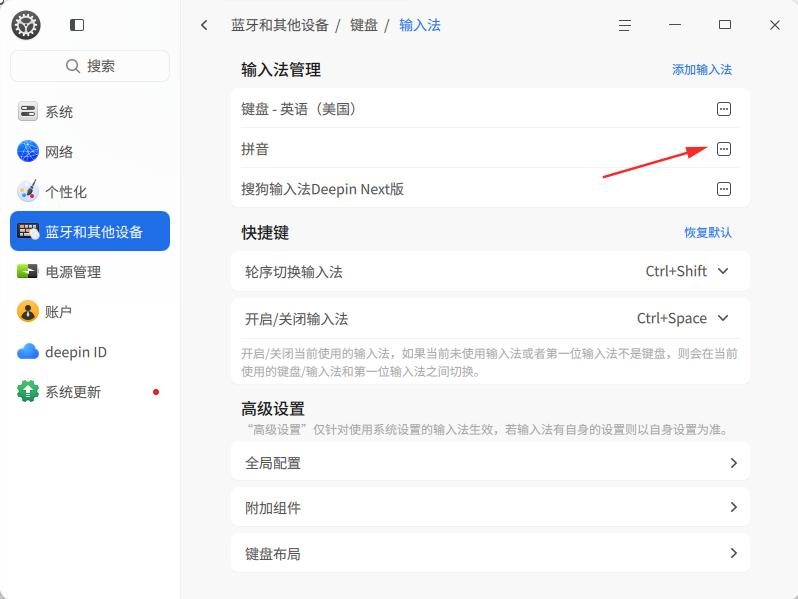
Uncheck "Pin the cursor for embedding pre-edited text at the beginning" and click OK to resolve the issue.